Practical write-ups on PeopleSoft security auditing, metadata, and operations. Each article stands on its own: the tables involved, the SQL if you want to do it by hand, and where psLens shortens the path.
This is the multi-page printable view of this section. Click here to print.
Articles
Practical articles on PeopleSoft security auditing, metadata research, and operations — the SQL, the tables, and the workflows.
- Connecting AI Coding Agents to PeopleSoft with Model Context Protocol (MCP)
- Why psLens Runs on Go, a Hypermedia UI Stack, and SWS Instead of Living Inside PeopleSoft
- Which Service Operations Can Half Your Users Call?
- Your PeopleSoft Nodes Probably Don't Have Passwords
- Who Can Access This PeopleSoft Component? The SQL, and the Gotchas
Connecting AI Coding Agents to PeopleSoft with Model Context Protocol (MCP)
How psLens uses an embedded Model Context Protocol (MCP) server to let Claude Code, Cursor, and Claude Desktop inspect PeopleSoft metadata, audit security, and diff environments in real time.
PeopleSoft has always been a black box to modern AI coding assistants.
Tools like Claude Code, Cursor, and Claude Desktop work by reading files on disk, navigating Git repositories, and parsing project trees. PeopleSoft does not work like that. Its object definitions, record structures, SQL objects, and PeopleCode live inside relational database tables (PSRECDEFN, PSRECFIELD, PSPROGMETA, PSAEAPPLDEFN), not on the filesystem.
Until now, getting that context to an LLM required writing ad-hoc SQL queries, taking screenshots of Application Designer, or manually copying and pasting code blocks into a chat window. That workflow is slow, breaks context across object hierarchies, and makes autonomous coding assistants impossible to use with PeopleSoft.
To solve this, psLens includes an embedded Model Context Protocol (MCP) server.
AI agents can now connect directly to your PeopleSoft environments over Streamable HTTP and Server-Sent Events (SSE). Without direct database access, two-tier client installs, or heavy middleware configuration, your AI assistants can inspect schemas, audit security permissions, diff environments, and triage batch issues in real time.
What Is Model Context Protocol (MCP)?
The Model Context Protocol is an open standard created by Anthropic. It standardizes how AI applications connect to external tools, data sources, and services. Instead of building custom API integrations for every AI client, an MCP server provides tools, prompts, and resources through a standardized JSON-RPC protocol.
When you configure an MCP server in Claude Code or Cursor, the LLM discovers the available tools and their schemas automatically. During a conversation or task, the LLM decides when to invoke a tool, passes typed parameters, and consumes structured results.
flowchart LR
    subgraph Agents ["AI Coding Agents"]
        direction TB
        CC["Claude Code CLI"]
        CD["Claude Desktop"]
        CR["Cursor IDE"]
    end

    subgraph Server ["psLens Standalone Go Server"]
        direction TB
        MCP["Embedded MCP Server\n(Streamable HTTP / SSE)"]
        SWS_C["SWS Query Client\n(Bounded Whitelist)"]
        MCP --> SWS_C
    end

        direction TB
        DEV["HCM DEV (PT 8.59)"]
        TEST["HCM TEST (PT 8.60)"]
        PROD["HCM PROD (PT 8.61)"]
        SWS_C -->|"HTTPS SWS Requests"| DEV
        SWS_C -->|"HTTPS SWS Requests"| TEST
        SWS_C -->|"HTTPS SWS Requests"| PROD


    Agents -->|"JSON-RPC / Bearer PAT"| MCP
How psLens Implements MCP
The psLens MCP server runs directly inside the psLens Go process. It requires no external Python bridge, no local daemon, and no changes to your PeopleSoft infrastructure.
- Authentication: Secured via cryptographically generated Personal Access Tokens (PATs) generated in Settings → MCP Tokens (
/settings/mcp). Tokens are SHA-256 hashed and stored in the internal NATS KV store. - Access Control: Queries run through our Simple Web Services (SWS) framework using a customer-reviewed table whitelist (
CHG_PSLENS_WL). The MCP server is read-only; it cannot mutate PeopleSoft database state. - Transports: Supports both Streamable HTTP (
/mcp) for standard tool calls and HTTP+SSE (/mcp/sse) for event-stream transports.
Connecting Claude Code takes a single command in your terminal:
claude mcp add --transport sse pslens https://{{your_subdomain}}.pslens.com/mcp/sse --header "Authorization: Bearer psl_mcp_YOUR_TOKEN_HERE"
Connecting Claude Desktop uses standard JSON configuration:
{
  "mcpServers": {
    "pslens": {
      "url": "https://{{your_subdomain}}.pslens.com/mcp",
      "headers": {
        "Authorization": "Bearer psl_mcp_YOUR_TOKEN_HERE"
      }
    }
  }
}
What AI Agents Can Do
The psLens MCP server exposes 20+ specialized tools across four functional areas:
1. Metadata & PeopleCode Exploration
Agents can inspect definitions and retrieve source code across all PeopleSoft container types:
search_objects: Fast wildcard search across records, fields, pages, components, menus, App Engines, App Packages, queries, projects, and service operations.get_object_definition: Returns structured metadata, field lists, keys, and subrecords. Withexpand_subrecords: true, it recursively flattens nested subrecords into a single effective field list.get_peoplecode: Extracts formatted source code for Record Events, App Package Classes, Component PostBuild/SaveEdit, Page Events, and App Engine Action steps.get_object_dependencies: Computes forward and reverse where-used graphs. An agent can discover every record containing a field (PSRECFIELD), every page displaying a field (PSPAGEFIELD), and every PSQuery referencing a field (PSQRYFIELD).search_code_sql: Performs fast substring searches across PeopleCode, SQL objects, and App Engine action SQL.
2. Reverse Security Graph & Access Auditing
Understanding access paths in PeopleSoft typically requires querying PSROLEUSER, PSROLECLASS, PSAUTHITEM, and PSMENUITEM. psLens traverses these graphs automatically:
who_has_access: Backward traversal from a component, menu, or service operation to identify every authorized permission list, role, and user ID.user_access_summary: Generates a consolidated security profile for an OPRID, including roles, permission lists, account status, and row-level security.audit_dangerous_access: Identifies elevated administrative privileges, full-access permission lists, and exposed web services.user_login_audit: Inspects authentication logs and failed sign-in attempts fromPSPTLOGINAUDIT.
3. Cross-Environment Comparison & Migration Drift
Because psLens connects to multiple databases simultaneously (DEV, TEST, PROD), an agent can inspect cross-environment drift in a single prompt:
compare_project: Diffs object definitions, field structures, and PeopleCode across two environments (e.g.HCMDEVvs.HCMPROD).find_missing_projects: Identifies projects present in a development environment that have not yet been migrated to production.compare_recurring_processes: Flags differences in Process Scheduler recurrence schedules and runtime parameters between environments.
4. Operational Incident Triage
When production alerts trigger, AI assistants can evaluate system health without needing access to PIA:
get_system_health: Real-time status of Process Scheduler dispatchers, queue latency, and database responsiveness.triage_process_scheduler: Retrieves stuck, error, or long-running process instances with human-readable status decoders.triage_integration_broker: Identifies failed or timed-out asynchronous and synchronous transaction contracts.list_active_alerts: Surfaces active operational alerts configured in psLens.
Built for Agent Ergonomics and Token Efficiency
psLens optimizes payloads specifically for LLM context windows and autonomous execution:
- Self-Describing Numeric Enums: Objects include human-readable decoders (
RunStatusDesc: "Error",FieldTypeDesc: "Character",RecTypeDesc: "SQL Table") alongside raw PeopleTools integers. - Safe Annotations: Tools include standard MCP annotations (
readOnlyHint: true,destructiveHint: false,idempotentHint: true), preventing repetitive confirmation prompts in Claude Desktop and Cursor. - Credential Protection & PII Masking: Data queries via
query_tableautomatically strip sensitive password hashes (OPERPSWD,OPERPSWDSALTED), encryption keys, and tokens, and mask sensitive PII fields (***). - Structured Outputs: Metadata and code outputs are structured and formatted for efficient LLM ingestion.
PeopleTools 8.63 Native MCP vs. psLens MCP
Oracle introduced native Model Context Protocol server support in PeopleTools 8.63 (released July 2026 for OCI, with on-premises availability following in late 2026), positioning it as an “Integration Broker for AI.”
Both implementations use the open MCP standard, but they address different layers:
| Capability | PeopleTools 8.63 Native MCP | psLens Embedded MCP Server |
|---|---|---|
| Primary Audience | End users, functional analysts, App Designer developers | System administrators, DBAs, developers, security auditors, SREs |
| PeopleTools Version | Requires PeopleTools 8.63+ exclusively | Version Agnostic: PeopleTools 8.53 through 8.63+ |
| Environment Scope | Single database: Queries only the hosted 8.63 instance | Multi-environment: Inspects and diffs DEV, TEST, and PROD in one session |
| Core Focus | Natural Language Search (OpenSearch), transactional application services, App Designer code assist | Deep metadata introspection, reverse where-used graphs, PeopleCode extraction, reverse security access, cross-environment drift, live batch triage |
| Cross-Environment Diffs | Not supported natively | Built-in (compare_project, find_missing_projects, compare_recurring_processes) |
| Infrastructure | Full PT 8.63 stack (PIA, Tuxedo, OpenSearch, Integration Broker) | Standalone Go service querying via SWS with database table whitelisting |
How They Coexist
- Use PeopleTools 8.63 Native MCP for conversational end-user AI (such as employee self-service transactions and OpenSearch document search) once your organization upgrades to 8.63.
- Use psLens MCP when your developers, administrators, auditors, and AI coding assistants need deep metadata analysis, security auditing, cross-environment drift detection, and operational triage across your existing PeopleTools environments today.
Get Started
The embedded MCP server is available in psLens now.
- Review the MCP Server Setup Guide for configuration examples and the full tool catalog.
- Read the AI Enablement Use Case to see how structured Markdown exports and MCP complement each other.
- Book a demo to see psLens and Claude Code running live against a PeopleSoft environment.
Subscribe for Updates
If you found this article helpful, subscribe to get notified of new PeopleSoft technical notes and psLens updates.
Why psLens Runs on Go, a Hypermedia UI Stack, and SWS Instead of Living Inside PeopleSoft
Why psLens uses Go, templ, Datastar, hypermedia, and SWS: safer PeopleSoft access, simpler deployment, and faster iteration than a bolt-on PeopleTools app.
When I started building psLens, I was not trying to create another PeopleSoft bolt-on. I wanted a tool that could sit beside PeopleSoft, search metadata fast, run audits, monitor Process Scheduler and Integration Broker, and stay easy to deploy and maintain.
That requirement set ruled out a lot of obvious choices.
psLens now runs as a standalone Go application with server-rendered UI components built in templ, live updates handled by Datastar (GitHub), and a PeopleSoft-side access layer provided by SWS. That combination is not accidental. Each part solves a specific problem that PeopleSoft teams run into when they try to build admin and security tooling the old way.
Start with the Real Constraint: Safe Access to PeopleSoft
The most important product decision was not Go or Datastar. It was the access boundary.
psLens does not connect directly to the PeopleSoft database. It talks to the SWS framework over HTTPS, and SWS enforces what psLens is allowed to read.
That matters because PeopleSoft environments contain security metadata, operator data, process information, Integration Broker configuration, PeopleCode references, and everything else you would expect in a live enterprise system. If you are going to put a modern web console in front of that, the access path has to be narrow and reviewable.
SWS is what makes that possible.
SWS Is the Enabler for psLens
SWS is the PeopleSoft-side product that makes psLens practical. It installs as a standard PeopleTools project, exposes a bounded REST API, and restricts queries to a whitelist of PeopleTools metadata tables that the customer reviews and loads.
That gives psLens a few properties that I care about a lot:
- No direct database credentials in the app.
- No write path back into PeopleSoft.
- No ability to query arbitrary tables outside the approved metadata surface.
- A clean HTTPS integration point that works across DEV, TEST, and PROD.
In other words, SWS turns PeopleSoft into something an external tool can query safely. Without it, psLens would either need direct database access, which I did not want, or it would need to live inside PeopleTools, which would drag the whole product back into the world I was trying to get out of.
This is the architecture in one picture:
flowchart LR
    U["Browser"] --> P["psLens\nGo + templ + Datastar"]

    P -->|HTTP SWS requests| PSDEV["PeopleSoft DEV"]
    P -->|HTTP SWS requests| PSTEST["PeopleSoft TEST"]
    P -->|HTTP SWS requests| PSPROD["PeopleSoft PROD"]
If you want the short product pitch, this is it: SWS provides the controlled access layer, and psLens turns that access into a usable operations and security console.
Why Go Fits This Product
Once I knew psLens would be a standalone application, Go became the obvious backend choice.
psLens needs to do a few things at the same time and do them predictably:
- serve normal web requests
- hold open Server-Sent Events connections for live UI updates
- run background alert checks
- generate reports
- stay simple to deploy for managed or self-hosted customers
Go is a good fit for that shape. I get a single compiled binary, straightforward concurrency, fast startup, and a deployment story that stays boring in the best way. That matters when the product may run on Fly.io, in a Docker container on a customer VM, or in a tighter self-hosted environment where the operator wants as few moving parts as possible.
I also wanted the codebase to stay readable. A lot of enterprise software ends up with unnecessary framework weight before it even solves the business problem. Go makes it easier to resist that.
Why I Kept the UI Server-Driven
One thing PeopleSoft got right early was the idea that the server should stay in control of application state. I did not want to throw that away just because I was building outside PeopleTools.
That is why psLens uses templ and Datastar instead of a heavy single-page application stack.
More specifically, psLens follows a hypermedia approach. The server owns the application state, returns HTML, and drives most interactions directly instead of splitting the product into a separate JavaScript app and JSON API that have to stay in sync.
With templ, the UI lives in typed templates that compile into Go. If I reference the wrong field, the build fails. If I rename something in a handler, the compiler catches the breakage.
With Datastar, the browser stays light. The server renders HTML fragments, streams them over Server-Sent Events, and Datastar morphs the DOM in place. I do not need a separate frontend build pipeline, a JSON API for every interaction, or a second copy of application state living in the browser.
That is a good trade for an admin console. The product is about search, inspection, monitoring, and reporting. It is not a drawing canvas or a spreadsheet. I care more about predictable behavior, low client complexity, and keeping sensitive logic on the server than I do about shipping a giant JavaScript bundle.
Why Not a React Frontend and JSON API?
I could have built psLens as a React app backed by a JSON API. A lot of teams would start there by default because React has become the standard answer for web applications. Personally, I would not have reached for that approach for psLens, but I mention it because it is the comparison most teams expect.
My issue is not React itself so much as the ecosystem gravity around it. Once you go down that path, you usually inherit a larger stack: client-side routing, API clients, state libraries, form libraries, build tooling, hydration concerns, and a second application model in the browser that has to stay aligned with the server. That is a lot of machinery for an admin console.
Hypermedia drastically reduces that complexity by removing whole categories of coordination work. Instead of building a JavaScript application that talks to the server, I can keep the server as the application and let the browser render the result.
In the usual SPA model, every feature expands into multiple layers:
- backend route
- JSON types
- API client code
- client state management
- component rendering logic
For psLens, that split buys me very little. The server already knows the query, the validation rules, the security constraints, and the final HTML I want to send. Datastar lets me keep that hypermedia flow intact.
flowchart LR
    subgraph SPA ["SPA Stack"]
        direction TB
        subgraph SPA_BROWSER ["Browser"]
            s_ui["UI event"]
            s_state["Client state"]
            s_fetch["API request"]
            s_render["Component re-render"]
            s_ui --> s_state --> s_fetch
            s_render --> s_state
        end

        subgraph SPA_SERVER ["Server"]
            s_api["JSON API"]
            s_logic["Validation + business logic"]
            s_data["Server-side state / data"]
            s_api --> s_logic --> s_data
        end

        s_fetch --> s_api
        s_api -->|"JSON response"| s_render
        s_state -. "must stay in sync" .- s_data
    end

    subgraph HM ["psLens Hypermedia Stack"]
        direction TB
        subgraph HM_BROWSER ["Browser"]
            h_ui["UI event"]
            h_req["Datastar request"]
            h_dom["DOM morph"]
            h_ui --> h_req
        end

        subgraph HM_SERVER ["Server"]
            h_handler["Go handler"]
            h_logic["Validation + business logic"]
            h_data["Server-side state / data"]
            h_html["templ HTML fragment"]
            h_handler --> h_logic --> h_data --> h_html
        end

        h_req --> h_handler
        h_html -->|"HTML over SSE"| h_dom
    end
The real difference is not just fewer boxes. In the SPA model, both the browser and the server end up owning state that has to stay aligned. In the hypermedia model, the server stays in charge and the browser mostly renders what it is told. That means less code to coordinate, fewer integration seams, and fewer ways for the UI and backend to drift apart.
Why This Stack Works Well for AI-Assisted Development
There is another advantage here that I did not fully appreciate until I started using AI coding tools heavily: this stack is easier for them to work with.
In psLens, a feature usually lives in one Go handler and one .templ file. The query logic, route behavior, and rendered output are close together. The compiler checks the result. That is a much better environment for AI-assisted changes than a stack where one feature is spread across six files in two languages plus an API contract in the middle.
This is not just a developer convenience. It affects product velocity. When the code is local, typed, and testable, I can add object support, reports, and admin features faster without turning the codebase into mush.
There is also a product-side AI angle. psLens exports PeopleSoft objects and reports as structured Markdown, which makes the content usable in tools like ChatGPT, Claude, Claude Code, and Cursor. SWS makes the metadata accessible. The Go and hypermedia stack turns it into a product. The Markdown export makes it portable.
The Short Answer to “Why Not Build psLens in PeopleTools?”
Because psLens is not trying to be another PeopleSoft application.
It is a separate operations and security console that happens to know a lot about PeopleSoft.
Building it outside PeopleTools gives me normal source control, repeatable deployment, automated tests, easier packaging, faster iteration, and a cleaner path for AI-assisted development. Building it on top of SWS keeps the PeopleSoft access model narrow and reviewable.
I still respect what PeopleTools is good at. If I were building transactional application logic inside PeopleSoft, I would use PeopleTools. But that is not this product. psLens is better as an external web application with a tightly controlled connection back to PeopleSoft.
Why These Choices Matter Commercially
This stack is not just an engineering preference. It supports the product promises psLens makes to customers.
- Dedicated deployment per customer.
- No direct database access.
- Read-only behavior enforced through SWS.
- Fast iteration without asking customers to rework PeopleSoft customizations.
- Straightforward self-hosting or managed hosting.
- A cleaner bridge from PeopleSoft metadata into modern documentation and AI workflows.
That is the real reason for the architecture. I wanted psLens to feel modern without asking customers to weaken their security posture or turn their PeopleSoft environment into a development host for yet another tool.
Closing
If you strip away the implementation details, the design comes down to one idea: keep the access path to PeopleSoft tight, and keep the product itself easy to ship.
SWS is what makes the access path credible. Go, templ, Datastar, and the hypermedia approach are what make the product practical.
If that combination sounds useful for your PeopleSoft environment, book a demo. I will show you the architecture, the security boundary, and the product running against a live system.
Subscribe for Updates
If you found this article helpful, subscribe to get notified of new PeopleSoft technical notes and psLens updates.
Which Service Operations Can Half Your Users Call?
PeopleSoft service operation access is granted by permission list (PSAUTHWS) and rides roles out to users. A single broadly-held role can expose a web service to hundreds of accounts. How to trace the chain, the gotchas that undercount it, and a faster way.
Ask a PeopleSoft security administrator “who can call this web service?” and you will usually get a pause. There is no delivered screen that ranks service operations by how many users can reach them. The grant is buried one level below where anyone looks: a service operation is authorized to a permission list, and permission lists ride roles out to users. A single broadly-held role can quietly put a data-moving web service in reach of hundreds of accounts that have no business calling it.
Why This Is a Security Problem, Not a Trivia Question
A service operation is not a report. Depending on its handler, calling one can read data straight out of the application tables or write data into them. The SOAPToCI family of operations, for example, turns any authorized caller into a Component Interface client that can create and update records over HTTP. An operation exposed to a wide audience is a wide write surface.
The exposure is easy to create and hard to see:
- Web service access is granted at the permission list level, but people think about access at the role level. The permission list that grants a sensitive operation often lives on a role that also grants something everyone needs, so it gets assigned broadly.
- There is no delivered inquiry that answers “rank my service operations by user reach.” You would have to write the join yourself, and most people never do.
- Non-production environments can have unusually broad access because they inherit delivered grants and then accumulate extra user assignments, so the widest-open operations are often the ones nobody configured on purpose.
The Security Chain
Service operation access flows through a fixed chain, the same shape as component access but with a different starting table:
PSAUTHWS— maps each service operation (IB_OPERATIONNAME) to the permission lists (CLASSID) that grant access to itPSROLECLASS— which roles carry each permission listPSROLEUSER— which users hold each rolePSOPRDEFN— the user accounts, includingACCTLOCK
A user can call a service operation if any permission list on any of their roles has a PSAUTHWS row for it.
The Query
To rank service operations by the number of unlocked users who can reach them:
SELECT   ws.IB_OPERATIONNAME,
         COUNT(DISTINCT ru.ROLEUSER) AS user_count
FROM     PSAUTHWS    ws
JOIN     PSROLECLASS rc ON rc.CLASSID  = ws.CLASSID
JOIN     PSROLEUSER  ru ON ru.ROLENAME = rc.ROLENAME
JOIN     PSOPRDEFN   o  ON o.OPRID     = ru.ROLEUSER
WHERE    o.ACCTLOCK = 0
GROUP BY ws.IB_OPERATIONNAME
ORDER BY user_count DESC;
The operations at the top of that list are the ones to justify first. For any single operation, drop the GROUP BY and add WHERE ws.IB_OPERATIONNAME = 'YOUR_OP' to see the exact roles and users behind the count.
Four Gotchas That Undercount Your Exposure
The join above is the honest starting point, but every mistake here makes access look smaller than it is, which is the dangerous direction to be wrong in.
Locked accounts cut both ways.
ACCTLOCK = 0answers “who can call it today.” Drop the filter and you answer “who is provisioned,” which is the right question for a cleanup audit. Decide which one you are running; they give different numbers.Dynamic roles.
PSROLEUSERlists who holds a role right now. If a role is populated by a rule or query, the membership can change on the next refresh, so today’s user count is a floor, not a ceiling.The count is only half the risk. A service operation reachable by 300 users is a footnote if its handler does nothing sensitive, and a serious finding if it maps to a Component Interface that writes to
PS_JOB. User reach tells you how many doors exist; you still have to look at what is behind each one by tracing the operation’s handler and routings.
The Faster Way
Writing the four-table join once is fine. Running it across every environment, keeping the primary-permission-list path in it, and re-checking after each refresh is the part that does not happen.
psLens ships this as the Web Service Operation Access Audit report. It traces PSAUTHWS → PSROLECLASS → PSROLEUSER → PSOPRDEFN for every operation and sorts by unlocked user count, so the widest-open operations are at the top, exported as audit-ready Markdown with each operation linked to its detail page. The SOAP to CI Access Audit does the same for the WEBLIB_SOAPTOCI write path and lists the Component Interfaces each user can actually reach.
The same chain is browsable in either direction: start from a service operation and see the permission lists, roles, and users behind it, or start from a user and see every web service they can call. No SQL access required, which also means the analyst asking the question does not need the database account that usually comes with it. You can read the exact output these reports produce before installing anything.
Subscribe for Updates
If you found this article helpful, subscribe to get notified of new PeopleSoft technical notes and psLens updates.
Your PeopleSoft Nodes Probably Don't Have Passwords
Most PeopleSoft environments have active message nodes with no authentication configured (AUTHOPTN=‘N’). How to check PSMSGNODEDEFN, why it matters, and what to fix first.
Here is a finding from a delivered Campus Solutions 9.2 development image: 62 active message nodes, 58 of them with no authentication configured. That is not an unusual environment. It is what delivered images look like, and refreshed non-prod environments inherit it.
Why It Matters
A message node with AUTHOPTN = 'N' accepts messages without authenticating the sender. Any system that can reach your Integration Broker gateway can send messages to or through that node. Whether that is exploitable depends on what routings and service operations the node participates in — but “unauthenticated by default and nobody has looked” is not a posture you want to explain to an auditor.
A prime example is the delivered ANONYMOUS node, which exists in all PeopleSoft databases. It acts as a fallback for inbound integrations when the incoming request does not specify a node or credentials. If the ANONYMOUS node is active, is associated with a high-privilege Default User ID, and has active any-to-local routings, anyone who can reach the gateway can run those service operations. For a detailed guide on securing this fallback mechanism, see Properly Securing the ANONYMOUS IB Node in Integration Broker: The Missing Manual.
Node authentication has three settings in PSMSGNODEDEFN.AUTHOPTN:
N— none. No authentication.P— password. The node authenticates with a stored password.C— certificate. The node authenticates with a certificate.
How to Check
SELECT MSGNODENAME, DESCR, NODE_TYPE, AUTHOPTN
FROM   PSMSGNODEDEFN
WHERE  ACTIVE_NODE = 1
AND    AUTHOPTN = 'N'
ORDER  BY MSGNODENAME;
Two follow-up checks worth running while you are there:
- Nodes with password auth but no password set.
AUTHOPTN = 'P'with an empty password is functionally the same as no auth. - Inactive nodes with no auth. Lower priority, but they are one activation away from being the first finding.
Tracing Which Service Operations Can Run
Even if you identify an unauthenticated node, understanding your actual exposure is difficult. You have to ask: What service operations can actually run through this node?
Answering this in native PeopleSoft is tedious because node authorization is split across two areas:
- Routings: The service operations that have explicit or any-to-local routings associated with the node.
- User Security: The service operations authorized to the node’s Default User ID (defined in
PSMSGNODEDEFN.USERID).
To trace the user’s security manually, you would have to query the database to join the node’s User ID (PSOPRDEFN) to its assigned roles (PSROLEUSER), join those roles to their permission lists (PSROLECLASS), and then join those permission lists to authorized web services (PSAUTHWS).
How psLens Simplifies the Audit
psLens does the heavy lifting for you. Since every object in the catalog is deep-linkable, you can navigate from a node to its service operations in a single click:
- User’s Service Operations Toggle: From any Message Node detail page, if a Default User ID is assigned, you can toggle User’s Service Operations in the sidebar. psLens instantly lists all service operations authorized for that user ID.
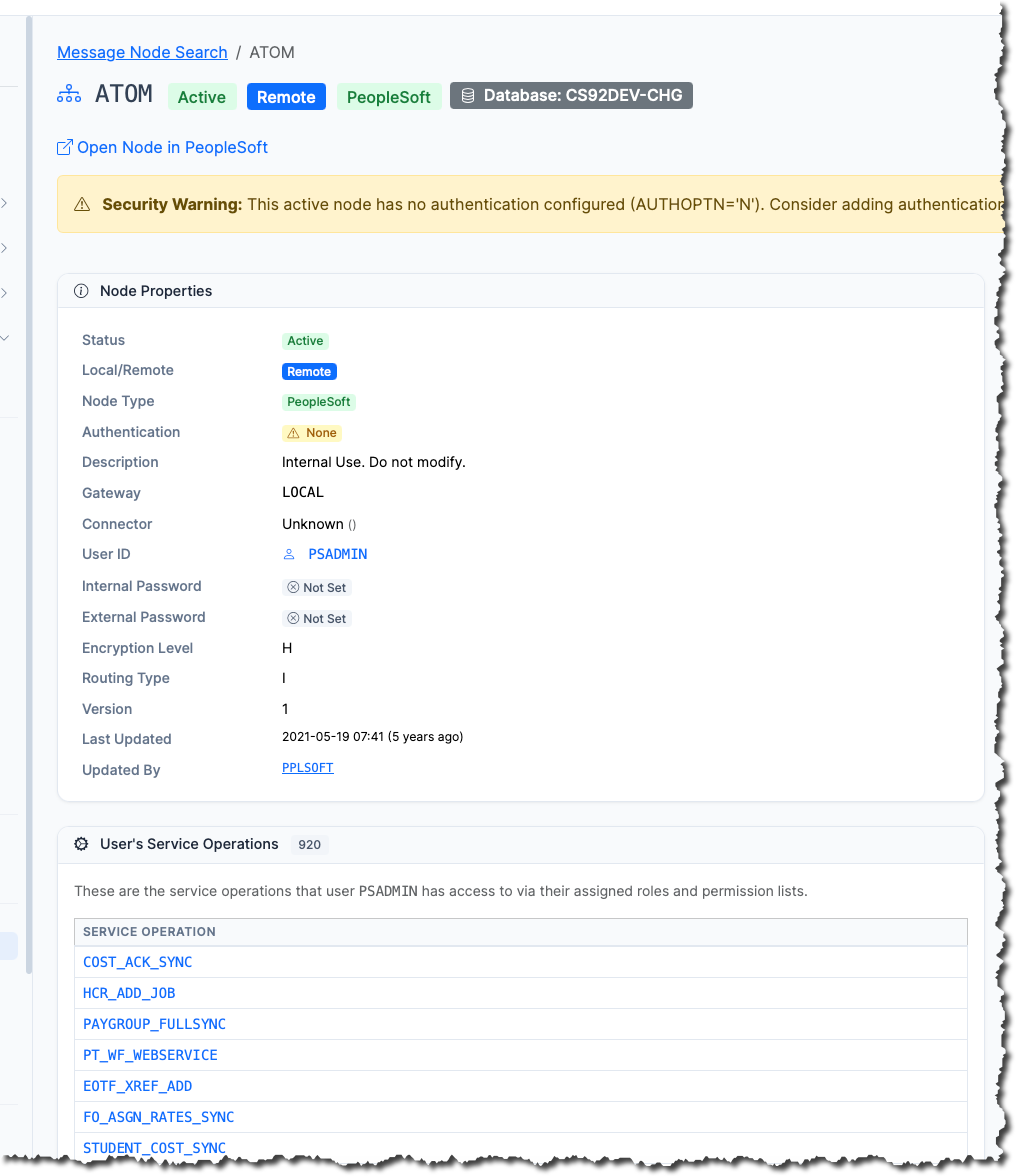
Message Node detail page showing properties and User’s Service Operations toggle in psLens
- Deep Links: Click on the User ID to inspect its full security configuration, or click any service operation in the list to navigate to its details and inspect its handlers and active routings.
- Automated Audit Report: The built-in Unauthenticated Node Service Operations report searches your entire environment for active no-auth nodes and maps them directly to the fully-active service operations they can run.
What to Fix First
Start with active nodes that participate in inbound routings — those are reachable from outside. Set AUTHOPTN to password or certificate and configure the credential on both sides of each integration. Do it in DEV first; a node password mismatch is a quiet way to break an integration.
Running This as a Repeatable Audit
psLens ships this exact check as the Nodes Without Passwords report: it categorizes active no-auth nodes, active nodes with auth but no password, and inactive no-auth nodes, and exports the findings as Markdown with links back to each node’s detail page. Results are stored for 90 days, so the next audit cycle can show the trend rather than a point-in-time screenshot.
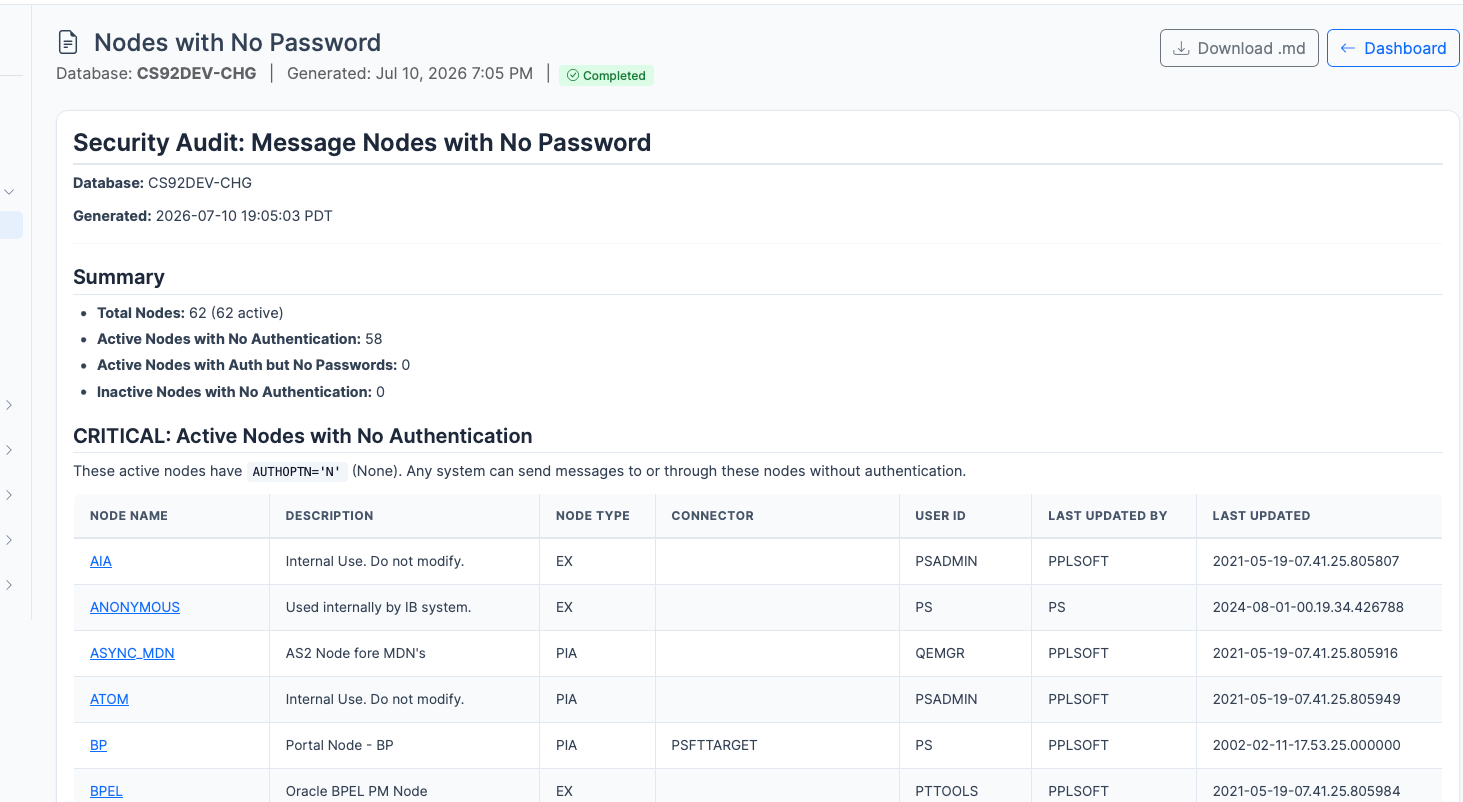
Nodes with No Password report dashboard in psLens
You can read the exact output it produces — including the 62-node dev-image run above — before installing anything.
Subscribe for Updates
If you found this article helpful, subscribe to get notified of new PeopleSoft technical notes and psLens updates.
Who Can Access This PeopleSoft Component? The SQL, and the Gotchas
How to trace PeopleSoft component access through PSAUTHITEM, PSROLECLASS, and PSROLEUSER — the query, the four mistakes that produce wrong answers, and a faster way.
“Who can get to this component?” is one of the most common questions a PeopleSoft security administrator gets, and PeopleSoft has no delivered screen that answers it in one place. The data lives in three tables, and the joins are easy to get subtly wrong.
The Security Chain
PeopleSoft component access flows through a fixed chain:
PSOPRDEFN— user accountsPSROLEUSER— which roles each user holdsPSROLECLASS— which permission lists each role carriesPSAUTHITEM— what each permission list grants: menu, component, and page entries with their authorized actions
A user can reach a component if any permission list on any of their roles has a PSAUTHITEM row for it.
The Query
To list users who can access a component (for example, USERMAINT):
SELECT DISTINCT RU.ROLEUSER, O.OPRDEFNDESC, RU.ROLENAME, RC.CLASSID
FROM   PSAUTHITEM AI
JOIN   PSROLECLASS RC ON RC.CLASSID = AI.CLASSID
JOIN   PSROLEUSER  RU ON RU.ROLENAME = RC.ROLENAME
JOIN   PSOPRDEFN   O  ON O.OPRID = RU.ROLEUSER
WHERE  AI.BARITEMNAME = 'USERMAINT'
AND    O.ACCTLOCK = 0
ORDER  BY RU.ROLEUSER;
In PSAUTHITEM, the component name is in BARITEMNAME; MENUNAME is the menu that exposes it, and PNLITEMNAME narrows a row to a specific page within the component.
Four Gotchas That Produce Wrong Answers
- Locked accounts. Without
ACCTLOCK = 0your audit lists users who cannot sign in. Fine for “who is provisioned,” wrong for “who can get in today.” Decide which question you are answering. - The same component on multiple menus. A component can be attached to more than one menu, and each menu grants a separate
PSAUTHITEMrow. Filtering onMENUNAMEalone undercounts. - Page-level rows. A permission list may grant only specific pages within a component (
PNLITEMNAME). If you are auditing access to a specific page, you need the page-level rows; component-level results overstate access. - Display-only is still access.
PSAUTHITEM.DISPLAYONLY = 1means the user can see the page but not save. For a data-exposure audit, display-only access to sensitive data still counts.
And a fifth that isn’t in the SQL at all: dynamic roles. If a role is populated by a role query or rule, PSROLEUSER tells you who holds it now, not who could acquire it tomorrow.
The Faster Way
psLens answers this from the component’s own page: search the component, and its detail page shows the permission lists that grant it, the roles that carry those permission lists, and the users who hold those roles — each one a link, so you can keep tracing in either direction. The same chain works backwards from a user or a permission list. The Security Admin workflow shows the click path, and the User Access report produces the audit-ready Markdown version.
No SQL access required — which also means the analyst asking the question doesn’t need the database account that usually comes with it.
Subscribe for Updates
If you found this article helpful, subscribe to get notified of new PeopleSoft technical notes and psLens updates.