Batch Processing Definitions
Browse and inspect PeopleSoft batch and Process Scheduler definitions.
This is the multi-page printable view of this section. Click here to print.
Browse and inspect PeopleSoft batch and Process Scheduler definitions.
——Application Engines (AE) are PeopleSoft’s batch processing framework. Unlike traditional COBOL or SQR programs, Application Engine programs are defined in PeopleSoft metadata tables (such as PSAEAPPLDEFN, PSAESECTDEFN, PSAESTEPDEFN, and PSAESTMTDEFN) and executed by the psae batch executable. They are commonly used for data processing, background calculations, integrations, and ETL processes.
psLens allows you to search and browse the structure of Application Engine programs, inspect their sections, steps, and actions, and view the associated SQL and PeopleCode source code without opening App Designer.
Application Engines structure batch execution across database tables and code modules:
PSAEAPPLDEFN) decompose batch logic into executable sections (PSAESECTDEFN), steps (PSAESTEPDEFN), and statement actions (PSAESTMTDEFN).PSSQLDEFN) or Application Engine PeopleCode programs.PRCSDEFN) for scheduling and execution in Process Scheduler.In Application Designer, reviewing an Application Engine program requires opening individual section and step nodes, clicking into actions, and switching windows to inspect SQL statements or PeopleCode scripts.
psLens presents the full section/step/action hierarchy with inline, syntax-highlighted SQL and PeopleCode source code viewable without opening Application Designer.
URL: /appengines?db={database}
PSAE to find all AEs starting with PSAE. Use % as a wildcard if needed (e.g., %PRCS% to find programs containing PRCS).URL: /appengines/{APPLID}?db={database}
The Detail Page exposes the internal structure of the Application Engine program:
MAIN) and steps defined in the program.——Process definitions (PRCSDEFN) specify the batch programs, reports, and scripts executable via PeopleSoft Process Scheduler. They map a logical process name to an underlying program type (SQR, Application Engine, COBOL, XML Publisher) and define command-line parameters, run control components, and default output options.
psLens pulls the process definition properties, execution statistics, recurrence schedule variance, run control record mappings, and project membership into a single browser view.
Process Definitions configure batch program execution within Process Scheduler:
PRCSDEFN) map to underlying executable objects such as App Engines (PSAEAPPLDEFN), SQRs, or COBOL programs.PRCSDEFNPNL) that store parameters in header/detail records.PSPRCSJOBDEFN).In Application Designer or Process Scheduler setup, reviewing a process definition requires navigating separate tabs for parameters, locations, and output destinations, while execution metrics require running custom SQL against PSPRCSRQST.
psLens combines definition properties, historical statistics, recurrence schedule variance, run control record mappings, and project membership into a single view.
URL: /processdefinitions?db={database}
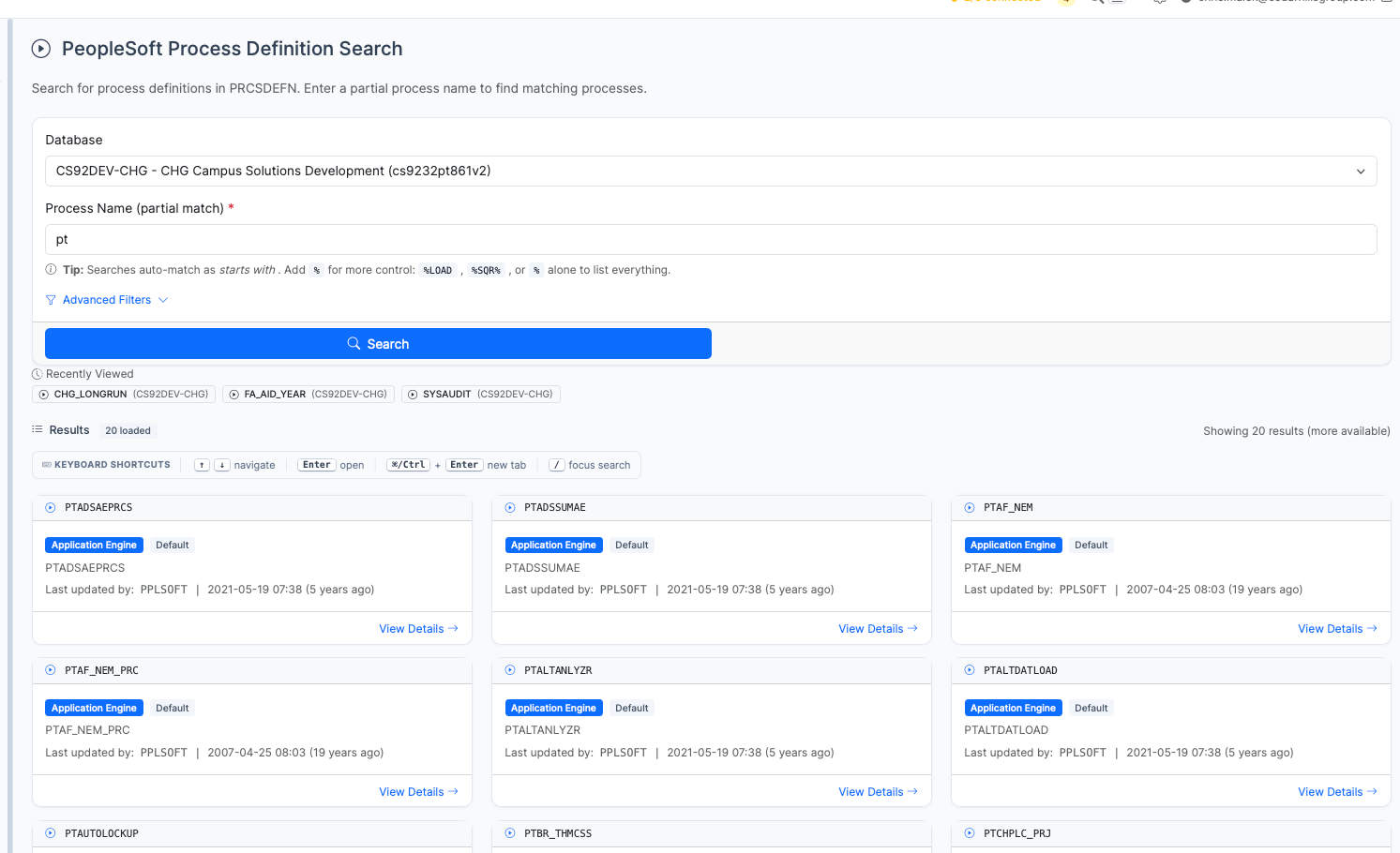
Process Definition search results for pt showing Application Engine processes
% patterns (for example, %AUDIT% or %).URL: /processdefinitions/{PRCSTYPE}/{PRCSNAME}?db={database}
The Detail Page displays process configuration, historical metrics, and schedule variance:
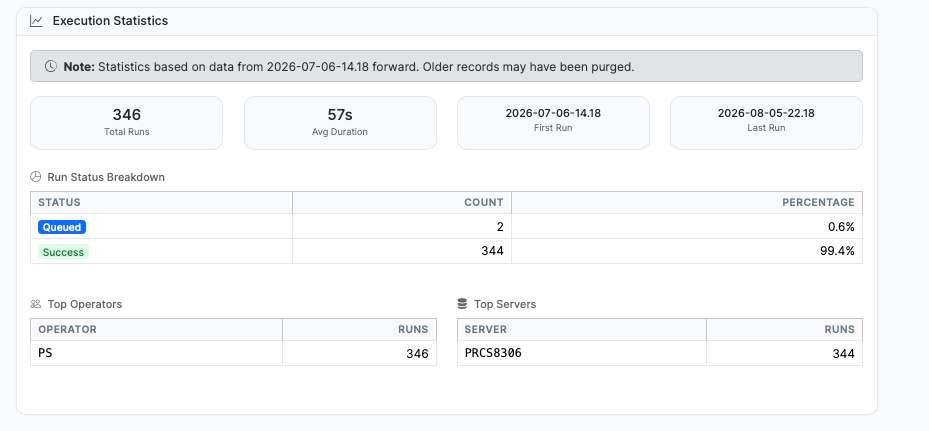
Execution Statistics panel summarizing run history, success rates, top operators, and servers
psLens analyzes historical process request data (PSPRCSRQST) to present statistics on:
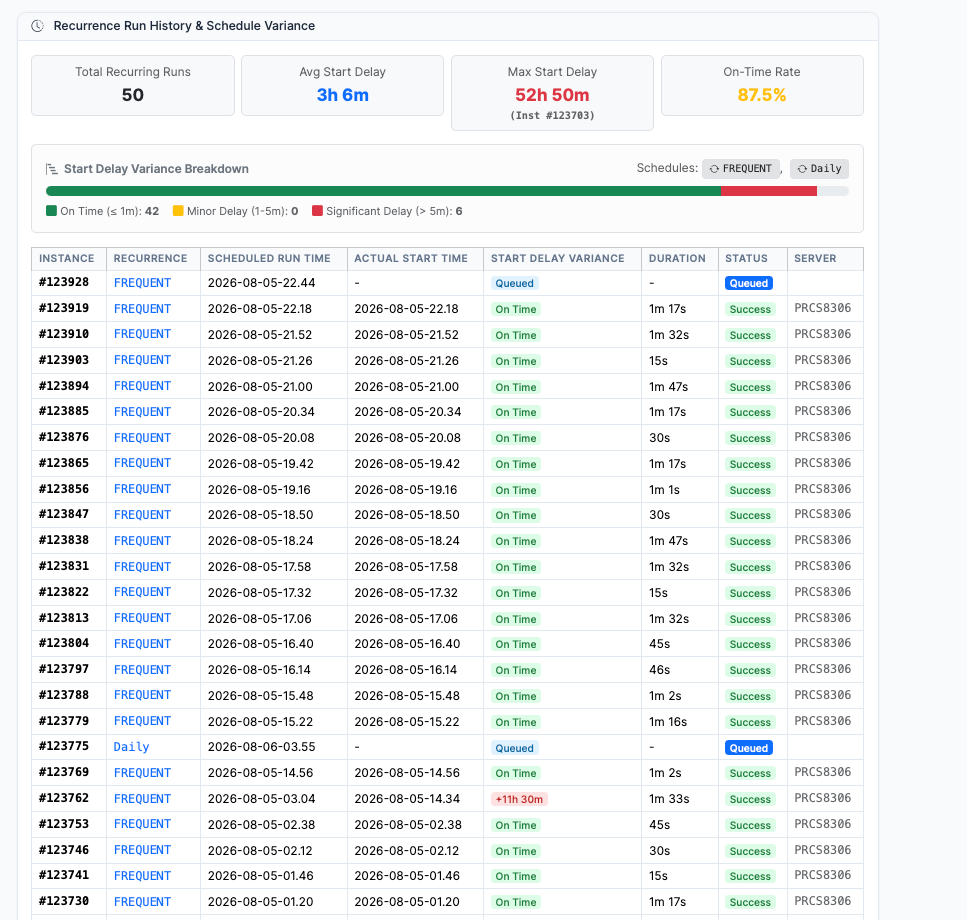
Recurrence Run History & Schedule Variance panel highlighting schedule latency and instance run logs
For processes executed via recurrence schedules (RECURNAME <> ' '), psLens calculates schedule latency:
BEGINDTTM - RUNDTTM): Compares target scheduled run times against actual execution start times.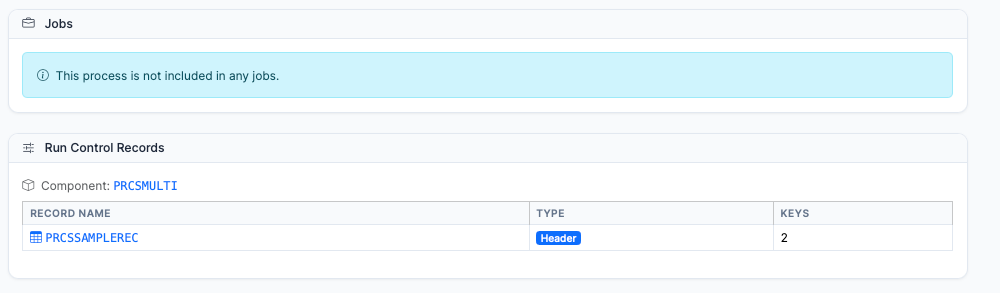
Run Control Records panel showing mapped component PRCSMULTI and header record PRCSSAMPLEREC
PRCSMULTI) and mapped header/detail tables (PRCSSAMPLEREC) used to store process parameters.PSPRCSJOBDEFN) that include this process as a job item.Queries PSPROJECTITEM where OBJECTTYPE = 20 to display Application Designer projects containing this Process Definition.
——Process Jobs (also called Job Definitions) are groups of one or more process definitions (or other jobs) bundled together to run as a single scheduled unit. A job executes its constituent processes in a defined sequence or in parallel, depending on the job definition.
psLens allows you to browse job definitions, inspect the list of items inside each job, and check their execution sequence.
Process Jobs organize multiple batch tasks into structured execution pipelines:
PSPRCSJOBDEFN) group multiple Process Definitions (PRCSDEFN) or nested sub-jobs into a single run request.RECURNAME) for automated repeating execution.In Process Scheduler setup, reviewing job definitions requires clicking through nested job item tabs and manually checking process sequence numbers.
psLens displays job properties, nested process definitions, execution sequence numbers, and run modes in a clean, unified view.
URL: /processjobs?db={database}
URL: /processjobs/{JOBNAME}?db={database}
The Detail Page displays:
——Recurrences define repeating schedule patterns used by the PeopleSoft Process Scheduler. Whenever a process or job is scheduled to run on a repeating schedule (e.g., daily, weekly, hourly), it is linked to a recurrence definition.
psLens allows you to search and view recurrence patterns to understand when a scheduled task is slated to run next and how frequently it triggers.
Recurrences drive automated scheduling for batch requests:
RECURNAME) attach to Process Definitions (PRCSDEFN) or Process Jobs (PSPRCSJOBDEFN) to automate recurring execution.In PIA, inspecting process recurrences requires opening schedule setup windows and calculating future execution times manually.
psLens displays recurrence frequency parameters, active run windows, and next-run predictions on a single screen.
URL: /recurrences?db={database}
URL: /recurrences/{RECURNAME}?db={database}
The Detail Page displays:
——Server Definitions represent the Process Scheduler Servers that are defined inside PeopleSoft. These servers execute the batch processes (like Application Engines, SQRs, etc.) and manage scheduling recurrences and daemon processes.
psLens allows you to search and browse server definitions to see how a server is configured, check its live heartbeat status, see active running processes, review what process classes and categories it is authorized to run, check operational schedules, and view its notification routing.
Server Definitions act as the execution engines for batch processing:
PSSERVERDEFN) execute Process Definitions (PRCSDEFN) and Process Jobs (PSPRCSJOBDEFN) assigned to their queues.PSSERVERSTAT.Monitoring Process Scheduler servers in PIA requires switching between Process Monitor server status pages, daemon configuration windows, and process category assignments.
psLens consolidates real-time server heartbeats, active running processes, CPU/memory metrics, daemon settings, authorized process categories, and status notification lists into a single view.
URL: /servers?db={database}
PRCS%).URL: /servers/{SERVERNAME}?db={database}
The Detail Page displays:
PSSERVERSTAT including:PSPRCSRQST.