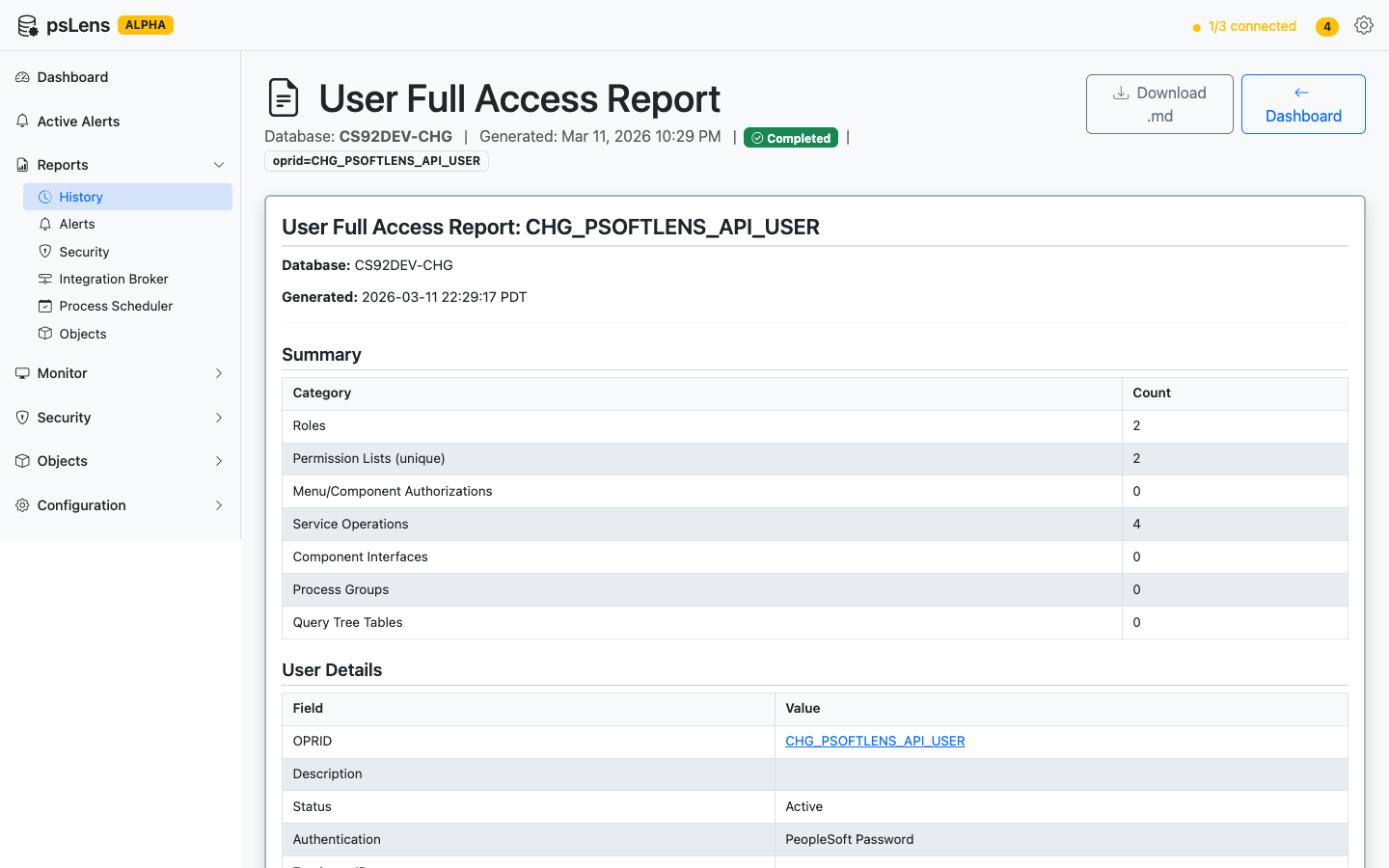
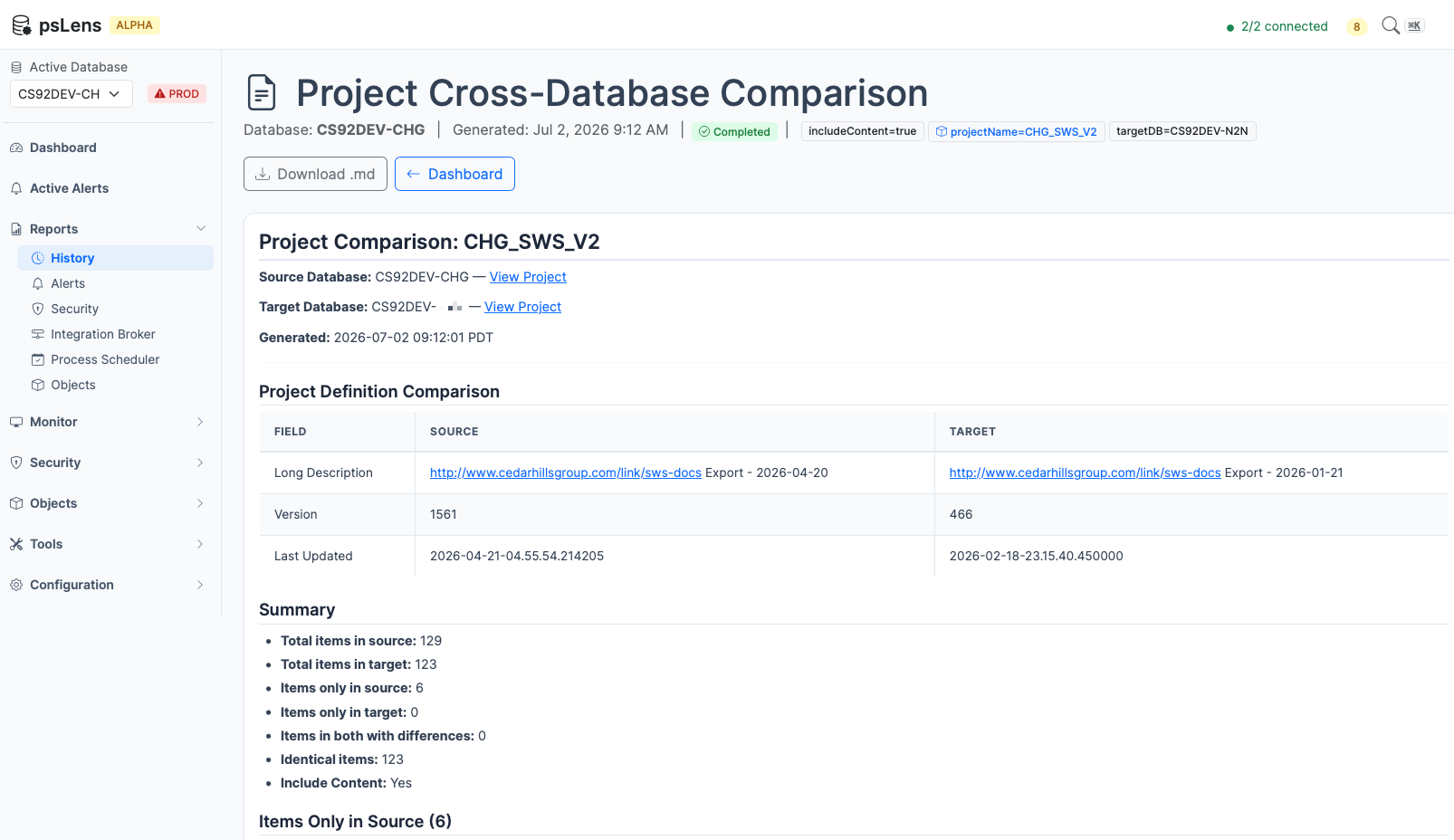
Alerts fire in real time. Reports run on demand against a selected database and produce a Markdown document with findings, evidence, and links back into psLens. Run them before an upgrade, after a migration, or whenever someone asks for proof.
Reports run in the background, render in the browser, and export as Markdown for audit trails and follow-up
How Reports Work
Go to the Reports page and choose a report to run
Select the database you want to analyze
The report runs in the background — you can navigate away and come back
When the report finishes, results are displayed as formatted output in the browser
You can also download the results as a Markdown (.md) file
Reports run asynchronously, so they don’t block the UI and you won’t lose your work if the report takes a few minutes. Progress is shown while the report runs.
Report results are stored for 90 days. You can go back and review previous runs from the Reports page.
Running a Report
Navigate to Reports in the left sidebar
Click Run New Report
Select the report type from the dropdown
Choose the database to run against
Adjust any parameters (such as threshold values) if needed
Click Run
The report appears in your report history as “Running.” Refresh or wait on the page — results appear automatically when the report completes.
Scheduling Reports
In addition to running reports on-demand, you can schedule reports to execute automatically at recurring intervals. Scheduled reports can target specific databases and send notifications when they complete.
How to Schedule a Report
Navigate to Reports and click Run New Report.
Locate the report you want to schedule and click the Schedule button.
In the configuration modal:
Target Databases: Select one or more active databases to target.
Schedule Interval: Choose from Daily, Weekly, or Monthly.
Time of Day: Specify the execution time in server local time (e.g., 02:00 or 14:30).
Notification Deliveries: Toggle Email or Webhook notifications on completion, then select an existing target from the dropdown or input a custom target.
Click Save Schedule. You will be automatically redirected to the Active Schedules page where your new schedule is listed.
Managing Active Schedules
Navigate to Active Schedules in the left sidebar. Here you can:
View: See all scheduled report parameters, target databases, and delivery endpoints.
Edit: Click Edit to modify the recurrence interval, time, targets, or databases.
Cancel: Click Cancel to disable and delete the schedule override.
Downloading Reports
On any completed report’s results page, click Download as Markdown to save the full report output as a .md file. Markdown files are plain text and can be opened in any text editor, rendered on GitHub, or converted to other formats.
If you want to inspect the artifact before installing anything, start with Sample Report Output.
Report Categories
Browse reports by category:
Security — Permission list analysis, password audits, user access reviews
We are open for product feedback. Each report here is a module in the psLens report framework, and the 26 reports were added one module at a time, so new reports are usually quick to incorporate. If your audit or operations work needs a report psLens does not ship, tell us. psLens is onboarding design partners, and partner requests set the build order.
See Reports in Action
The report catalog tells you what each report reads and what it returns. A live walkthrough shows the important part: how teams run them, how long they take, and how the output fits into audits, migrations, and operational reviews.
Security audit reports for PeopleSoft: permission list analysis, password audits, user access reviews, and more.
Eight reports against PSOPRDEFN, PSCLASSDEFN, PSROLECLASS, PSAUTHITEM, and PSMSGNODEDEFN. They answer: who has too much, who has stale credentials, and which IB nodes will let any caller in.
Lists users with special PeopleTools access (Application Designer, Data Mover, Object Security, Query, Import Manager), traced through permission lists and roles
Identifies permission lists granting access to dangerous capabilities such as SOAP-to-CI, WSDL generation, user profile management, and node configuration
Identifies users with native passwords in PSOPRDEFN when using Single Sign-On
1.1 - Full Access Permission Lists
This report identifies PeopleSoft permission lists that have an unusually high number of menu authorizations.
New to psLens? This page documents one specific report. To see how it runs in the product, what
the output looks like, and how teams use it in practice, start with a live walkthrough.
This report identifies PeopleSoft permission lists that have an unusually high number of menu authorizations. Permission lists with 50+ menu authorizations are usually “superuser” lists that grew organically. Find them so you can audit who has them.
What It Detects
Permission lists where the total count of menu authorizations meets or exceeds a configurable threshold (default: 50).
Menu authorizations are entries in PSAUTHITEM that match real menus in PSMENUITEM via a parent-child join. This excludes special permissions like APPLICATION_DESIGNER, DATA_MOVER, QUERY, and WEBLIB entries.
Tables Queried
PSCLASSDEFN — Permission List Definitions
The primary record for PeopleSoft permission lists (also called “classes”).
Field
Description
CLASSID
Permission list name (primary key)
CLASSDEFNDESC
Description of the permission list
LASTUPDOPRID
Last operator who modified this permission list
LASTUPDDTTM
Timestamp of last modification
PSAUTHITEM — Menu Authorization Entries
Each row represents a menu/bar/item combination that a permission list is authorized to access.
Field
Description
CLASSID
Permission list (foreign key to PSCLASSDEFN)
MENUNAME
Menu name
BARNAME
Menu bar name
BARITEMNAME
Menu bar item name
DISPLAYONLY
Whether access is display-only
AUTHORIZEDACTIONS
Bitmask of authorized actions
PSMENUITEM — Menu Item Details
Used via a parent-child join with PSAUTHITEM to validate that authorization entries correspond to real menu items. Only PSAUTHITEM entries matching a PSMENUITEM record are counted.
Field
Description
MENUNAME
Menu name (join key)
BARNAME
Menu bar name (join key)
ITEMNAME
Item name (joins to BARITEMNAME)
PNLGRPNAME
Component name
MARKET
Market code
ITEMLABEL
Display label
Data Flow
1. Fetch ALL permission lists from PSCLASSDEFN
   via SearchPermissionLists (batches of 300)
        |
        v
2. For EACH permission list:
   Query PSAUTHITEM joined with PSMENUITEM
   via GetMenuAuthorizations (pages of 100)
   Count total matching entries
        |
        v
3. Filter: keep only permission lists where
   menu auth count >= minMenuCount (default 50)
        |
        v
4. Sort results by menu auth count (descending)
        |
        v
5. Generate Markdown report with summary table
Report Output
The generated report contains:
Header with database name, generation timestamp, and threshold value
Summary showing total permission lists analyzed and count flagged
Flagged Permission Lists table with columns:
Permission List (CLASSID)
Description (truncated to 50 characters)
Menu Auth Count
Last Updated By (operator ID)
Last Updated (timestamp)
Recommendations section with remediation guidance
Parameters
Parameter
Default
Description
minMenuCount
50
Minimum number of menu authorizations to flag a permission list
Interpreting Results
High counts (200+): These permission lists likely grant access to a very large portion of the application. They are often “admin” or “superuser” lists and should be reviewed to ensure they are only assigned to appropriate roles.
Moderate counts (50-200): May indicate permission lists that have grown over time. Consider whether they can be split into more focused lists.
Last Updated By: If the operator is not a known security administrator, investigate whether the change was authorized.
Recommendations
Review flagged permission lists for excessive access
Consider splitting broad permission lists into more focused, role-specific lists
Verify that the “Last Updated By” operator is authorized to make security changes
1.2 - Nodes with No Password
This report identifies active PeopleSoft message nodes that have no authentication configured or have authentication enabled but no passwords set.
New to psLens? This page documents one specific report. To see how it runs in the product, what
the output looks like, and how teams use it in practice, start with a live walkthrough.
This report identifies active PeopleSoft message nodes that have no authentication configured or have authentication enabled but no passwords set. Anything on the network can post messages to these nodes.
What It Detects
The report categorizes problem nodes into three severity levels:
CRITICAL — Active Nodes with No Authentication
Active nodes where AUTHOPTN = 'N' (None). Any external system can communicate with these nodes without providing any credentials.
WARNING — Active Nodes with Auth but No Passwords
Active nodes that have an authentication option configured (AUTHOPTN is P, C, or T) but neither the internal password (IBPASSWORD) nor external password (IBEXTERNALPWD) fields contain a value.
INFO — Inactive Nodes with No Authentication
Nodes that are currently inactive (ACTIVE_NODE = '0') but have no authentication. While not an immediate risk, these would become vulnerable if reactivated.
Table Queried
PSMSGNODEDEFN — Message Node Definitions
The primary record for PeopleSoft Integration Broker message nodes.
Field
Description
Values
MSGNODENAME
Node name (primary key)
ACTIVE_NODE
Whether the node is active
1 = Active, 0 = Inactive
AUTHOPTN
Authentication option
N = None, P = Password, C = Certificate, T = Token
IBPASSWORD
Internal password
Non-empty means password is set
IBEXTERNALPWD
External password
Non-empty means password is set
USERID
PeopleSoft user ID associated with the node
CONNID
Connector ID
e.g., HTTPTARGET, JMSTARGET
NODE_TYPE
Node type
DESCR
Description
LASTUPDOPRID
Last updated by operator
LASTUPDDTTM
Last updated timestamp
Data Flow
1. Fetch ALL message nodes from PSMSGNODEDEFN
   via SearchNodes (batches of 300)
        |
        v
2. Categorize each node:
   - Is it active? (ACTIVE_NODE == "1")
   - What is its auth option? (AUTHOPTN)
   - Does it have any password? (IBPASSWORD or IBEXTERNALPWD)
        |
        v
3. Sort into three buckets:
   CRITICAL: Active + AuthOptn == "N"
   WARNING:  Active + AuthOptn != "N" + no passwords
   INFO:     Inactive + AuthOptn == "N"
        |
        v
4. Generate Markdown report grouped by severity
Categorization Logic
The report uses these helper methods on each node record:
Method
Logic
IsActive()
Returns true if ACTIVE_NODE == "1"
HasInternalPassword()
Returns true if IBPASSWORD is non-empty
HasExternalPassword()
Returns true if IBEXTERNALPWD is non-empty
HasAnyPassword()
Returns true if either internal or external password is set
Report Output
The generated report contains:
Header with database name and generation timestamp
Summary with total node counts, active count, and counts per severity category
CRITICAL section (if any): Table with node name, description, node type, connector, user ID, last updated by/when
WARNING section (if any): Table with node name, description, auth option label, internal/external password status (Set/Not Set), user ID, last updated
INFO section (if any): Table with inactive node name, description, node type, last updated by/when
Recommendations based on which severity categories have findings
Parameters
This report has no configurable parameters.
Interpreting Results
CRITICAL findings require immediate action. Active nodes with no authentication mean any system on the network can send messages without credentials.
WARNING findings should be investigated. Authentication is configured but credentials may not be properly set, rendering the authentication ineffective.
INFO findings are lower priority but represent latent risk. If these nodes are ever reactivated, they would immediately become vulnerable.
Authentication Option Reference
Value
Label
Description
N
None
No authentication required
P
Password
Password-based authentication
C
Certificate
Certificate-based authentication
T
Token
Token-based authentication
Recommendations
Immediately configure authentication on active nodes with AUTHOPTN='N'
Set AUTHOPTN to P (Password) or C (Certificate) and configure credentials
Set internal or external passwords on nodes that have auth enabled but no credentials
1.3 - Stale Password Audit
This report identifies unlocked PeopleSoft user accounts whose passwords have not been changed within a configurable number of days.
New to psLens? This page documents one specific report. To see how it runs in the product, what
the output looks like, and how teams use it in practice, start with a live walkthrough.
This report identifies unlocked PeopleSoft user accounts whose passwords have not been changed within a configurable number of days. External auditors will ask. SSO accounts are automatically excluded, so the list is users who still have a real PeopleSoft password.
What It Detects
The report categorizes stale password accounts into three severity levels based on how long the password has been unchanged:
CRITICAL — Password Not Changed in Over 1 Year
Unlocked accounts where the password has not been changed in over 365 days. These represent the highest risk and should be addressed immediately.
WARNING — Password Not Changed in Over 180 Days
Unlocked accounts where the password is between 180 and 365 days old.
INFO — Password Exceeds Configured Threshold
Unlocked accounts where the password exceeds the configured threshold (default 90 days) but is less than 180 days old.
The report also separately identifies:
No Password Change Date Recorded. Unlocked accounts with no recorded LASTPSWDCHANGE value (may be migrated or misconfigured)
SSO users (accounts with no PeopleSoft password set) are automatically excluded from this report.
Table Queried
PSOPRDEFN — Operator Definitions (User Accounts)
The primary record for PeopleSoft user accounts.
Field
Description
Values
OPRID
User ID (primary key)
OPRDEFNDESC
User description/name
LASTPSWDCHANGE
Date of last password change
Date format
LASTSIGNONDTTM
Date/time of last sign-on
Datetime format
ACCTLOCK
Account lock status
0 = Active, 1 = Locked
PTOPERPSWDV2
Password hash
Non-empty means password is set (SSO users have no password)
OPRCLASS
Primary permission list
Data Flow
1. Fetch ALL users from PSOPRDEFN
   via SearchUsers (batches of 300)
        |
        v
2. Filter:
   - Skip locked accounts (ACCTLOCK = 1)
   - Skip SSO users (no password set)
        |
        v
3. Parse LASTPSWDCHANGE date and compute days since change
        |
        v
4. Categorize into severity buckets:
   CRITICAL: > 365 days since password change
   WARNING:  > 180 days
   INFO:     > staleDays threshold (default 90)
   Plus: No change date recorded
        |
        v
5. Sort each category by days since change (oldest first)
        |
        v
6. Generate Markdown report grouped by severity
Parameters
Parameter
Default
Description
staleDays
90
Number of days after which a password is considered stale
Report Output
The generated report contains:
Header with database name, generation timestamp, and threshold parameter
Summary with total user counts, unlocked count, and counts per severity category
CRITICAL section (if any): Table with user ID (linked), description, last password change date, days since change, last sign-on, permission list
WARNING section (if any): Same table format
INFO section (if any): Same table format
No Password Change Date section (if any): Table with user ID, description, last sign-on, permission list
Recommendations based on which categories have findings
Interpreting Results
CRITICAL findings require immediate action. Passwords unchanged for over a year are a significant security risk, especially if the accounts are actively used (check the Last Sign-on column).
WARNING findings should be scheduled for remediation. These accounts are approaching a year without a password change.
INFO findings indicate policy non-compliance. The accounts exceed your configured threshold but are not yet at the warning level.
No Password Change Date accounts are often migrated accounts. Verify they are legitimate and consider requiring a password reset.
SSO users (no PeopleSoft password set) are automatically excluded from this report.
Investigate accounts with no password change date — these may need manual password resets.
1.4 - User Full Access Report
This report generates a consolidated view of everything a single PeopleSoft user can access.
New to psLens? This page documents one specific report. To see how it runs in the product, what
the output looks like, and how teams use it in practice, start with a live walkthrough.
Report ID:security-user-accessCategory: Security
Parameters:oprid (required) — the PeopleSoft User ID to audit
Purpose
This report generates a consolidated view of everything a single PeopleSoft user can access. It expands all roles and permission lists to show the full scope of a user’s security profile in one document. This is useful for security audits, access reviews, onboarding/offboarding verification, and compliance reporting.
What It Covers
The report walks the full PeopleSoft security hierarchy for the specified user:
User Details. Account status, authentication method, direct permission list assignments
Roles. All roles assigned to the user (including dynamic roles)
Permission Lists. Unique permission lists derived from assigned roles, with a reverse map showing which roles grant each
PeopleTools Access. Client tool access (Application Designer, Data Mover, etc.)
Menu/Component Access. All menu authorizations grouped by menu, showing components and display-only status
Service Operations. All authorized Integration Broker service operations
Component Interfaces. All authorized component interfaces
Process Groups. Authorized process scheduler groups
Query Tree / Row-Level Security. Accessible records via query tree security
Tables Queried
Table
Purpose
PSOPRDEFN
User definition and account details
PSROLEUSER
User-to-role assignments
PSROLECLASS
Role-to-permission-list mapping
PSCLASSDEFN
Permission list definitions
PSAUTHITEM + PSMENUITEM
Menu/component authorizations
PSAUTHWS
Service operation authorizations
PSAUTHBUSCOMP
Component interface authorizations
PSAUTHPRCS
Process group authorizations
SCRTY_ACC_GRP
Query tree security access groups
PSTREENODE
Query tree node hierarchy
Data Flow
1. Fetch user details from PSOPRDEFN
        |
        v
2. Fetch all roles from PSROLEUSER
        |
        v
3. Batch-fetch permission lists for all roles
   from PSROLECLASS
        |
        v
4. Collect unique permission list ClassIDs
        |
        v
5. For ALL unique ClassIDs, fetch:
   - PeopleTools access (PSAUTHITEM special entries)
   - Menu authorizations (PSAUTHITEM + PSMENUITEM)
   - Service operation auths (PSAUTHWS)
   - Component interface auths (PSAUTHBUSCOMP)
   - Process group auths (PSAUTHPRCS)
   - Query tree access groups (SCRTY_ACC_GRP)
        |
        v
6. For query trees: walk tree hierarchy to
   resolve accessible leaf records
        |
        v
7. Generate consolidated Markdown report
How to Run
This report can be launched in two ways:
From the User Detail Page: Navigate to any user’s detail page and click the Run Full Access Report button in the right sidebar. The report automatically uses the current user and database.
From the Reports Page: Go to Reports > Run New Report > User Full Access Report. Click Go to Users to search for a user, then run it from the user’s detail page.
Report Output
The generated report contains:
Summary table with counts for each access category
User Details with account status, authentication, and direct permission lists
Roles table with dynamic assignment indicators
Permission Lists table showing which roles grant each permission list
PeopleTools Access table showing Yes/No for each client tool
Menu/Component Access grouped by menu name, with component links, labels, and display-only flags
Service Operations table with operation and permission list links
Component Interfaces table with interface and permission list links
Process Groups table listing authorized process groups
Query Tree tables showing accessible records with tree and access group context
All object names in the report are linked back to their detail pages in psLens for easy navigation.
Interpreting Results
Large number of roles: Users with many roles may have accumulated access over time. Review whether all roles are still needed.
Overlapping permission lists: Multiple roles may grant the same permission list. While not harmful, it can make access reviews harder.
PeopleTools access: Application Designer, Data Mover, and Object Security access should be limited to developers and security administrators.
Display-only flags: Components marked as display-only mean the user can view but not modify data through those pages.
Process groups: Verify that users only have access to process groups relevant to their job function.
1.5 - Dangerous Permissions Audit
This report identifies permission lists that grant access to dangerous capabilities in PeopleSoft.
New to psLens? This page documents one specific report. To see how it runs in the product, what
the output looks like, and how teams use it in practice, start with a live walkthrough.
This report identifies permission lists that grant access to dangerous capabilities in PeopleSoft. Each of the eight checks is a known attack path: SOAP-to-CI lets a permission-list holder call any Component Interface without a dedicated service operation, USERPROFILES lets them mint new accounts, IB_NODE lets them point a node at attacker-controlled infrastructure. Each category is assigned a severity level (CRITICAL or HIGH) to help prioritize remediation.
What It Checks
The report audits 8 categories of dangerous access:
CRITICAL Severity
Category
Menu/Bar Item
Risk
SOAP to CI (WEBLIB_SOAPTOCI)
MENUNAME = 'WEBLIB_SOAPTOCI'
Allows programmatic access to Component Interfaces via SOAP without dedicated service operations
User Profile Management
MENUNAME = 'MAINTAIN_SECURITY', bar items: USERPROFILES, USER_SAVEAS, USERMAINT_DIST (non-display-only)
Ability to create, modify, or delete user profiles — the highest-level security object
Node Configuration
MENUNAME = 'IB_CONFIGURE', bar item: IB_NODE (non-display-only)
Ability to define or modify Integration Broker nodes, including authentication credentials
HIGH Severity
Category
Menu/Bar Item
Risk
WSDL Generation (WEBLIB_MSGWSDL)
MENUNAME = 'WEBLIB_MSGWSDL'
Can expose the structure and endpoints of web services
Role Management
MENUNAME = 'MAINTAIN_SECURITY', bar items: ROLEMAINT, ROLESAVEAS (non-display-only)
Ability to create, modify, or delete roles, controlling permission assignments
Permission List Purge
MENUNAME = 'MAINTAIN_SECURITY', bar items: PURGE_PERMLIST, PURGE_ROLEDEFN, PURGE_USR_PROFILE (non-display-only)
Ability to purge permission lists, roles, or user profiles
URL Definitions Management
MENUNAME = 'MAINTAIN_SECURITY', bar item: URL_MAINTENANCE (non-display-only)
Ability to create or modify URL definitions for redirects or external integrations
Process Type Definitions
MENUNAME = 'PROCESSMONITOR', bar item: PRCSTYPE (non-display-only)
Ability to modify process type definitions controlling batch process execution
Table Queried
PSAUTHITEM — Authorization Items
Queried once per category with the specific WHERE clause for that check.
Field
Description
CLASSID
Permission list that has this access
MENUNAME
Menu name being authorized
BARITEMNAME
Menu bar item name
DISPLAYONLY
Display-only flag (0 = full access, 1 = display only)
PSROLECLASS — Role/Permission List Assignments
Queried per permission list found, via GetPermissionListRoles.
Field
Description
CLASSID
Permission list
ROLENAME
Role that includes this permission list
PSOPRALIASTYPE / PSOPRDEFN — User Counts
Queried in batch via GetUnlockedUserCountForRoles to count unlocked users per role.
Data Flow
1. For each of 8 dangerous capability categories:
        |
        v
2. Query PSAUTHITEM with category-specific WHERE clause
   -> Extract unique permission lists (CLASSID)
        |
        v
3. For each permission list found:
   -> Fetch assigned roles via PSROLECLASS
        |
        v
4. Batch query unlocked user counts for all roles
        |
        v
5. Sort findings by total unlocked user count (descending)
        |
        v
6. Generate per-category section with severity badge,
   description, and permission list table
        |
        v
7. Generate summary and recommendations
Parameters
This report has no configurable parameters.
Report Output
The generated report contains:
Header with database name and generation timestamp
Per-category sections (8 total), each with:
Severity badge (CRITICAL or HIGH)
Description of the dangerous capability
Count of permission lists with this access
Table with: Permission List (linked), Roles, Unlocked User count
Or “No findings” if no permission lists have this access
Summary with total categories checked and total permission lists found
Recommendations for each category
Interpreting Results
CRITICAL findings should be reviewed immediately. SOAP-to-CI access, user profile management, and node configuration can all be used for privilege escalation or unauthorized data access.
HIGH findings should be scheduled for remediation. These capabilities are security-sensitive but may have legitimate use cases in limited quantities.
Permission lists with no roles assigned may be orphaned but should still be reviewed — they could be assigned in the future.
High unlocked user counts indicate broad exposure to the dangerous capability and should be prioritized for remediation.
Display-only access is excluded. The report only flags non-display-only (DISPLAYONLY = 0) access for menu-based checks, so findings represent actual write/execute capability.
Recommendations
Remove WEBLIB_SOAPTOCI access in production environments unless absolutely required for integration — use dedicated service operations instead
Restrict WSDL generation to development environments only; in production, serve static WSDL files
Limit user profile management to a small number of designated security administrators
Implement change management processes for role and permission list modifications
Restrict purge operations to emergency use only and require approval workflows
Audit node configuration access regularly, as nodes contain authentication credentials
1.6 - SOAP to CI Access Audit
‘SOAP to CI’ is a powerful tool that allows using excel or any web client to interact with PeopleSoft Component Interfaces via SOAP web services.
New to psLens? This page documents one specific report. To see how it runs in the product, what
the output looks like, and how teams use it in practice, start with a live walkthrough.
“SOAP to CI” is a powerful tool that allows using excel or any web client to interact with PeopleSoft Component Interfaces via SOAP web services. However, this capability also introduces significant security risks if not properly controlled, as it can allow users to programmatically read or write data in the application database. The number of users with access to this WebLib should be tightly controlled and regularly audited.
The SOAP to Component Interface Access Audit report identifies all PeopleSoft users (OPRIDs) who have access to the SOAP-to-CI WebLib (WEBLIB_SOAPTOCI). This WebLib allows programmatic data loading into PeopleSoft using standard Component Interface Web Services (acting as the endpoint for Excel-to-CI and custom integrations like psDataLoader).
For each identified user, the report details:
The security paths (Roles and Permission Lists) granting WebLib access.
The specific Component Interfaces they are authorized to access and execute, and which Roles and Permission Lists grant that CI access.
This report is critical for security audits to ensure that only authorized integration accounts or administrators possess programmatic write access to the application database.
Tables Queried
PSAUTHITEM — WebLib Authorizations
Used to find permission lists that grant access to WEBLIB_SOAPTOCI.
Field
Description
Filter
CLASSID
Permission list name
MENUNAME
WebLib name
MENUNAME = 'WEBLIB_SOAPTOCI'
PSROLECLASS — Role to Permission List Mapping
Used to trace permission lists back to roles.
Field
Description
CLASSID
Permission list
ROLENAME
Role assigning the permission list
PSROLEUSER — User to Role Mapping
Used to identify users assigned to the roles that grant Weblib access, and to map all roles assigned to those users.
Field
Description
ROLEUSER
User ID (OPRID)
ROLENAME
Assigned role
PSOPRDEFN — Operator Definitions
Used to identify users who get direct access via their Primary Permission List (OPRCLASS), and to retrieve user account lock status and descriptions.
Used to trace all Component Interface authorizations for the permission lists assigned to the identified users.
Field
Description
CLASSID
Permission list
BCNAME
Component Interface name
BCMETHOD
Component Interface method
Data Flow
1. Query PSAUTHITEM to find all permission lists (CLASSID) authorizing WEBLIB_SOAPTOCI
        |
        v
2. Query PSROLECLASS to trace those permission lists back to Roles
        |
        v
3. Query PSROLEUSER and PSOPRDEFN to identify all users (OPRID) with:
   - Assignment to those Roles
   - Direct Primary Permission List (OPRCLASS) granting access
        |
        v
4. Fetch user details (description, lock status) for all identified users
        |
        v
5. Fetch all Roles and Permission Lists assigned to those users
        |
        v
6. Fetch all Component Interface (CI) authorizations (PSAUTHBUSCOMP) for those permission lists
        |
        v
7. For each user, map their SOAP-to-CI access paths and all authorized Component Interfaces
        |
        v
8. Sort users (active first, then by ID) and generate the Markdown report
Parameters
This report has no configurable parameters.
Report Output
The generated report contains:
Header with database name and generation timestamp.
Summary statistics (total users, active vs. locked, unique roles, unique permission lists).
WebLib Access Path Summary Table listing each Role-Permission List pair granting SOAP-to-CI access and the number of active users with that assignment.
User Access Details Section detailing each user:
User ID (linked to detail page) and Description.
Account lock status (Active/Unlocked vs. Locked 🔒).
A table of Accessible Component Interfaces detailing which Role and Permission List grants access to each specific Component Interface.
Remediation Recommendations to secure your environments.
Interpreting Results
Unlocked users with SOAP-to-CI access must be verified. Programmatic SOAP-to-CI access should be reserved for integration service accounts or system administrators. Standard business users should not have access to this WebLib.
Active users with no Component Interface access have WebLib access but cannot interact with any business objects. While they present less immediate risk, their WebLib access should still be revoked to adhere to the principle of least privilege.
Locked users are flagged with Locked 🔒. While they cannot authenticate, their security definitions should still be cleaned up if their access is no longer required.
Primary Permission List grants (indicated by Primary Permission List instead of a Role) should be avoided. Best practice is to assign Weblib access through Roles.
Recommendations
Restrict WEBLIB_SOAPTOCI: Remove this WebLib access from any roles assigned to standard business users. Ensure it is only assigned to dedicated integration/service accounts.
Implement Least Privilege for CIs: Verify that service accounts only have access to the specific Component Interfaces (CIs) required for their integration. Remove broad or administrative permission lists that grant access to unnecessary CIs.
Lock Stale Accounts: Ensure that any old, inactive, or deprecated integration accounts are explicitly locked in PSOPRDEFN.
1.7 - SSO Bypass Password Audit
This page documents the SSO Bypass Password Audit report, which identifies native PeopleSoft user passwords stored in the PSOPRDEFN table.
New to psLens? This page documents one specific report. To see how it runs in the product, what
the output looks like, and how teams use it in practice, start with a live walkthrough.
This page documents the SSO Bypass Password Audit report, which identifies native PeopleSoft user passwords stored in the PSOPRDEFN table.
Purpose
Environments using Single Sign-On (SSO) should not store native passwords in the PeopleSoft database. If PSOPRDEFN passwords exist, users can bypass SSO controls—including Multi-Factor Authentication (MFA)—by accessing PeopleSoft backdoor login paths (such as ?cmd=login query parameters or web service endpoints).
To prevent backdoor access, the fields OPERPSWD, PTOPERPSWDV2, and OPERPSWDSALT must be cleared to a single space, since PeopleSoft does not support database nulls.
Important: There are types of users that need to maintain their PeopleSoft password for various reasons that this report will flag.
Anyone who needs 2-tier PeopleTools Access
Developers
Administrators
Special Accounts
App Server Accounts
API User Accounts for External Integrations
SOAP-to-CI Users (maybe)
For any accounts that you know should have a password, you can enter rolename for accounts to avoid. One idea here is to create a new role like X_CAN_HAVE_PS_PASSWORD (replace X_ With your desired prefix) so you can clearly mark these special users and everyone else should have their passwords cleared.
What It Detects
The report checks the PSOPRDEFN table for any row where OPERPSWD, PTOPERPSWDV2, or OPERPSWDSALT is not a single space. Results are grouped into two sections based on account status:
Active Users with Local Passwords: High risk. These accounts can be logged into directly.
Locked Users with Local Passwords: Low risk. These accounts are locked, but their passwords should still be cleared.
Table Queried
PSOPRDEFN
The primary table containing PeopleSoft operator definitions.
Field
Description
Values
OPRID
User ID (primary key)
OPRDEFNDESC
User description
ACCTLOCK
Account lock status
1 = Locked, 0 = Active
LASTSIGNONDTTM
Last sign-on date and time
OPERPSWD
Legacy password hash
PTOPERPSWDV2
Password hash (V2)
OPERPSWDSALT
Password salt
PSROLEDEFN
Used to validate that the entered excluded roles are real roles.
PSROLEUSER
Used via a subquery to exclude users assigned to the specified excluded roles.
Data Flow
1. If excludeRoles is provided, validate each role against PSROLEDEFN
    |
    v
2. Query PSOPRDEFN for rows where OPERPSWD, PTOPERPSWDV2, or OPERPSWDSALT is not ' ' (filtering out users assigned to excluded roles via a PSROLEUSER subquery)
    |
    v
3. Segment users based on ACCTLOCK (0 = Active, 1 = Locked)
    |
    v
4. Compile a bulk SQL update script containing individual UPDATE statements for all affected users
Report Output
The report outputs:
A summary of active and locked users containing passwords.
Tables listing the user ID, description, last sign-on date, and active password fields.
A bulk remediation SQL script with individual update queries.
Parameters
excludeRoles: Comma-separated list of role names to exclude from the audit (optional). If specified, any user assigned to any of these roles is excluded from the report. The report validates that all entered role names exist in PSROLEDEFN.
1.8 - PeopleTools Access Audit
Special PeopleTools access (Application Designer, Data Mover, Object Security, Query, Import Manager, 2-Tier Client) is granted on the PeopleTools …
New to psLens? This page documents one specific report. To see how it runs in the product, what
the output looks like, and how teams use it in practice, start with a live walkthrough.
Special PeopleTools access (Application Designer, Data Mover, Object Security, Query, Import Manager, 2-Tier Client) is granted on the PeopleTools tab of a permission list and recorded in PSAUTHITEM. This report lists every user who holds any of that access and the path that grants it: permission list to role to user.
What It Detects
For each PeopleTools application, the permission lists that grant it, the roles that carry those permission lists, and the users in those roles. Each grant is marked Full (edit) or Read-only based on PSAUTHITEM.DISPLAYONLY. Each user is marked Active or Locked from PSOPRDEFN.ACCTLOCK.
The tools tracked are the MENUNAME values PeopleSoft uses for standalone tools access:
PSROLECLASS — which roles include each permission list.
PSROLEUSER — which users hold each role.
PSOPRDEFN — account lock status (ACCTLOCK) and primary permission list (OPRCLASS).
PSOPROBJ — Definition Security grants: permission list to object group, with DISPLAYONLY (edit vs read-only).
PSOBJGROUP — object group membership (which definitions belong to a custom group).
Report Output
Four sections:
Summary — count of permission lists and distinct users per tool, plus the total number of users with any special access.
Access by Tool — each tool with its permission lists (Full or Read-only), descriptions, and the roles that carry them.
Access by User — every in-scope user with their account status, the tools they hold and at what level, a Def. Security column (can they edit definitions), and the permission lists and roles that grant them.
Definition Security (Object Security) — object group grants (PSOPROBJ): which permission lists can edit or read the definitions in each object group, and which users that reaches via primary permission list and roles.
Permission lists, roles, and users link back to their psLens detail pages.
Parameters
Parameter
Default
Description
activeOnly
false
When true, restrict the user sections to unlocked accounts only.
Interpreting Results
Full vs Read-only. Read-only Application Designer access can open and inspect definitions but not save changes. Full access can modify them. Treat Full access in a production database as the higher risk.
Locked users. Locked accounts still hold the grant. They appear so you can audit dormant access that would return if the account is unlocked. Set activeOnly = true to hide them.
Object Security. Access to the Object Security tool lets a user change Definition Security itself, which governs which definitions developers can edit.
Definition Security details
Holding Application Designer access lets a developer open the tool. What definitions they can edit is controlled by Definition Security object groups (PSOBJGROUP) linked to permission lists through PSOPROBJ. The DISPLAYONLY flag on that link is the difference between read-only and edit access.
The delivered PEOPLETOOLS object group holds the system definitions and is read-only by default. An Edit grant on it (DISPLAYONLY = 0) means the permission list can modify delivered PeopleTools objects in Application Designer — a high-privilege grant worth auditing.
The report applies these grants to users through both their primary permission list (PSOPRDEFN.OPRCLASS) and their roles, and labels which path reaches each user. Permission-list-level grants are reported exactly from PSOPROBJ; the user roster is the set reached through those permission lists.
2 - Integration Broker
Integration Broker reports for PeopleSoft: service operation audits, node security, routing analysis, and volume reporting.
Eight reports against the PSOPERATION, PSMSGNODEDEFN, PSIBRTNGDEFN, and IB log tables. Use them to find unauthenticated nodes, routings open to ~~ANY~~, sync ops running without logging, and dead operations no one bothered to deactivate.
Shows IB message volume for a date range broken down by async operations, pub/sub contracts, and logged sync operations
2.1 - Web Service Operation Access Audit
This report provides a consolidated view of which PeopleSoft service operations (web services) are accessible, through which permission lists and r…
New to psLens? This page documents one specific report. To see how it runs in the product, what
the output looks like, and how teams use it in practice, start with a live walkthrough.
This report provides a consolidated view of which PeopleSoft service operations (web services) are accessible, through which permission lists and roles, and how many active (unlocked) users have access through each role. It answers the question: “Who can call our web services and through what security chain?”
What It Captures
The report traces the full security chain for every service operation authorization:
Service Operation — The web service endpoint (from PSAUTHWS)
Permission List — The permission list granting access to that operation
Role — Each role that includes that permission list
Unlocked User Count — The number of users with that role whose accounts are not locked
Tables Queried
PSAUTHWS — Web Service Authorizations
Maps service operations to the permission lists that grant access.
Field
Description
IB_OPERATIONNAME
Service operation name (key)
CLASSID
Permission list granting access
PSROLECLASS — Role to Permission List Mapping
Maps roles to their assigned permission lists.
Field
Description
ROLENAME
Role name (key)
CLASSID
Permission list (key)
PSROLEUSER — Role to User Mapping
Maps roles to users, filtered to unlocked accounts only.
Field
Description
ROLENAME
Role name (key)
ROLEUSER
User OPRID (key)
PSOPRDEFN — User Definitions
Used as a subquery filter to count only unlocked users.
Field
Description
OPRID
User operator ID (key)
ACCTLOCK
Account lock status (0=unlocked, 1=locked)
Data Flow
1. Bulk fetch ALL PSAUTHWS records (paginated, batches of 300)
   -> Build map: Service Operation -> Permission Lists
        |
        v
2. For each unique Permission List, query PSROLECLASS
   -> Build map: Permission List -> Roles
        |
        v
3. For each unique Role, query PSROLEUSER
   with subquery filter: ACCTLOCK = 0 on PSOPRDEFN
   -> Build map: Role -> Unlocked User IDs
        |
        v
4. Group by service operation and sort by unique user count (descending)
   -> Generate Markdown report
Report Output
The generated report contains:
Summary with counts of service operations, unique permission lists, and unique roles.
Access Details List grouped by service operation. Each section lists the service operation, its distinct unlocked user count, and a nested bulleted list of its granting permission lists, roles, and the actual active user IDs (truncated at 15).
Sorted by unique user count (descending) to highlight the most widely accessible operations.
Permission lists with no roles show “(No roles assigned)”.
Recommendations for security review.
Interpreting Results
High unlocked user counts on sensitive service operations indicate broad access that may violate least-privilege principles.
Permission lists with “(No roles assigned)” are assigned to service operations but not included in any role. They may be orphaned or misconfigured.
Roles with 0 unlocked users grant web service access but have no active users. They are candidates for cleanup.
Operations with multiple permission lists and roles have complex access chains that are difficult to audit manually.
Use Cases
Security audit — Identify which web services have the broadest user access
Least-privilege review — Find operations accessible to more users than expected
Cleanup — Identify permission lists or roles granting web service access with no active users
2.2 - IB Node Security Audit
This report audits Integration Broker node user accounts for security issues that go beyond authentication configuration (which is covered by the N…
New to psLens? This page documents one specific report. To see how it runs in the product, what
the output looks like, and how teams use it in practice, start with a live walkthrough.
This report audits Integration Broker node user accounts for security issues that go beyond authentication configuration (which is covered by the Nodes with No Password report). It checks for elevated user privileges on nodes, shared user accounts across multiple nodes, and nodes with no active routings.
What It Detects
CRITICAL — Anonymous Node User Analysis
Checks the ANONYMOUS node’s associated PeopleSoft user account. Flags as HIGH RISK if:
The user account is unlocked (can log into PIA directly)
The user has PeopleTools access (Application Designer, Data Mover, etc.)
The ANONYMOUS node handles unauthenticated IB traffic. Its user should have minimal privileges and a locked account.
WARNING — Shared Node Users
Identifies cases where the same PeopleSoft User ID (OPRID) is configured on multiple active nodes. Each node should have its own distinct service account for:
Audit trail — Knowing which node performed an action
Security isolation — Revoking one node’s access without affecting others
Least privilege — Tailoring permissions per node’s specific needs
WARNING — Active Nodes with No Active Routings
Finds active non-local nodes that have no active routings in PSIBRTNGDEFN. These nodes may be:
Leftover from decommissioned integrations
Candidates for deactivation to reduce attack surface
Covered only by wildcard (~~ANY~~) routings (reported separately)
WARNING — Node Users with PeopleTools Access
Identifies node service accounts whose permission lists grant access to PeopleTools clients (Application Designer, Data Mover, Query, etc.). Node accounts should never need development tool access.
Tables Queried
PSMSGNODEDEFN — Message Node Definitions
Field
Description
Values
MSGNODENAME
Node name (primary key)
ACTIVE_NODE
Whether the node is active
1 = Active, 0 = Inactive
LOCALNODE
Whether this is a local node
1 = Local, 0 = External
USERID
PeopleSoft user ID associated with the node
NODE_TYPE
Node type
PSIBRTNGDEFN — Routing Definitions
Field
Description
Values
SENDERNODENAME
Sending node name
Node name or ~~ANY~~
RECEIVERNODENAME
Receiving node name
EFF_STATUS
Effective status
A = Active, I = Inactive
PSOPRDEFN — User Definitions
Field
Description
Values
OPRID
User ID (primary key)
OPRCLASS
Primary permission list
ACCTLOCK
Account lock status
0 = Unlocked, 1 = Locked
PSAUTHITEM — Menu/Tools Authorizations
Used to check if a permission list grants PeopleTools client access (APPLICATION_DESIGNER, DATA_MOVER, etc.).
Data Flow
1. Fetch ALL message nodes from PSMSGNODEDEFN
   (batches of 300)
        |
        v
2. Fetch ALL active routings from PSIBRTNGDEFN
   Build set of node names with active routings
        |
        v
3. For each unique UserID on active nodes:
   Look up user in PSOPRDEFN
        |
        v
4. For each unique permission list found:
   Check PSAUTHITEM for PeopleTools access
        |
        v
5. Analyze and categorize findings:
   - Anonymous node user privileges
   - Shared node users (same OPRID on 2+ nodes)
   - Active nodes not in routing coverage set
   - Node users with PeopleTools access
        |
        v
6. Generate Markdown report grouped by severity
Interpreting Results
CRITICAL findings on the ANONYMOUS node indicate that unauthenticated IB traffic is processed under a user with elevated privileges. This is a significant security risk.
Shared node users increase blast radius if one account is compromised and make it harder to trace which node performed specific actions.
Nodes with no routings represent unnecessary attack surface. If a node isn’t routing any messages, it should be deactivated.
PeopleTools access on node accounts means a compromised integration could potentially be used to modify PeopleSoft objects.
Recommendations
Lock the ANONYMOUS node user account to prevent direct PIA login
Remove PeopleTools access from node service account permission lists
Create distinct service accounts for each Integration Broker node
Deactivate nodes with no active routings if they are no longer needed
2.3 - Active ANY to Local Node Routings
This report identifies Integration Broker routings where the sender node is ANY and the receiver is the default local node.
New to psLens? This page documents one specific report. To see how it runs in the product, what
the output looks like, and how teams use it in practice, start with a live walkthrough.
This report identifies Integration Broker routings where the sender node is ~~ANY~~ and the receiver is the default local node. The ~~ANY~~ sender is a wildcard that allows any external node to send messages to the local system for that routing’s operation, bypassing node-specific routing controls.
~~ANY~~ routings are sometimes intentional (e.g., for broadly available services), but if left active without review they let any external node send messages inbound. This report lists which operations are open to inbound messages from any node.
What It Detects
WARNING — Active ~~ANY~~ to Local Node Routings
Active routings in PSIBRTNGDEFN where:
SENDERNODENAME = '~~ANY~~'
RECEIVERNODENAME is the default local node
EFF_STATUS = 'A' (Active)
These routings are currently allowing any external node to send messages inbound.
Used to find inbound routings to the default local node.
Field
Description
Filter
ROUTINGDEFNNAME
Routing definition name
SENDERNODENAME
Sender node
Checked for ~~ANY~~
RECEIVERNODENAME
Receiver node
= {default local node}
EFF_STATUS
Effective status
A = Active, I = Inactive
EFFDT
Effective date
IB_OPERATIONNAME
Service operation name
DESCR
Description
Data Flow
1. Fetch ALL message nodes from PSMSGNODEDEFN
   (batches of 300)
        |
        v
2. Filter for default local nodes:
   LOCALNODE = 1 AND LOCALDEFAULTFLG = 'Y'
        |
        v
3. For each default local node, fetch inbound routings
   from PSIBRTNGDEFN where RECEIVERNODENAME = node
        |
        v
4. Filter for active routings where SENDERNODENAME = '~~ANY~~'
        |
        v
5. Generate Markdown report with findings
Report Output
The generated report contains:
Header with database name and generation timestamp
Summary with total nodes scanned, default local node name(s), and count of active ~~ANY~~ routings
WARNING section (if any): Table of active ~~ANY~~ routings with routing name, receiver node, linked service operation, and description
Recommendations if active ~~ANY~~ routings are found
Interpreting Results
WARNING findings should be reviewed. Each active ~~ANY~~ routing means any external node can send messages for that operation to the local system. Determine whether this is intentional.
No findings means all inbound routings use explicit sender nodes, which is the most secure configuration.
Recommendations
Review each active ~~ANY~~ routing to determine if a wildcard sender is truly needed
Replace with explicit sender node routings where possible to restrict which nodes can send messages inbound
Deactivate unneeded ~~ANY~~ routings to reduce the attack surface
2.4 - Active Service Operations Report
This report lists all fully active service operations — those with at least one active version, at least one active routing, and at least one activ…
New to psLens? This page documents one specific report. To see how it runs in the product, what
the output looks like, and how teams use it in practice, start with a live walkthrough.
This report lists all fully active service operations — those with at least one active version, at least one active routing, and at least one active handler — along with their permission lists that grant access.
The report pulls all service operations with their child records (versions, handlers, routings) in a single paginated hierarchical query, then bulk-fetches PSAUTHWS to map each operation to its permission lists. Operations are filtered to those with at least one active version, routing, and handler before being written to the report. For a system with N service operations and A PSAUTHWS rows, expect roughly N/50 + A/300 API calls. A site with 500 operations and 2000 auth rows runs in about 17 calls.
Report Output
The generated report contains:
Header with database name and generation timestamp
Summary with total operations and count of active operations
Active handlers table (handler name, type, app class path)
Active routings table (routing name, sender, receiver, generated flag)
Permission lists table (linked to permission list detail pages)
Interpreting Results
Operations with no permission lists may be inaccessible or may rely on other authentication mechanisms
Operations with ~~ANY~~ sender routings accept messages from any external node. Review whether this is intentional
Operations with no active handlers may indicate stale configuration
Operations with many permission lists have broad access. Verify this is appropriate
Use Cases
IB inventory — Get a complete list of all active service operations and their configuration
Security review — Identify which operations are accessible and by whom
Cleanup — Find operations with no active handlers or routings that may be candidates for deactivation
2.5 - Active Service Operations with No Routings
This report identifies active service operations that have no active routing definitions.
New to psLens? This page documents one specific report. To see how it runs in the product, what
the output looks like, and how teams use it in practice, start with a live walkthrough.
This report identifies active service operations that have no active routing definitions. These operations have at least one active version but cannot process any messages because no routing is configured to direct traffic to or from them. Usually this means a half-finished setup or an operation that should have been deactivated when its routings were.
What It Detects
An operation is flagged when:
It has at least one active version (ACTIVE_FLAG = 'A' in PSOPRVERDFN)
It has zero active routings (EFF_STATUS = 'A' in PSIBRTNGDEFN)
The report also shows the count of inactive routings, which helps distinguish between operations that never had routings and those whose routings were intentionally deactivated.
1. Paginate through all PSOPERATION records
   (batches of 300)
        |
        v
2. For each operation, fetch full details
   (versions, routings)
        |
        v
3. Filter to operations with at least one
   active version (ACTIVE_FLAG = 'A')
        |
        v
4. Exclude operations that have any active
   routing (EFF_STATUS = 'A')
        |
        v
5. Generate summary table of flagged operations
Report Output
The generated report contains:
Summary with total operations, active operations, and count flagged with no routings
Flagged operations table with operation name (linked to detail page), service, type, active version count, inactive routing count, and description
Recommendations for remediation actions
Interpreting Results
Operations with zero total routings likely never had routings configured. These may be newly created or inherited operations that were never fully set up
Operations with inactive routings only suggest the routings were intentionally deactivated. Verify whether the operation itself should also be deactivated
Async operations without routings are especially notable since they rely on routings for subscription/publication contracts
Sync operations without routings cannot receive inbound requests
Recommendations
If the operation is needed: Create and activate routing definitions to enable message processing
If the operation is not needed: Inactivate all versions to keep the IB configuration clean
If routings exist but are inactive: Review whether deactivation was intentional or an oversight
2.6 - Unauthenticated Node Service Operations
This report identifies active nodes with no authentication configured (AUTHOPTN=‘N’) and then determines which fully-active service operations are …
New to psLens? This page documents one specific report. To see how it runs in the product, what
the output looks like, and how teams use it in practice, start with a live walkthrough.
This report identifies active nodes with no authentication configured (AUTHOPTN='N') and then determines which fully-active service operations are reachable through those nodes. A service operation is considered fully active only when it meets all three criteria: an active version, an active routing, and an active handler.
Any operation reachable through one of these nodes can be invoked without credentials.
What It Captures
For each active node with no authentication:
Node metadata (name, description, user ID)
All fully-active service operations routed through that node
The routing that links the operation to the node
Operation type (REST/HTTP Post, Sync/Async)
Tables Queried
PSMSGNODEDEFN — Message Node Definitions
Paginated to discover all nodes. Filtered to active nodes with AUTHOPTN = 'N'.
1. Paginate through all PSMSGNODEDEFN records
   -> Filter to active nodes with AUTHOPTN = 'N'
   -> Build set of no-auth node names
        |
        v
2. Paginate through all PSOPERATION records
   (batches of 300)
        |
        v
3. For each operation, fetch full details
   (versions, handlers, routings)
        |
        v
4. Filter to "fully active" operations:
   - At least one active version
   - At least one active handler
   - At least one active routing
        |
        v
5. Check if any active routing references
   a no-auth node (as sender OR receiver)
        |
        v
6. Generate report grouped by node
Report Output
The generated report contains:
Header with database name and generation timestamp
Summary with counts of no-auth nodes, total operations checked, and matching operations
No-Auth Nodes table listing each unauthenticated node with its user ID and count of reachable operations
Per-node sections with a table of all service operations accessible through that node, including operation type and routing name
Recommendations for remediation
Interpreting Results
Nodes with many accessible operations are higher risk and should be prioritized for remediation
The User ID on each node indicates what PeopleSoft user context is used for operations through that node. Review its privileges
REST operations are typically more easily exploitable from external systems than HTTP Post (SOAP) operations
If no nodes are found with AUTHOPTN='N', the report exits early with a clean result
Recommendations
Configure authentication (AUTHOPTN = 'P' or 'C') on all active nodes
Set internal and/or external passwords on nodes that require password authentication
Review the PeopleSoft user ID associated with each no-auth node for excessive privileges
Consider deactivating routings that should not be accessible without authentication
This report identifies active synchronous service operations that have active routings where message detail logging is disabled.
New to psLens? This page documents one specific report. To see how it runs in the product, what
the output looks like, and how teams use it in practice, start with a live walkthrough.
This report identifies active synchronous service operations that have active routings where message detail logging is disabled. When logging is off on a sync routing, transaction data is not recorded in the IB logs, making it impossible to troubleshoot failures or audit message traffic.
What It Detects
A routing is flagged when all three conditions are met:
The service operation is synchronous (RTNGTYPE = 'S' in PSOPERATION)
It has at least one active version (ACTIVE_FLAG = 'A' in PSOPRVERDFN)
An active routing (EFF_STATUS = 'A' in PSIBRTNGDEFN) has logging disabled (LOGMSGDTLFLG = '2')
Tables Queried
PSOPERATION — Service Operation Definitions
Paginated to discover all operations, filtered to synchronous only.
Message detail logging flag (0=Header, 1=Header+Detail, 2=No Logging)
Flagged when '2' (No Logging)
Data Flow
1. Paginate through all PSOPERATION records
   (batches of 300)
        |
        v
2. For each operation, fetch full details
   (versions, routings)
        |
        v
3. Filter to synchronous operations with at
   least one active version
        |
        v
4. Check each active routing for LOGMSGDTLFLG
   Flag routings where value is '2' (No Logging)
        |
        v
5. Generate table of flagged routings
Report Output
The generated report contains:
Summary with total operations, active sync operations, sync with active routings, and count of routings without logging
Flagged routings table with operation name (linked to detail page), service, routing name, sender node, receiver node, and description
Recommendations for enabling logging
Interpreting Results
High count of flagged routings may indicate a blanket policy of disabling logging. Consider enabling it at least for critical operations
Generated routings (auto-created by PeopleSoft) often have logging disabled by default. Review whether these carry important traffic
Custom routings without logging suggest an intentional decision that should be validated with the integration team
Recommendations
Enable logging: In PeopleTools > Integration Broker > Integration Setup > Routings, set the “Log Detail” flag to “Header Only” (0) or “Header & Detail” (1) for each flagged routing
Performance consideration: Header-only logging has trivial overhead. Header+Detail can balloon the IB log tables on high-volume routings — turn it on for the ones you actually want to troubleshoot
Review periodically: Logging may be intentionally disabled during high-volume batch processing. Re-enable after batch windows complete
2.8 - Daily IB Volume/Usage Report
This report shows Integration Broker message volume for a configurable date range. It breaks down traffic into four categories:
New to psLens? This page documents one specific report. To see how it runs in the product, what
the output looks like, and how teams use it in practice, start with a live walkthrough.
This report shows Integration Broker message volume for a configurable date range. It breaks down traffic into four categories:
Async Operations — publication headers (PSAPMSGPUBHDR), the top-level async message record
Publication Contracts — per-subscriber delivery records (PSAPMSGPUBCON)
Subscription Contracts — subscription handler execution records (PSAPMSGSUBCON)
Synchronous Operations — logged sync transactions (PSIBLOGHDR). Only operations with logging enabled appear here
Each category shows counts grouped by operation name and status (Done, Error, New, etc.), sorted by total volume descending.
Parameters
Parameter
Default
Description
from_date
Today (YYYY-MM-DD)
Start of the date range (inclusive)
to_date
Today (YYYY-MM-DD)
End of the date range (inclusive)
Leave both parameters blank to report on today’s traffic. Set a range such as from_date=2026-01-01 and to_date=2026-01-31 for a monthly view.
Tables Queried
PSAPMSGPUBHDR — Async Operation Headers
The master record for each async IB message (one row per publication).
Field
Description
Filter
IB_OPERATIONNAME
Service operation name
Grouped by
STATUSSTRING
Message status (DONE, ERROR, NEW, etc.)
Grouped by
CREATEDTTM
When the record was created
Date range filter
PSAPMSGPUBCON — Publication Contracts
One row per subscriber for each async publication.
Field
Description
Filter
IB_OPERATIONNAME
Service operation name
Grouped by
STATUSSTRING
Contract status
Grouped by
CREATEDTTM
When the record was created
Date range filter
PSAPMSGSUBCON — Subscription Contracts
One row per subscription handler execution.
Field
Description
Filter
IB_OPERATIONNAME
Service operation name
Grouped by
STATUSSTRING
Contract status
Grouped by
CREATEDTTM
When the record was created
Date range filter
PSIBLOGHDR — Sync Operation Log Headers
Logged synchronous transaction records. Only populated when message detail logging is enabled on the routing.
Field
Description
Filter
IB_OPERATIONNAME
Service operation name
Grouped by
STATUSSTRING
Transaction status
Grouped by
PUBLISHTIMESTAMP
When the transaction was processed
Date range filter
Data Flow
1. Fetch async operation summary (PSAPMSGPUBHDR)
   GROUP BY IB_OPERATIONNAME, STATUSSTRING
        |
        v
2. Fetch publication contract summary (PSAPMSGPUBCON)
   GROUP BY IB_OPERATIONNAME, STATUSSTRING
        |
        v
3. Fetch subscription contract summary (PSAPMSGSUBCON)
   GROUP BY IB_OPERATIONNAME, STATUSSTRING
        |
        v
4. Fetch sync operation summary (PSIBLOGHDR)
   GROUP BY IB_OPERATIONNAME, STATUSSTRING
        |
        v
5. Pivot each dataset into a per-operation table
   with status columns, sorted by total descending
Report Output
The generated report contains:
Summary table with total message counts for each of the four categories
Async Operations table — one row per operation, columns for each status (Done, Error, New, etc.) plus Total
Publication Contracts table — same format
Subscription Contracts table — same format
Synchronous Operations table — same format, with a note that only logging-enabled operations appear
Interpreting Results
Async Operations
Done — successfully processed and delivered
Error — failed; check the IB Monitor for details
New — queued but not yet processed (may indicate a stuck dispatcher)
A high Error count relative to Done signals a systemic integration problem. A high New count with no decrease over time indicates the IB dispatcher may be stopped.
Publication vs Subscription Contracts
Each async publication spawns one publication contract (PSAPMSGPUBCON) per subscribing node
Compare day-over-day volumes — sudden drops may indicate a sending system stopped, not just low traffic
3 - Process Scheduler
Process Scheduler reports for PeopleSoft: recurring process exports, critical process monitoring, and batch schedule analysis.
Three reports against PSPRCSRQST and PRCSRECUR: monitor/alert on recurring schedules, diff a current schedule against a saved baseline, and verify named processes have actually run in the last N hours.
Compares the current batch schedule against a previously exported baseline to detect added, removed, or changed processes
3.1 - Recurring Processes Schedule Comparison
This report compares the current batch schedule against a previously exported baseline from the ‘Recurring Schedule & Drift Monitoring’ report.
New to psLens? This page documents one specific report. To see how it runs in the product, what
the output looks like, and how teams use it in practice, start with a live walkthrough.
Report ID:recurring-processes-compareCategory: Process Scheduler
Purpose
This report compares the current batch schedule against a previously exported baseline from the “Recurring Schedule & Drift Monitoring” report. It identifies processes that have been added, removed, or changed since the baseline was captured, helping you detect unintended schedule modifications after migrations, upgrades, or configuration changes.
How It Works
The report requires a baseline — a previously run “Recurring Schedule & Drift Monitoring” report. It parses the baseline report’s markdown table to extract the saved schedule, then fetches the current recurring processes from the database and compares the two sets.
Comparison Logic
Processes are matched by a composite key of:
Process Name (PRCSNAME)
Process Type (PRCSTYPE)
Operator ID (OPRID)
Recurrence Name (RECURNAME)
The report detects three types of differences:
Status
Meaning
+ Added
Process exists in current schedule but not in baseline
- Removed
Process was in baseline but is no longer queued
~ Changed
Process exists in both but the server assignment has changed
Table Queried
PSPRCSRQST — Process Request Table
Fetched via GetQueuedRecurringProcesses (batches of 300).
Field
Description
PRCSNAME
Process name
PRCSTYPE
Process type (e.g., SQR, Application Engine)
OPRID
Operator ID that owns the schedule
RUNCNTLID
Run control ID
RECURNAME
Recurrence name/schedule
SERVERNAMERUN
Assigned process scheduler server
RUNDTTM
Scheduled run date/time
The baseline data is parsed from the markdown table in the previous “Recurring Schedule & Drift Monitoring” report output — no additional database query is needed for the baseline.
Data Flow
1. Load baseline report output by Run ID
   -> Parse markdown table to extract baseline processes
        |
        v
2. Fetch current recurring processes from PSPRCSRQST
   via GetQueuedRecurringProcesses (batches of 300)
        |
        v
3. Build lookup maps for both baseline and current sets
   using composite key: PrcsName|PrcsType|OpRid|RecurName
        |
        v
4. Compare sets to find:
   - Removed: in baseline but not in current
   - Added: in current but not in baseline
   - Changed: in both but server assignment differs
        |
        v
5. Generate comparison report with summary and diff table
Parameters
Parameter
Required
Description
baseline_run_id
Yes
Select a previously completed “Recurring Schedule & Drift Monitoring” report to use as the baseline
Select the baseline from the dropdown list. If no baseline runs are found, you must first run the “Recurring Schedule & Drift Monitoring” report.
Report Output
The generated report contains:
Header with database name, generation timestamp, and baseline Run ID
Summary with baseline process count, current process count, and total differences found
Difference breakdown with counts of added, removed, and changed processes
Recommendations for handling each type of difference
If no differences are found, the report confirms that the current schedule matches the baseline.
Interpreting Results
Removed processes may indicate an intentional change or an accidental deletion during a migration. Verify with the batch schedule owner before dismissing.
Added processes should be documented and reviewed to ensure they follow naming and scheduling standards.
Changed processes (server assignment changes) are common after environment migrations and should be verified to ensure processes are running on the correct scheduler server.
A clean comparison (no differences) confirms that the batch schedule survived a migration or change window intact.
Recommendations
Export a baseline (“Recurring Schedule & Drift Monitoring”) before any major environment change (migration, refresh, upgrade)
Run this comparison report immediately after the change to verify the schedule
Investigate all removed processes — they may need to be re-created manually
For added processes, verify they were intentionally scheduled and follow your naming conventions
For server assignment changes, confirm the target scheduler server is appropriate for the process workload
3.2 - Recurring Schedule & Drift Monitoring
This report lists all currently queued recurring batch processes from the PeopleSoft Process Scheduler and acts as the source for schedule drift mo…
New to psLens? This page documents one specific report. To see how it runs in the product, what
the output looks like, and how teams use it in practice, start with a live walkthrough.
Report ID:recurring-processesCategory: Process Scheduler
Purpose
This report lists all currently queued recurring batch processes from the PeopleSoft Process Scheduler and acts as the source for schedule drift monitoring. When scheduled with the On Change (on_change) notification mode, it automatically alerts on changes (added, removed, or server assignment changes) compared to a baseline run.
It captures the batch schedule configuration so it can be preserved for disaster recovery, environment migrations, or operational documentation.
The report answers: “What recurring processes are currently scheduled, who set them up, with what run control, on what recurrence, and on which server?”
What It Captures
For each queued process with a recurrence assigned:
OPRID. The operator who scheduled the process
RUNCNTLID. The run control ID used
RECURNAME. The recurrence definition controlling the schedule
SERVERNAMERUN. The Process Scheduler server assigned to run it
Process Name and Type. The process definition being executed
Additionally, the report fetches and displays the schedule details for each unique recurrence found (type, days, time window, repeat interval).
Tables Queried
PSPRCSRQST — Process Request Instances
The primary table for process scheduler requests.
Field
Description
Filter
PRCSINSTANCE
Unique process instance number
PRCSNAME
Process definition name
PRCSTYPE
Process type (SQR, AE, COBOL, etc)
OPRID
Operator who scheduled the process
RUNCNTLID
Run control ID
RUNSTATUS
Current run status
Filtered to 5 (Queued)
SERVERNAMERUN
Assigned server
RECURNAME
Recurrence name
Filtered to non-blank
RUNDTTM
Scheduled run date/time
PRCSRECUR — Recurrence Definitions
Looked up for each unique recurrence found to display schedule details.
Field
Description
RECURNAME
Recurrence name (primary key)
RECURDESCR
Description
RECURTYPE
Type: 2=Daily, 4=Weekly, 6=Monthly, 8=Custom
RUN{DAY} flags
Which days of the week to run
BEGINDTTM
Schedule start date/time
ENDDTTM
Schedule end date/time
REPEATRECURRENCE
Repeat interval value
REPEATUNIT
Repeat unit: 0=Minutes, 1=Hours
Data Flow
1. Query PSPRCSRQST where RECURNAME <> ' ' AND RUNSTATUS = 5
   Paginate through all results (batches of 300)
        |
        v
2. Collect unique RECURNAME values
   For each, fetch PRCSRECUR via GetRecurrenceByName
        |
        v
3. Generate Markdown report:
   - Summary counts
   - Main table of all queued recurring processes
   - Recurrence schedule details section
Report Output
The generated report contains:
Header with database name and generation timestamp
Summary with total process count, unique recurrences, unique operators, unique servers
Process Table with Process Name, Type, OPRID, Run Control ID, Recurrence, Server, Run Date/Time
Recurrence Details for each unique recurrence: type, scheduled days, start/end dates, repeat interval, duration
Parameters
This report has no configurable parameters.
Interpreting Results
Each row represents a process request that is currently queued with a recurring schedule
The same process may appear multiple times if scheduled by different operators or with different run controls
If a server column shows “(any)”, the process can run on any available Process Scheduler server
The Recurrence Details section shows how often each schedule runs
Use Cases
Disaster Recovery. Document the batch schedule before a system outage so it can be recreated
Environment Migration. Capture batch schedules before refreshing or migrating an environment
Audit. Review who has scheduled recurring processes and on which servers
Operational Documentation. Maintain a record of the production batch schedule
3.3 - Process Run Check
This report verifies that a set of critical batch processes have run successfully within a configurable time window.
New to psLens? This page documents one specific report. To see how it runs in the product, what
the output looks like, and how teams use it in practice, start with a live walkthrough.
Report ID:process-run-checkCategory: Process Scheduler
Purpose
This report verifies that a set of critical batch processes have run successfully within a configurable time window. It checks each process for a recent successful completion and flags any that are missing or have not completed successfully.
The report answers: “Have my critical processes run successfully in the last N hours?”
Parameters
Parameter
Default
Description
processes
(none)
Comma-separated list of process names to check (e.g., PSXPIDX,PRCSJOBPURGE,PSRUNSTATS). Required. Maximum 50 processes.
hours
24
Time window in hours. The report checks for successful runs within this many hours from now.
PRCSNAME = '{name}', ordered by PRCSINSTANCE DESC, limit 1
Success check
PRCSNAME, PRCSINSTANCE, RUNSTATUS, BEGINDTTM
PRCSNAME = '{name}' AND RUNSTATUS = 9 AND BEGINDTTM >= cutoff, limit 1
Data Flow
1. Parse process names from comma-separated parameter
   Calculate cutoff time (now - hours)
        |
        v
2. For each process name:
   a. Query PSPRCSRQST for most recent run (any status)
   b. Query PSPRCSRQST for most recent successful run (status=9) since cutoff
        |
        v
3. Sort results: failures first, then passes
        |
        v
4. Generate Markdown report:
   - Summary with pass/fail counts
   - Results table
   - Recommendations for failures
Report Output
The generated report contains:
Header with database name, generation timestamp, and time window
Summary showing how many processes passed vs. failed
Results Table with columns: Status (PASS/FAIL), Process Name, Last Run Time, Last Run Status, Successful Run in Window
Recommendations section for any failing processes with details about their last run
Interpreting Results
PASS. The process had at least one successful run (RUNSTATUS=9) within the time window
FAIL. No successful run was found within the time window. This could mean:
The process ran but ended in error or another non-success status
The process has not run at all within the window
The process has never run (no history in PSPRCSRQST)
The “Last Run Time” and “Last Run Status” columns show the most recent run regardless of status, so you can see if it ran but failed
Use Cases
Morning Operations Check. Verify that overnight batch processes completed successfully before the business day starts
Critical Process Monitoring. Confirm that essential processes (search index builds, security syncs, integration processes) are running on schedule
Post-Maintenance Verification. After system maintenance, verify that all scheduled processes have resumed and are completing successfully
SLA Compliance. Document that required processes are running within expected timeframes
3.4 - Stalled Recurrences
This report identifies scheduled recurring processes that have completed a run recently but do not have a subsequent scheduled instance.
New to psLens? This page documents one specific report. To see how it runs in the product, what
the output looks like, and how teams use it in practice, start with a live walkthrough.
Report ID:stalled-recurrencesCategory: Process Scheduler
Purpose
This report identifies scheduled recurring processes that have completed a run recently but do not have a subsequent scheduled instance.
In PeopleSoft, recurring batch schedules are kept active by the Process Scheduler, which automatically schedules the next run when the current run starts or completes. However, issues like database refreshes, scheduler outages, cancellations, or errors can cause a schedule to stall without generating a future instance. This report lists all such stalled recurring processes to ensure they can be resumed.
The report answers: “Which of my recurring batch processes have stopped scheduling?”
Parameters
Parameter
Default
Description
lookback_days
14
The window in days. The report checks for recurring processes that completed their last run within this window but have no future runs.
Tables Queried
PSPRCSRQST — Process Request Instances
The report queries PSPRCSRQST to fetch historical and future instances that have a recurrence name assigned:
1. Calculate the lookback cutoff date based on 'lookback_days'
        |
        v
2. Query PSPRCSRQST for all requests with a recurrence name since the cutoff date
        |
        v
3. Group requests by (PRCSNAME, RUNCNTLID, OPRID, RECURNAME)
        |
        v
4. For each group:
   - Identify active/pending instances (Queued, Blocked, Hold, Pending, Initiated, Processing, Posting, Restart)
   - Identify completed instances (Success, Error, Cancelled, etc.)
   - If there is at least one completed run, but ZERO active/pending runs:
     - Mark the recurrence as stalled
     - Find the latest completed instance
        |
        v
5. Generate the Markdown report:
   - Summary count of stalled recurrences
   - Table of stalled recurrences with last run status and links
   - Troubleshooting recommendations
Report Output
The generated report contains:
Header displaying the database name, run ID, and lookback window.
Summary showing the count of stalled recurrences detected.
Results Table with columns: Process Name, Recurrence, User, Run Control, Last Instance, Last Status, and Last Run Date/Time.
Recommendations detailing the resolution steps.
Interpreting Results
If a recurrence is listed in the report, it has stopped running. Check the Last Status column:
Error / Not Successful / Unable to Post: The schedule stopped due to a process failure. The scheduler may not have been able to queue the next run, or the recurrence was stopped.
Success / Success with Warning / Cancelled: The process ran or was cancelled but did not reschedule. This could happen if the recurrence ended naturally (reached its end date), or if it was manually cancelled and not rescheduled.
Six reports against PSPROJECTDEFN, PSPROJECTITEM, PSPCMTXT, PSSQLTEXTDEFN, and the per-object definition tables. Use them to inventory customizations, compare a project across two databases, search code and SQL text strings, diff PeopleCode in an uploaded project file against a live database, find every reference to a Message Catalog entry, and identify target projects that are missing or newer before a database refresh.
For an uploaded project XML, emits per-object file source, database source, and a line-level diff for every PeopleCode program. LLM-friendly.
4.1 - Customized Objects Inventory
This report provides a complete inventory of all customized PeopleSoft objects across ten major object types.
New to psLens? This page documents one specific report. To see how it runs in the product, what
the output looks like, and how teams use it in practice, start with a live walkthrough.
This report provides a complete inventory of all customized PeopleSoft objects across ten major object types. It answers the question: “What did we customize in this environment?”
Anything not stamped PPLSOFT is something you’ll have to defend during an upgrade.
Definition of “Customized”
An object is considered customized if its LASTUPDOPRID (last updated by operator) is notPPLSOFT. Objects delivered by Oracle PeopleSoft are stamped with PPLSOFT when installed. Any object modified by a customer operator will have a different value.
Object Types Covered
Object Type
PeopleSoft Table
psLens Detail Page
Records
PSRECDEFN
/records/{name}
Fields
PSDBFIELD
/fields/{name}
Pages
PSPNLDEFN
/pages/{name}
Components
PSPNLGRPDEFN
/components/{name}
Menus
PSMENUDEFN
/menus/{name}
Application Packages
PSPACKAGEDEFN
/apppackages/{name}
Application Engines
PSAEAPPLDEFN
/appengines/{name}
SQL Objects
PSSQLDEFN
/sqlobjects/{name}
Service Operations
PSOPERATION
/serviceoperations/{name}
Roles
PSROLEDEFN
/roles/{name}
Data Flow
1. For each object type:
   Query the primary table with LASTUPDOPRID <> 'PPLSOFT'
   (using paginated batches of 500 rows)
        |
        v
2. Collect all results across all pages
        |
        v
3. Generate summary table with counts per object type
        |
        v
4. Generate per-type detail sections with links to psLens detail pages
Report Output
The report contains:
Header with database name, generation timestamp, and definition of “customized”
Summary table showing the count of customized objects per type and a grand total
Detail section per object type, each with a markdown table listing:
Object name (linked to the psLens detail page)
Description (where available)
Object Owner ID (where available)
Last Updated By operator
Last Updated timestamp
Parameters
This report has no configurable parameters.
Interpreting Results
High counts in a specific object type indicate heavy customization in that area. This increases upgrade risk for those object types.
Object Owner ID (OBJECTOWNERID) shows the functional owner of the object (e.g., a product line or module). A customer-specific owner ID confirms the object is a true customization vs. a third-party product extension.
Last Updated By shows which operator last touched the object. Objects last updated by a system batch operator may have been auto-modified vs. intentionally customized.
Objects with no entry in a section means that type has no customizations, which is worth noting for upgrade planning.
Use Cases
Pre-upgrade assessment. Run this report before a PeopleTools or application upgrade to understand the full scope of customizations that will need to be reviewed and re-applied.
Customization audit. Share with Oracle support or an implementation partner to get an accurate picture of what has been changed in the environment.
Developer handoff. Use as a starting inventory when onboarding new team members or transferring system ownership.
4.2 - Project Cross-Database Comparison
This report compares a PeopleSoft project’s definition and items across two databases. It identifies:
New to psLens? This page documents one specific report. To see how it runs in the product, what
the output looks like, and how teams use it in practice, start with a live walkthrough.
This report compares a PeopleSoft project’s definition and items across two databases. It identifies:
Objects that exist only in the source database (not yet migrated to target)
Objects that exist only in the target database (previously migrated, now deleted in source)
Objects in both databases where the item metadata (source status, target status, upgrade action, take action, copy done) differs
This is primarily a migration and change management tool. Use it to verify that a project migration completed correctly, to audit what is in DEV vs. TEST vs. PROD, or to identify drift between environments.
The report surfaces added, removed, and changed project items so migration drift is visible in one artifact
What It Detects
Items Only in Source
Objects that are in the project in the source database but not in the target. These are typically items that have not been migrated yet or were added to the project after the last migration.
Items Only in Target
Objects that are in the project in the target database but not in the source. These may indicate objects that were removed from the project definition in the source after migration, or items migrated separately.
Items with Differences
Objects present in both databases but with different metadata values:
Field
Description
Source Status
Whether the object was copied from the source (Copied, Not Copied, etc.)
Target Status
Whether the object was copied to the target
Upgrade Action
The configured upgrade action for this item
Take Action
Whether psLens will take action on this item during copy
Copy Done
Whether the copy operation completed for this item
Project Definition Comparison
In addition to items, the report compares the project header fields:
Description and long description
Version number
Last updated timestamp and operator
Owner ID and release label
Tables Queried
PSPROJECTDEFN — Project Definitions
Field
Description
PROJECTNAME
Project name (primary key)
DESCR
Short description
DESCRLONG
Long description
VERSION
Version number
LASTUPDOPRID
Last updated by
LASTUPDTTM
Last updated timestamp
OBJECTOWNERID
Object owner ID
RELEASELABEL
Release label
RELEASEDTTM
Release date/time
PSPROJECTITEM — Project Items
Field
Description
PROJECTNAME
Project name
OBJECTTYPE
Numeric object type code
OBJECTVALUE1-4
Object identifier fields (vary by type)
SOURCESTATUS
Copy-from status
TARGETSTATUS
Copy-to status
UPGRADEACTION
Configured upgrade action
TAKEACTION
Whether action will be taken
COPYDONE
Copy completion flag
Data Flow
1. Fetch project definition from Source DB
        |
        v
2. Fetch project definition from Target DB
        |
        v
3. Compare project header fields
   → Report differences
        |
        v
4. Fetch all project items from Source DB
        |
        v
5. Fetch all project items from Target DB
        |
        v
6. Build composite key maps for each item
   (ObjectType + ObjectValue1-4)
        |
        v
7. Find items only in source (not in target)
8. Find items only in target (not in source)
9. Find items in both with field differences
        |
        v
10. Generate Markdown report with summary + detail sections
Parameters
Parameter
Required
Description
projectName
Yes
The exact PeopleSoft project name to compare
targetDB
Yes
The name of the target database (as configured in psLens)
The source database is the database selected when running the report.
Report Output
The generated report contains:
Header with source and target database names, project name, and generation timestamp
Project Definition Comparison table showing any fields that differ between the two databases
Summary with counts: total items in source, total in target, only-in-source, only-in-target, with-differences, identical
Items Only in Source section, grouped by object type
Items Only in Target section, grouped by object type
Items with Differences table showing object type, name, field, source value, and target value
If the project does not exist in one of the databases, the report notes this and shows the available definition from the other database.
Interpreting Results
Items only in source are likely candidates for migration — they exist in your development or staging environment but have not been moved to the target yet.
Items only in target may indicate stale objects in the target environment that were removed from the project in source, or objects migrated separately outside this project.
Items with differences in Source/Target Status or Copy Done fields can indicate a migration that did not complete cleanly.
Project definition differences in Version or Last Updated can help confirm which database has the more recent project definition.
Use Cases
Pre-migration verification: Confirm which objects in a project have not yet been migrated to the next environment
Post-migration audit: Verify that all project items made it to the target cleanly
Environment drift detection: Identify objects that exist in PROD but not in DEV (or vice versa)
Change management documentation: Generate a Markdown report of exactly what changed between environments for a release
4.3 - Missing Projects Refresh Risk Report
This page documents the report used to audit project risk in a target database before a database refresh.
New to psLens? This page documents one specific report. To see how it runs in the product, what
the output looks like, and how teams use it in practice, start with a live walkthrough.
This page documents the report used to audit project risk in a target database before a database refresh.
Purpose
When refreshing a non-production PeopleSoft database (like TEST or DEV) with a copy of production (like PRD), code or metadata changes in TEST/DEV that have not yet been migrated to production are permanently deleted. This report identifies target database projects updated since a specific date that are missing or have older versions in the production database.
What It Detects
The report groups target projects into three risk categories based on their presence and versions in the source database:
High Risk: Missing in Source
Projects that exist in the target database but are completely missing in the source database. Overwriting the target database will delete these projects and their constituent objects.
Medium Risk: Newer in Target
Projects that exist in both databases, but the target database contains a newer version number or last updated timestamp. Overwriting the target database will revert these changes to the older version.
Low Risk: Identical or Older in Target
Projects that exist in both databases where the source database has an identical or newer version. These are safe to overwrite.
Tables Queried
PSPROJECTDEFN — Project Definitions
Field
Description
PROJECTNAME
Project name (primary key)
PROJECTDESCR
Short description
VERSION
Version number
LASTUPDOPRID
Last updated by
LASTUPDDTTM
Last updated timestamp
Parameters
Parameter
Required
Description
source_db
Yes
The name of the source/production database (e.g. PRD)
as_of_date
Yes
The date to filter target projects (updated on or after this date)
The target database is selected from the primary database dropdown in the report runner.
Use Cases
Pre-refresh audit: Run this report before restoring a production database backup to a non-production database to identify developer work that needs to be backed up or migrated.
Unmigrated work tracking: Audit what projects have been created or modified in a test database but not yet migrated to production.
4.4 - Project Import — PeopleCode Diff vs Database
You uploaded a PeopleSoft project XML on the Project Import page, and you want to know — line-by-line — how every PeopleCode program inside that fi…
New to psLens? This page documents one specific report. To see how it runs in the product, what
the output looks like, and how teams use it in practice, start with a live walkthrough.
You uploaded a PeopleSoft project XML on the Project Import page, and you want to know — line-by-line — how every PeopleCode program inside that file compares to the same program in a live database.
The Project Import results page itself shows a quick Same / Different / Not in DB badge per object (powered by a content-hash compare against PSPCMTXT). That’s enough for triage. When you need to see what actually changed, run this report; it emits a full markdown document with file source, database source, and a unified diff for every PeopleCode object that differs.
The output is designed to be reviewed by hand or fed directly to an LLM — the per-object structure (file block, DB block, diff block) is what most assistants need to reason about the change.
What It Compares
This report only looks at PeopleCode-bearing object types:
Record PeopleCode (type 8)
Menu PeopleCode (type 9)
Message PeopleCode (type 39)
App Engine PeopleCode (type 43)
Page PeopleCode (type 44)
Component PeopleCode (type 46)
Component Record PeopleCode (type 47)
Component Record Field PeopleCode (type 48)
Application Package PeopleCode (type 58)
For each PeopleCode item in the project, the report:
Reads the source from the uploaded XML (peoplecode_text node parsed at upload time).
Fetches the current source from the target database’s PSPCMTXT table, concatenating multi-row PCTEXT payloads in PROGSEQ order.
Normalizes both sides (line-ending normalization, trailing-whitespace strip, blank-line collapse) so cosmetic differences don’t show up as content changes.
Classifies the item as Same, Different, Not in DB, No XML Source, or Error.
For Different items, renders both sources and a line-level diff inline.
Non-PeopleCode object types in the same project are not included in this report — use the Project Import results page for those (it uses LASTUPDDTTM comparison, which is reliable for non-PeopleCode types).
Parameters
Parameter
Required
Default
Description
project_id
Yes
—
The file-store ID of the uploaded project. The Project Import results page provides a “PeopleCode Diff Report” button that pre-fills this.
max_objects
No
100
Cap on how many Different objects are rendered with full source + diff. Excess Different objects are mentioned in a footer line; raise the cap if you need them all inline. Prevents the report from blowing up on projects with hundreds of changed PeopleCode programs.
include_same
No
false
Set to true to append a table listing every PeopleCode object that matched. Off by default since this is usually the noise, not the signal.
The target database is the standard psLens database selector on the Reports page — the report runs against whichever database you have selected.
Output Structure
The report is a single markdown document with these sections in order:
Header — project name, source DB (from the XML export), target DB, export date, exporter ID, uploaded filename, upload time.
Summary — counts of Same / Different / Not in DB / No XML Source / Errors.
Different — one section per Different object containing:
File source — code fence with peoplecode language hint.
Database source — code fence with peoplecode language hint.
Line diff (file → DB) — code fence with diff language hint; lines unchanged on both sides appear with two-space prefix, removed-from-file lines with -, added-in-DB lines with +.
Not in Database — one section per item, with the file source rendered. These are typically programs the project would create on import.
No XML Source — table of programs the DB has but the XML didn’t inline. Usually means the project listed the PJM entry without the PCM payload.
Errors — table of programs whose DB query failed, with the underlying error.
Same (optional, include_same=true) — table of matching programs.
Tips
Feed it to an LLM. The structure (file block + DB block + diff block per object) is what assistants need to reason about a change. Download the markdown and paste into your assistant of choice, or use the Download .md button on the report run page.
Pair with the Cross-Database Comparison report.project-compare covers two databases; this one covers file vs database. Different problems.
Run before a project import. Knowing exactly what will change in PeopleCode terms is the question this report answers — not “what does the timestamp say” but “what code lines will end up different.”
4.5 - Message Catalog Usages
This report searches the entire PeopleSoft database and codebase to locate every usage of a specific Message Catalog entry.
New to psLens? This page documents one specific report. To see how it runs in the product, what
the output looks like, and how teams use it in practice, start with a live walkthrough.
Report ID:msgcat-usagesCategory: Objects / Development
Purpose
This report searches the entire PeopleSoft database and codebase to locate every usage of a specific Message Catalog entry. It answers the question: “If I modify or delete this message set or number, what fields, pages, or PeopleCode programs will be affected?”
Use this when someone hands you a (10, 12) error code, or when you want to know if anything still references a message before you delete it.
What Gets Searched
The report dynamically discovers and queries all tables that store message reference columns (MESSAGE_SET_NBR and MESSAGE_NBR or their field aliases, such as GRDLBLMSGSET and GRDLBLMSGNUM), as well as the PeopleCode codebase.
Whitelisted Tables:
The report automatically queries all whitelisted database tables containing both message columns or their aliases. The most common UI placement searched is:
PSPNLFIELD (Page Fields): Finds where message catalogs are assigned as static labels or tooltips on page controls.
PeopleCode Source (PSPCMTXT):
Searches the actual text of all compiled PeopleCode programs for function calls that fetch catalog messages. This includes:
MsgGet(...)
MsgGetText(...)
MsgGetExplainText(...)
Non-Whitelisted Tables:
Discovers any other database tables in the system that contain both message columns or their aliases but are not currently in the SWS whitelisting table. The report generates a custom SQL snippet for each of these so developers can query them manually.
Report Output
The generated markdown report contains:
Detailed Findings: Tables showing matching objects (e.g. Page Fields and data tables) with key identifiers and deep links back to their respective psLens detail pages.
PeopleCode References: A table listing the PeopleCode program type, record/package name, event, and field where the MsgGet call was found.
Manual Query SQL Block: A single consolidated SQL block with comments identifying each non-whitelisted table, ready to copy and paste into a SQL client.
Parameters
Parameter
Required
Type
Description
message_set_nbr
Yes
Integer
The Message Set number to search for (e.g., 10 or 20000).
message_nbr
No
Integer
The specific Message number. If omitted, the report returns all usages across every message in the specified Message Set.
Use Cases
Impact Analysis: Before updating a delivered or custom message text, run this report to ensure the change is appropriate for all context areas where it is displayed.
Error Debugging: If an application log or user screenshot displays an error message ID (e.g., (10, 12)), run the report with message_set_nbr = 10 and message_nbr = 12 to instantly locate the exact line of PeopleCode emitting the error.
Audit and Cleanup: Scan custom message sets (e.g., set numbers > 20000) to find orphan messages that are no longer referenced anywhere in code or page labels.
4.6 - Code & SQL Text Search
This report performs text string searches across PeopleCode programs (PSPCMTXT), SQL Objects (PSSQLTEXTDEFN), and Application Engine SQL statements (PSAESTMTDEFN).
New to psLens? This page documents one specific report. To see how it runs in the product, what
the output looks like, and how teams use it in practice, start with a live walkthrough.
Report ID:code-sql-search Category: Objects / Development
Purpose
The Code & SQL Text Search report performs text searches across PeopleCode, standalone SQL Objects, and Application Engine SQL statements. It returns matched line numbers, surrounding code context, and deep links to psLens detail pages.
Use this report when searching for references to deprecated fields, custom function calls, hardcoded URLs, or specific SQL statements.
Metadata Tables Searched
PSPCMTXT (PeopleCode Source Text):
Searches plain-text PeopleCode across Record, Page, Component, Component Interface, App Package, Message, App Engine, and Menu PeopleCode programs. Concatenates multi-row PROGSEQ sequences to compute line numbers and extract 2-line code context.
PSSQLTEXTDEFN (SQL Object Source Text):
Searches SQL text for views, standalone SQL objects, App Engine SQL definitions, and App Class SQL statements. Concatenates multi-row SEQNUM rows to return line-level matches.
Summary: Total match counts broken down by PeopleCode, SQL Objects, and App Engine SQL.
PeopleCode Matches: Program type, record or package name, event or class name, line number, and a syntax-highlighted code block with surrounding context lines and a match indicator (<-- MATCH).
SQL Object Matches: SQL ID, line number, code snippet, and deep links to /sqlobjects/{SQLID}.
App Engine SQL Matches: Application Engine ID, section, step, line number, code snippet, and deep links to /appengines/{APPLID}.
Parameters
Parameter
Required
Type
Default
Description
search_term
Yes
String
The text string to search for across code and SQL text.
scope
No
String
All
Search scope: All, PeopleCode, or SQL.
case_sensitive
No
Boolean
false
Set to true to perform exact case-sensitive text matching.
custom_only
No
Boolean
false
Set to true to filter for items last updated by non-PPLSOFT user IDs.
max_results
No
Integer
200
Maximum total matches to return in the report output.
Use Cases
Impact Analysis: Before modifying a record field or function signature, search PSPCMTXT to locate all calling locations.
Hardcoded Reference Audit: Search for hardcoded URL paths, IP addresses, or environment-specific strings in PeopleCode and SQL objects.
Upgrade & Tax Update Triage: Search for modified SQL views or Application Engine SQL statements when evaluating target database releases.
5 - Sample Report Output
Real psLens report output, exported to Markdown from a development environment, so you can see the exact artifact a report run produces before installing anything.
Every psLens report produces a Markdown document: findings up top, supporting detail below, stored for 90 days and exportable with one click. The files linked on this page are real output, run against a Campus Solutions 9.2 development image and exported exactly as psLens produced them. Only hostnames and two service-account names were changed. The deep links inside each file point at a placeholder psLens URL; in your deployment they resolve to the live object pages.
Stale Passwords Report
Lists unlocked accounts whose password is older than the configured threshold (90 days in this run), with last sign-on and permission list context. Against this dev image it analyzed 212 user accounts and flagged 11 accounts that had not changed passwords in over a year, including the delivered PS superuser at 463 days.
Checks permission lists for capabilities that bypass security controls or escalate privileges: SOAP-to-CI web library access, WSDL generation, user profile management, role management, node configuration, and more. Each finding lists the permission lists involved, the roles that carry them, and the count of unlocked users affected. This run found 2 permission lists granting SOAP-to-CI access, one of them attached to broad self-service roles.
Flags message nodes with no authentication configured. Against this dev image: 62 active nodes, 58 of them with AUTHOPTN='N', meaning any system that can reach the gateway can send messages through them. Delivered dev images really do look like this, which is why the report exists.
Each report above is documented in the reports catalog with its parameters and the PeopleTools tables it reads. Reports run in the background with live progress, and results stay available for 90 days.