Six reports against PSPROJECTDEFN, PSPROJECTITEM, PSPCMTXT, PSSQLTEXTDEFN, and the per-object definition tables. Use them to inventory customizations, compare a project across two databases, search code and SQL text strings, diff PeopleCode in an uploaded project file against a live database, find every reference to a Message Catalog entry, and identify target projects that are missing or newer before a database refresh.
For an uploaded project XML, emits per-object file source, database source, and a line-level diff for every PeopleCode program. LLM-friendly.
1 - Customized Objects Inventory
This report provides a complete inventory of all customized PeopleSoft objects across ten major object types.
New to psLens? This page documents one specific report. To see how it runs in the product, what
the output looks like, and how teams use it in practice, start with a live walkthrough.
This report provides a complete inventory of all customized PeopleSoft objects across ten major object types. It answers the question: “What did we customize in this environment?”
Anything not stamped PPLSOFT is something you’ll have to defend during an upgrade.
Definition of “Customized”
An object is considered customized if its LASTUPDOPRID (last updated by operator) is notPPLSOFT. Objects delivered by Oracle PeopleSoft are stamped with PPLSOFT when installed. Any object modified by a customer operator will have a different value.
Object Types Covered
Object Type
PeopleSoft Table
psLens Detail Page
Records
PSRECDEFN
/records/{name}
Fields
PSDBFIELD
/fields/{name}
Pages
PSPNLDEFN
/pages/{name}
Components
PSPNLGRPDEFN
/components/{name}
Menus
PSMENUDEFN
/menus/{name}
Application Packages
PSPACKAGEDEFN
/apppackages/{name}
Application Engines
PSAEAPPLDEFN
/appengines/{name}
SQL Objects
PSSQLDEFN
/sqlobjects/{name}
Service Operations
PSOPERATION
/serviceoperations/{name}
Roles
PSROLEDEFN
/roles/{name}
Data Flow
1. For each object type:
   Query the primary table with LASTUPDOPRID <> 'PPLSOFT'
   (using paginated batches of 500 rows)
        |
        v
2. Collect all results across all pages
        |
        v
3. Generate summary table with counts per object type
        |
        v
4. Generate per-type detail sections with links to psLens detail pages
Report Output
The report contains:
Header with database name, generation timestamp, and definition of “customized”
Summary table showing the count of customized objects per type and a grand total
Detail section per object type, each with a markdown table listing:
Object name (linked to the psLens detail page)
Description (where available)
Object Owner ID (where available)
Last Updated By operator
Last Updated timestamp
Parameters
This report has no configurable parameters.
Interpreting Results
High counts in a specific object type indicate heavy customization in that area. This increases upgrade risk for those object types.
Object Owner ID (OBJECTOWNERID) shows the functional owner of the object (e.g., a product line or module). A customer-specific owner ID confirms the object is a true customization vs. a third-party product extension.
Last Updated By shows which operator last touched the object. Objects last updated by a system batch operator may have been auto-modified vs. intentionally customized.
Objects with no entry in a section means that type has no customizations, which is worth noting for upgrade planning.
Use Cases
Pre-upgrade assessment. Run this report before a PeopleTools or application upgrade to understand the full scope of customizations that will need to be reviewed and re-applied.
Customization audit. Share with Oracle support or an implementation partner to get an accurate picture of what has been changed in the environment.
Developer handoff. Use as a starting inventory when onboarding new team members or transferring system ownership.
2 - Project Cross-Database Comparison
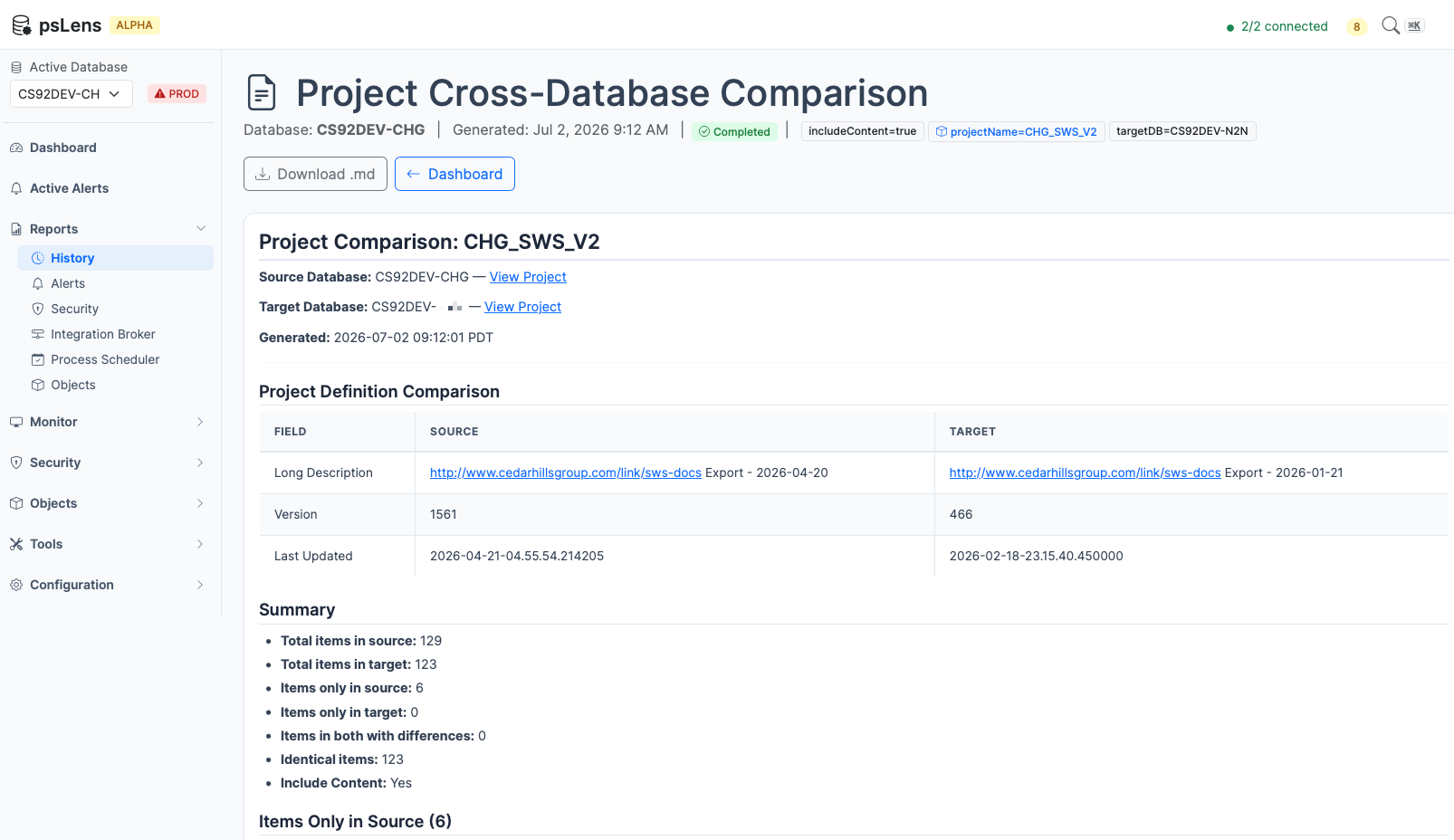
This report compares a PeopleSoft project’s definition and items across two databases. It identifies:
New to psLens? This page documents one specific report. To see how it runs in the product, what
the output looks like, and how teams use it in practice, start with a live walkthrough.
This report compares a PeopleSoft project’s definition and items across two databases. It identifies:
Objects that exist only in the source database (not yet migrated to target)
Objects that exist only in the target database (previously migrated, now deleted in source)
Objects in both databases where the item metadata (source status, target status, upgrade action, take action, copy done) differs
This is primarily a migration and change management tool. Use it to verify that a project migration completed correctly, to audit what is in DEV vs. TEST vs. PROD, or to identify drift between environments.
The report surfaces added, removed, and changed project items so migration drift is visible in one artifact
What It Detects
Items Only in Source
Objects that are in the project in the source database but not in the target. These are typically items that have not been migrated yet or were added to the project after the last migration.
Items Only in Target
Objects that are in the project in the target database but not in the source. These may indicate objects that were removed from the project definition in the source after migration, or items migrated separately.
Items with Differences
Objects present in both databases but with different metadata values:
Field
Description
Source Status
Whether the object was copied from the source (Copied, Not Copied, etc.)
Target Status
Whether the object was copied to the target
Upgrade Action
The configured upgrade action for this item
Take Action
Whether psLens will take action on this item during copy
Copy Done
Whether the copy operation completed for this item
Project Definition Comparison
In addition to items, the report compares the project header fields:
Description and long description
Version number
Last updated timestamp and operator
Owner ID and release label
Tables Queried
PSPROJECTDEFN — Project Definitions
Field
Description
PROJECTNAME
Project name (primary key)
DESCR
Short description
DESCRLONG
Long description
VERSION
Version number
LASTUPDOPRID
Last updated by
LASTUPDTTM
Last updated timestamp
OBJECTOWNERID
Object owner ID
RELEASELABEL
Release label
RELEASEDTTM
Release date/time
PSPROJECTITEM — Project Items
Field
Description
PROJECTNAME
Project name
OBJECTTYPE
Numeric object type code
OBJECTVALUE1-4
Object identifier fields (vary by type)
SOURCESTATUS
Copy-from status
TARGETSTATUS
Copy-to status
UPGRADEACTION
Configured upgrade action
TAKEACTION
Whether action will be taken
COPYDONE
Copy completion flag
Data Flow
1. Fetch project definition from Source DB
        |
        v
2. Fetch project definition from Target DB
        |
        v
3. Compare project header fields
   → Report differences
        |
        v
4. Fetch all project items from Source DB
        |
        v
5. Fetch all project items from Target DB
        |
        v
6. Build composite key maps for each item
   (ObjectType + ObjectValue1-4)
        |
        v
7. Find items only in source (not in target)
8. Find items only in target (not in source)
9. Find items in both with field differences
        |
        v
10. Generate Markdown report with summary + detail sections
Parameters
Parameter
Required
Description
projectName
Yes
The exact PeopleSoft project name to compare
targetDB
Yes
The name of the target database (as configured in psLens)
The source database is the database selected when running the report.
Report Output
The generated report contains:
Header with source and target database names, project name, and generation timestamp
Project Definition Comparison table showing any fields that differ between the two databases
Summary with counts: total items in source, total in target, only-in-source, only-in-target, with-differences, identical
Items Only in Source section, grouped by object type
Items Only in Target section, grouped by object type
Items with Differences table showing object type, name, field, source value, and target value
If the project does not exist in one of the databases, the report notes this and shows the available definition from the other database.
Interpreting Results
Items only in source are likely candidates for migration — they exist in your development or staging environment but have not been moved to the target yet.
Items only in target may indicate stale objects in the target environment that were removed from the project in source, or objects migrated separately outside this project.
Items with differences in Source/Target Status or Copy Done fields can indicate a migration that did not complete cleanly.
Project definition differences in Version or Last Updated can help confirm which database has the more recent project definition.
Use Cases
Pre-migration verification: Confirm which objects in a project have not yet been migrated to the next environment
Post-migration audit: Verify that all project items made it to the target cleanly
Environment drift detection: Identify objects that exist in PROD but not in DEV (or vice versa)
Change management documentation: Generate a Markdown report of exactly what changed between environments for a release
3 - Missing Projects Refresh Risk Report
This page documents the report used to audit project risk in a target database before a database refresh.
New to psLens? This page documents one specific report. To see how it runs in the product, what
the output looks like, and how teams use it in practice, start with a live walkthrough.
This page documents the report used to audit project risk in a target database before a database refresh.
Purpose
When refreshing a non-production PeopleSoft database (like TEST or DEV) with a copy of production (like PRD), code or metadata changes in TEST/DEV that have not yet been migrated to production are permanently deleted. This report identifies target database projects updated since a specific date that are missing or have older versions in the production database.
What It Detects
The report groups target projects into three risk categories based on their presence and versions in the source database:
High Risk: Missing in Source
Projects that exist in the target database but are completely missing in the source database. Overwriting the target database will delete these projects and their constituent objects.
Medium Risk: Newer in Target
Projects that exist in both databases, but the target database contains a newer version number or last updated timestamp. Overwriting the target database will revert these changes to the older version.
Low Risk: Identical or Older in Target
Projects that exist in both databases where the source database has an identical or newer version. These are safe to overwrite.
Tables Queried
PSPROJECTDEFN — Project Definitions
Field
Description
PROJECTNAME
Project name (primary key)
PROJECTDESCR
Short description
VERSION
Version number
LASTUPDOPRID
Last updated by
LASTUPDDTTM
Last updated timestamp
Parameters
Parameter
Required
Description
source_db
Yes
The name of the source/production database (e.g. PRD)
as_of_date
Yes
The date to filter target projects (updated on or after this date)
The target database is selected from the primary database dropdown in the report runner.
Use Cases
Pre-refresh audit: Run this report before restoring a production database backup to a non-production database to identify developer work that needs to be backed up or migrated.
Unmigrated work tracking: Audit what projects have been created or modified in a test database but not yet migrated to production.
4 - Project Import — PeopleCode Diff vs Database
You uploaded a PeopleSoft project XML on the Project Import page, and you want to know — line-by-line — how every PeopleCode program inside that fi…
New to psLens? This page documents one specific report. To see how it runs in the product, what
the output looks like, and how teams use it in practice, start with a live walkthrough.
You uploaded a PeopleSoft project XML on the Project Import page, and you want to know — line-by-line — how every PeopleCode program inside that file compares to the same program in a live database.
The Project Import results page itself shows a quick Same / Different / Not in DB badge per object (powered by a content-hash compare against PSPCMTXT). That’s enough for triage. When you need to see what actually changed, run this report; it emits a full markdown document with file source, database source, and a unified diff for every PeopleCode object that differs.
The output is designed to be reviewed by hand or fed directly to an LLM — the per-object structure (file block, DB block, diff block) is what most assistants need to reason about the change.
What It Compares
This report only looks at PeopleCode-bearing object types:
Record PeopleCode (type 8)
Menu PeopleCode (type 9)
Message PeopleCode (type 39)
App Engine PeopleCode (type 43)
Page PeopleCode (type 44)
Component PeopleCode (type 46)
Component Record PeopleCode (type 47)
Component Record Field PeopleCode (type 48)
Application Package PeopleCode (type 58)
For each PeopleCode item in the project, the report:
Reads the source from the uploaded XML (peoplecode_text node parsed at upload time).
Fetches the current source from the target database’s PSPCMTXT table, concatenating multi-row PCTEXT payloads in PROGSEQ order.
Normalizes both sides (line-ending normalization, trailing-whitespace strip, blank-line collapse) so cosmetic differences don’t show up as content changes.
Classifies the item as Same, Different, Not in DB, No XML Source, or Error.
For Different items, renders both sources and a line-level diff inline.
Non-PeopleCode object types in the same project are not included in this report — use the Project Import results page for those (it uses LASTUPDDTTM comparison, which is reliable for non-PeopleCode types).
Parameters
Parameter
Required
Default
Description
project_id
Yes
—
The file-store ID of the uploaded project. The Project Import results page provides a “PeopleCode Diff Report” button that pre-fills this.
max_objects
No
100
Cap on how many Different objects are rendered with full source + diff. Excess Different objects are mentioned in a footer line; raise the cap if you need them all inline. Prevents the report from blowing up on projects with hundreds of changed PeopleCode programs.
include_same
No
false
Set to true to append a table listing every PeopleCode object that matched. Off by default since this is usually the noise, not the signal.
The target database is the standard psLens database selector on the Reports page — the report runs against whichever database you have selected.
Output Structure
The report is a single markdown document with these sections in order:
Header — project name, source DB (from the XML export), target DB, export date, exporter ID, uploaded filename, upload time.
Summary — counts of Same / Different / Not in DB / No XML Source / Errors.
Different — one section per Different object containing:
File source — code fence with peoplecode language hint.
Database source — code fence with peoplecode language hint.
Line diff (file → DB) — code fence with diff language hint; lines unchanged on both sides appear with two-space prefix, removed-from-file lines with -, added-in-DB lines with +.
Not in Database — one section per item, with the file source rendered. These are typically programs the project would create on import.
No XML Source — table of programs the DB has but the XML didn’t inline. Usually means the project listed the PJM entry without the PCM payload.
Errors — table of programs whose DB query failed, with the underlying error.
Same (optional, include_same=true) — table of matching programs.
Tips
Feed it to an LLM. The structure (file block + DB block + diff block per object) is what assistants need to reason about a change. Download the markdown and paste into your assistant of choice, or use the Download .md button on the report run page.
Pair with the Cross-Database Comparison report.project-compare covers two databases; this one covers file vs database. Different problems.
Run before a project import. Knowing exactly what will change in PeopleCode terms is the question this report answers — not “what does the timestamp say” but “what code lines will end up different.”
5 - Message Catalog Usages
This report searches the entire PeopleSoft database and codebase to locate every usage of a specific Message Catalog entry.
New to psLens? This page documents one specific report. To see how it runs in the product, what
the output looks like, and how teams use it in practice, start with a live walkthrough.
Report ID:msgcat-usagesCategory: Objects / Development
Purpose
This report searches the entire PeopleSoft database and codebase to locate every usage of a specific Message Catalog entry. It answers the question: “If I modify or delete this message set or number, what fields, pages, or PeopleCode programs will be affected?”
Use this when someone hands you a (10, 12) error code, or when you want to know if anything still references a message before you delete it.
What Gets Searched
The report dynamically discovers and queries all tables that store message reference columns (MESSAGE_SET_NBR and MESSAGE_NBR or their field aliases, such as GRDLBLMSGSET and GRDLBLMSGNUM), as well as the PeopleCode codebase.
Whitelisted Tables:
The report automatically queries all whitelisted database tables containing both message columns or their aliases. The most common UI placement searched is:
PSPNLFIELD (Page Fields): Finds where message catalogs are assigned as static labels or tooltips on page controls.
PeopleCode Source (PSPCMTXT):
Searches the actual text of all compiled PeopleCode programs for function calls that fetch catalog messages. This includes:
MsgGet(...)
MsgGetText(...)
MsgGetExplainText(...)
Non-Whitelisted Tables:
Discovers any other database tables in the system that contain both message columns or their aliases but are not currently in the SWS whitelisting table. The report generates a custom SQL snippet for each of these so developers can query them manually.
Report Output
The generated markdown report contains:
Detailed Findings: Tables showing matching objects (e.g. Page Fields and data tables) with key identifiers and deep links back to their respective psLens detail pages.
PeopleCode References: A table listing the PeopleCode program type, record/package name, event, and field where the MsgGet call was found.
Manual Query SQL Block: A single consolidated SQL block with comments identifying each non-whitelisted table, ready to copy and paste into a SQL client.
Parameters
Parameter
Required
Type
Description
message_set_nbr
Yes
Integer
The Message Set number to search for (e.g., 10 or 20000).
message_nbr
No
Integer
The specific Message number. If omitted, the report returns all usages across every message in the specified Message Set.
Use Cases
Impact Analysis: Before updating a delivered or custom message text, run this report to ensure the change is appropriate for all context areas where it is displayed.
Error Debugging: If an application log or user screenshot displays an error message ID (e.g., (10, 12)), run the report with message_set_nbr = 10 and message_nbr = 12 to instantly locate the exact line of PeopleCode emitting the error.
Audit and Cleanup: Scan custom message sets (e.g., set numbers > 20000) to find orphan messages that are no longer referenced anywhere in code or page labels.
6 - Code & SQL Text Search
This report performs text string searches across PeopleCode programs (PSPCMTXT), SQL Objects (PSSQLTEXTDEFN), and Application Engine SQL statements (PSAESTMTDEFN).
New to psLens? This page documents one specific report. To see how it runs in the product, what
the output looks like, and how teams use it in practice, start with a live walkthrough.
Report ID:code-sql-search Category: Objects / Development
Purpose
The Code & SQL Text Search report performs text searches across PeopleCode, standalone SQL Objects, and Application Engine SQL statements. It returns matched line numbers, surrounding code context, and deep links to psLens detail pages.
Use this report when searching for references to deprecated fields, custom function calls, hardcoded URLs, or specific SQL statements.
Metadata Tables Searched
PSPCMTXT (PeopleCode Source Text):
Searches plain-text PeopleCode across Record, Page, Component, Component Interface, App Package, Message, App Engine, and Menu PeopleCode programs. Concatenates multi-row PROGSEQ sequences to compute line numbers and extract 2-line code context.
PSSQLTEXTDEFN (SQL Object Source Text):
Searches SQL text for views, standalone SQL objects, App Engine SQL definitions, and App Class SQL statements. Concatenates multi-row SEQNUM rows to return line-level matches.
Summary: Total match counts broken down by PeopleCode, SQL Objects, and App Engine SQL.
PeopleCode Matches: Program type, record or package name, event or class name, line number, and a syntax-highlighted code block with surrounding context lines and a match indicator (<-- MATCH).
SQL Object Matches: SQL ID, line number, code snippet, and deep links to /sqlobjects/{SQLID}.
App Engine SQL Matches: Application Engine ID, section, step, line number, code snippet, and deep links to /appengines/{APPLID}.
Parameters
Parameter
Required
Type
Default
Description
search_term
Yes
String
The text string to search for across code and SQL text.
scope
No
String
All
Search scope: All, PeopleCode, or SQL.
case_sensitive
No
Boolean
false
Set to true to perform exact case-sensitive text matching.
custom_only
No
Boolean
false
Set to true to filter for items last updated by non-PPLSOFT user IDs.
max_results
No
Integer
200
Maximum total matches to return in the report output.
Use Cases
Impact Analysis: Before modifying a record field or function signature, search PSPCMTXT to locate all calling locations.
Hardcoded Reference Audit: Search for hardcoded URL paths, IP addresses, or environment-specific strings in PeopleCode and SQL objects.
Upgrade & Tax Update Triage: Search for modified SQL views or Application Engine SQL statements when evaluating target database releases.