Your PeopleSoft Nodes Probably Don't Have Passwords
Categories:
Here is a finding from a delivered Campus Solutions 9.2 development image: 62 active message nodes, 58 of them with no authentication configured. That is not an unusual environment. It is what delivered images look like, and refreshed non-prod environments inherit it.
Why It Matters
A message node with AUTHOPTN = 'N' accepts messages without authenticating the sender. Any system that can reach your Integration Broker gateway can send messages to or through that node. Whether that is exploitable depends on what routings and service operations the node participates in — but “unauthenticated by default and nobody has looked” is not a posture you want to explain to an auditor.
A prime example is the delivered ANONYMOUS node, which exists in all PeopleSoft databases. It acts as a fallback for inbound integrations when the incoming request does not specify a node or credentials. If the ANONYMOUS node is active, is associated with a high-privilege Default User ID, and has active any-to-local routings, anyone who can reach the gateway can run those service operations. For a detailed guide on securing this fallback mechanism, see Properly Securing the ANONYMOUS IB Node in Integration Broker: The Missing Manual.
Node authentication has three settings in PSMSGNODEDEFN.AUTHOPTN:
N— none. No authentication.P— password. The node authenticates with a stored password.C— certificate. The node authenticates with a certificate.
How to Check
SELECT MSGNODENAME, DESCR, NODE_TYPE, AUTHOPTN
FROM   PSMSGNODEDEFN
WHERE  ACTIVE_NODE = 1
AND    AUTHOPTN = 'N'
ORDER  BY MSGNODENAME;
Two follow-up checks worth running while you are there:
- Nodes with password auth but no password set.
AUTHOPTN = 'P'with an empty password is functionally the same as no auth. - Inactive nodes with no auth. Lower priority, but they are one activation away from being the first finding.
Tracing Which Service Operations Can Run
Even if you identify an unauthenticated node, understanding your actual exposure is difficult. You have to ask: What service operations can actually run through this node?
Answering this in native PeopleSoft is tedious because node authorization is split across two areas:
- Routings: The service operations that have explicit or any-to-local routings associated with the node.
- User Security: The service operations authorized to the node’s Default User ID (defined in
PSMSGNODEDEFN.USERID).
To trace the user’s security manually, you would have to query the database to join the node’s User ID (PSOPRDEFN) to its assigned roles (PSROLEUSER), join those roles to their permission lists (PSROLECLASS), and then join those permission lists to authorized web services (PSAUTHWS).
How psLens Simplifies the Audit
psLens does the heavy lifting for you. Since every object in the catalog is deep-linkable, you can navigate from a node to its service operations in a single click:
- User’s Service Operations Toggle: From any Message Node detail page, if a Default User ID is assigned, you can toggle User’s Service Operations in the sidebar. psLens instantly lists all service operations authorized for that user ID.
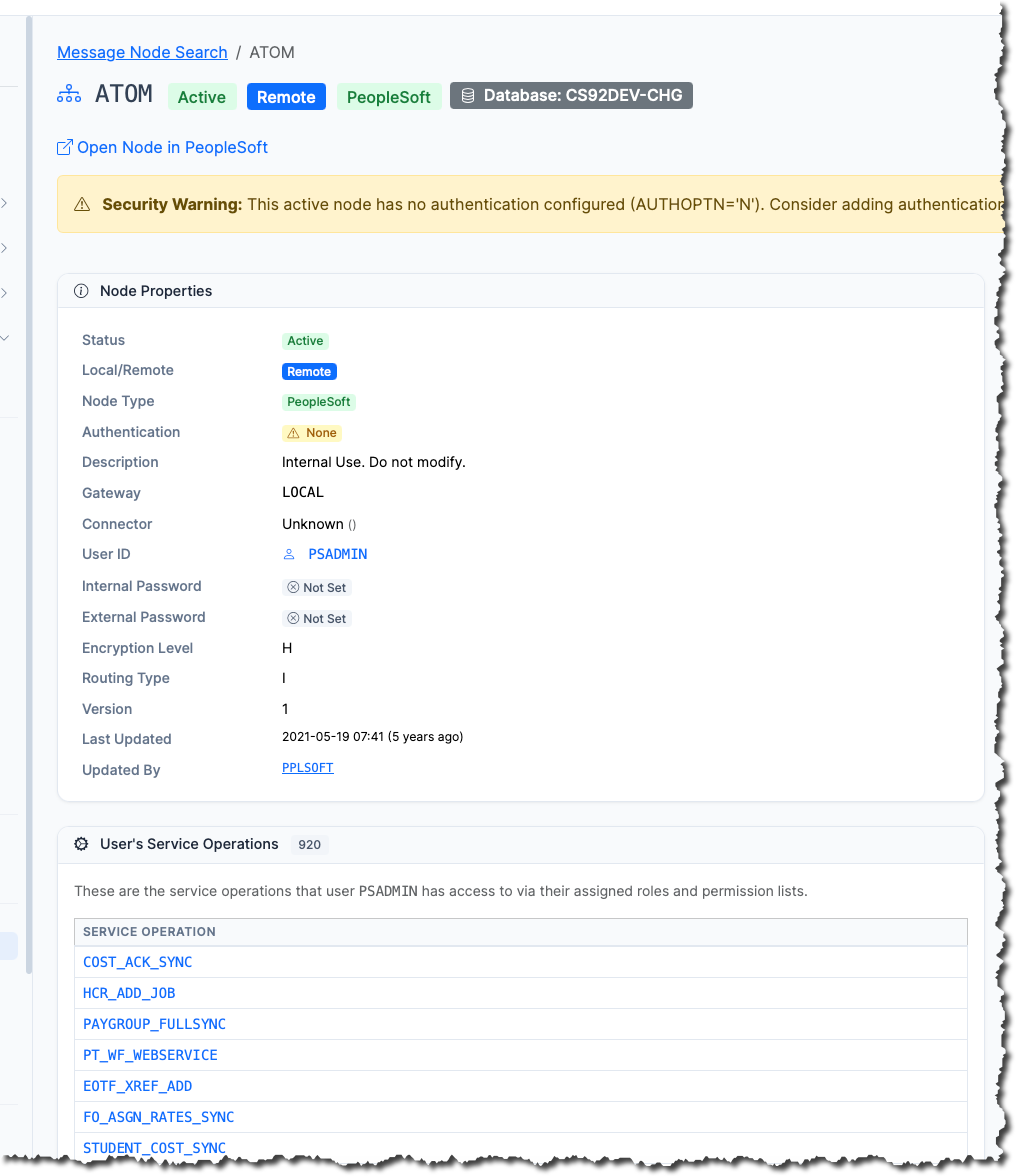
Message Node detail page showing properties and User’s Service Operations toggle in psLens
- Deep Links: Click on the User ID to inspect its full security configuration, or click any service operation in the list to navigate to its details and inspect its handlers and active routings.
- Automated Audit Report: The built-in Unauthenticated Node Service Operations report searches your entire environment for active no-auth nodes and maps them directly to the fully-active service operations they can run.
What to Fix First
Start with active nodes that participate in inbound routings — those are reachable from outside. Set AUTHOPTN to password or certificate and configure the credential on both sides of each integration. Do it in DEV first; a node password mismatch is a quiet way to break an integration.
Running This as a Repeatable Audit
psLens ships this exact check as the Nodes Without Passwords report: it categorizes active no-auth nodes, active nodes with auth but no password, and inactive no-auth nodes, and exports the findings as Markdown with links back to each node’s detail page. Results are stored for 90 days, so the next audit cycle can show the trend rather than a point-in-time screenshot.
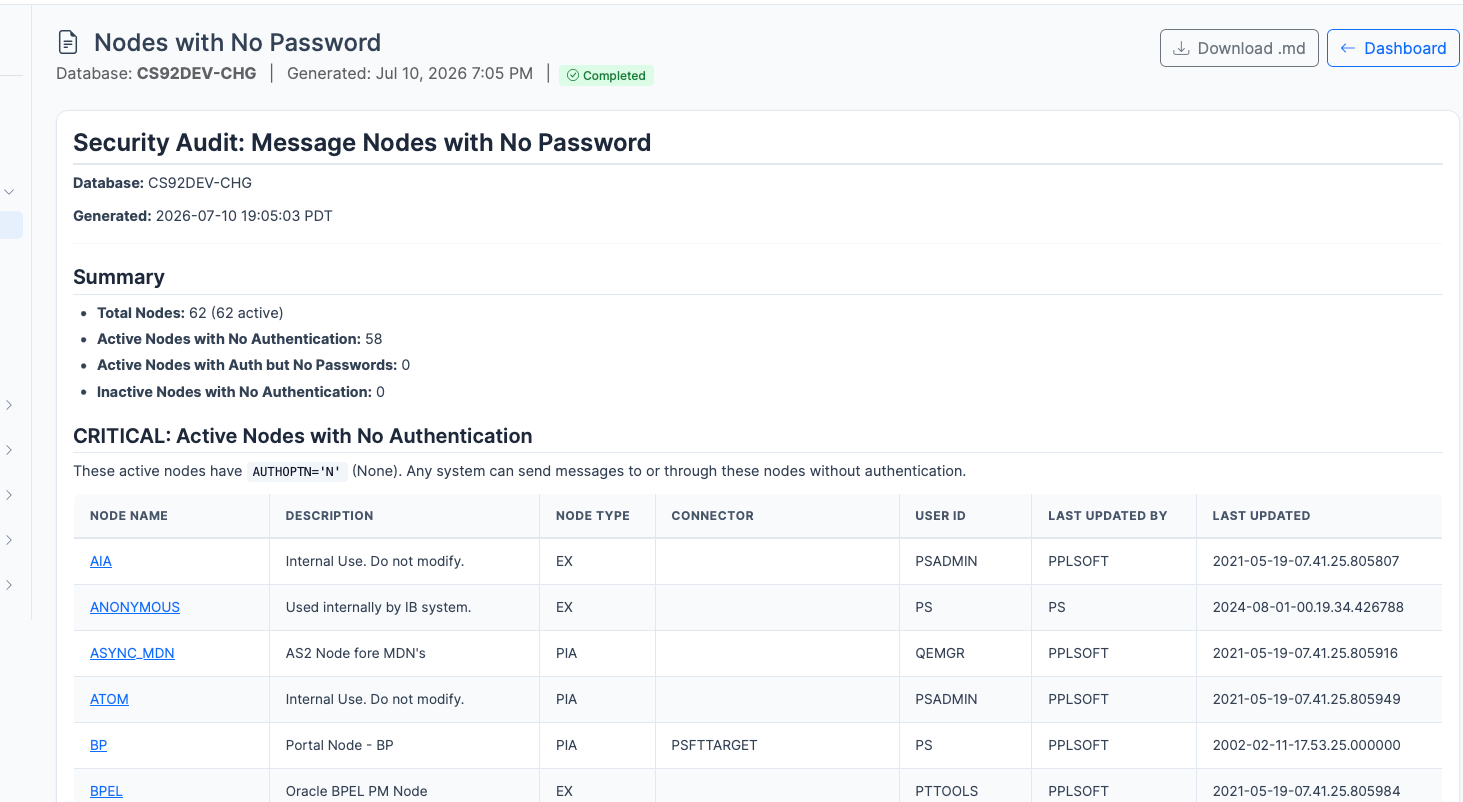
Nodes with No Password report dashboard in psLens
You can read the exact output it produces — including the 62-node dev-image run above — before installing anything.
Subscribe for Updates
If you found this article helpful, subscribe to get notified of new PeopleSoft technical notes and psLens updates.