Search Framework Monitor
Categories:
Search Framework Monitor
The Search Framework Monitor lists every search definition deployed to a search instance (PTSF_DEPLOY_OBJ) with its latest index build, its Real-Time Indexing status, the depth of its Real-Time Indexing queue, and its indexing errors.
URL: /searchmonitor?db={database}
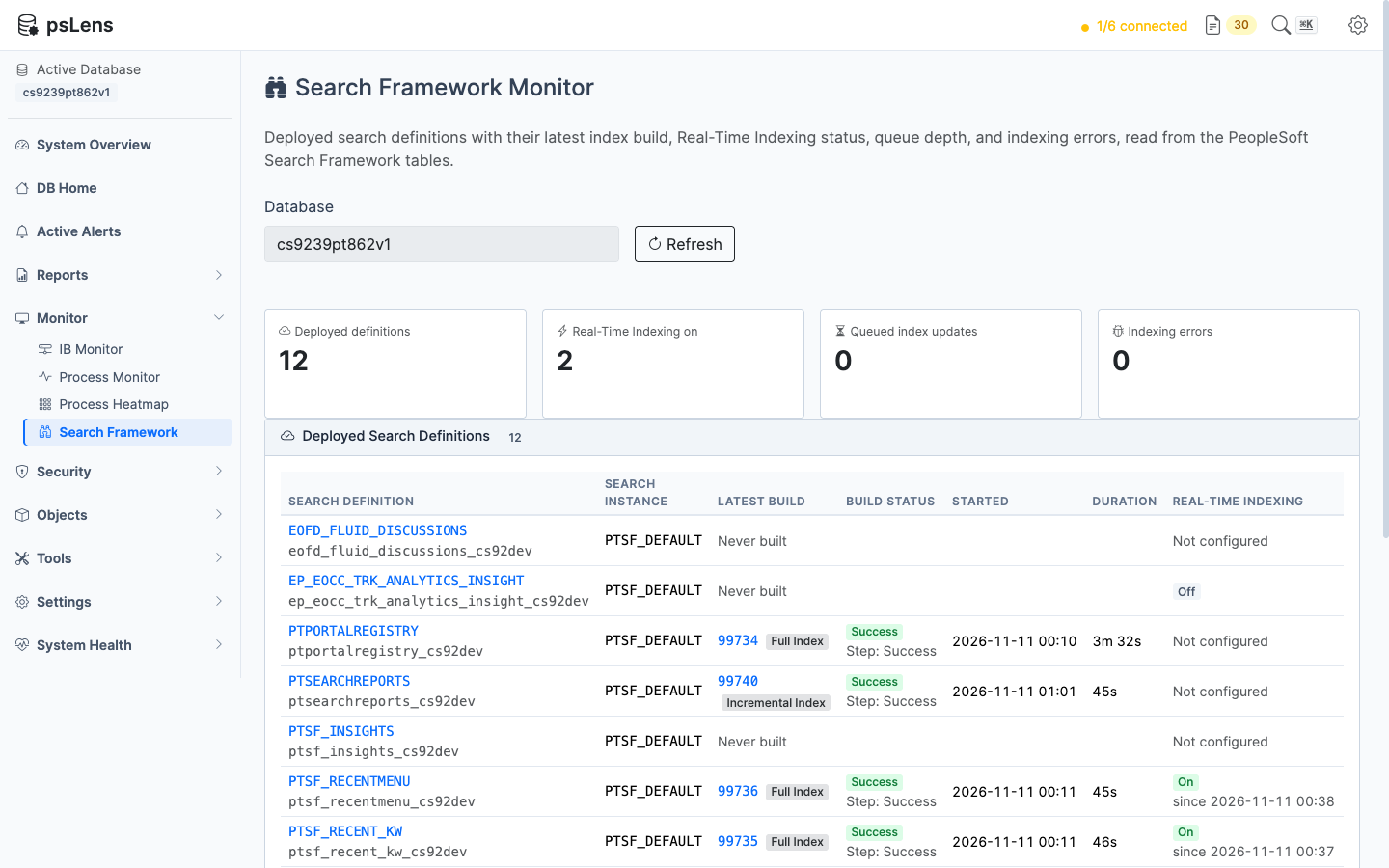
The Search Framework Monitor for a database with twelve deployed search definitions, four of them built
What the Page Shows
Four totals sit above the table: deployed definitions, definitions with Real-Time Indexing on, queued index updates, and indexing errors.
The table has one row per deployed search definition and search instance:
| Column | What it shows | Source |
|---|---|---|
| Search Definition | The definition, linked to its detail page, and the name of its index | PTSF_DEPLOY_OBJ |
| Latest Build | The process instance of the most recent index build, linked to Process Monitor, and the build type | PTSF_SCHED_STAT |
| Build Status | The Process Scheduler run status of that build and the last step it reached | PSPRCSRQST, PTSF_SCHED_STAT |
| Started, Duration | When the build started and how long it ran | PSPRCSRQST |
| Real-Time Indexing | On, Off, Paused by the batch switch, or Not configured | PTSF_INDEX, PTSF_RTI_STATUS |
| Queue | Index updates waiting to be sent to the search engine, and the age of the oldest | PTSF_RTISTG, PTSF_INDEXTRREC |
| Errors | Requests the search engine rejected plus rows that failed Real-Time Indexing | PTSF_ES_DT_ERR, PTSF_INDDATA_ER |
A definition that has never been built shows Never built. A build whose process request has been purged from PSPRCSRQST shows Purged for its status.
Detail Panels
- Real-Time Indexing Queue: the oldest 100 queued updates from
PTSF_RTISTG, with the record whose trigger queued each one and the keys of the affected row. - Indexing Errors: the newest 100 rows from each error table. Search engine errors show the first 500 characters of the engine’s response. Failed Real-Time Indexing rows show the record and the keys of the row.
What the Page Does Not Show
- Document counts are shown only when PeopleSoft recorded them. On an OpenSearch instance a successful build can leave every count in
PTSF_INDEX_STATat zero. The page then shows no count. The number of documents in an index has to be checked in the search engine. - The contents of the index. psLens reads the PeopleSoft Search Framework tables. It does not connect to the search engine.
Data Handling
- Request bodies are never read.
PTSF_ES_DT_ERRstores the document that was sent to the search engine. psLens excludes that column from its query, along with the old field values stored inPTSF_INDDATA_ER. - Sensitive keys are masked. A row key whose field name is on the
mcp.maskedFieldslist is shown as***.
Missing Tables
Only PTSF_DEPLOY_OBJ is required. Each other table is optional: when one is not whitelisted the page names it and shows n/a in the columns it feeds, never a zero. The tables are listed under Search Framework in Whitelist Tables.
Related Pages
- Search Definitions shows one definition’s mappings, security, and Real-Time Indexing triggers.
- Search Framework alerts watch the same tables for a queue that is backing up, Real-Time Indexing left switched off, and indexing errors.
- Process Monitor shows the index build process (
PTSF_GENFEED) with its parameters and message log. - The Search Framework Integrity Audit and Search Framework Security Audit reports check the definitions themselves.