# File Layouts

> Browse PeopleSoft File Layout definitions — segments, fields, file format attributes, projects, and PeopleCode references.

---

LLMS index: [llms.txt](/llms.txt)

---

<div id="pslens-context-panel" class="card border-info mb-4 d-none">
  <div class="card-header bg-light text-info py-2 fw-bold d-flex align-items-center border-bottom border-info-subtle">
    <i class="bi bi-info-circle-fill me-2"></i>
    <span>Tailored Operational Context</span>
  </div>
  <div class="card-body p-0">
    <ul class="list-group list-group-flush">
      <li id="row-db" class="list-group-item d-flex align-items-center justify-content-between py-2 d-none">
        <strong>Target Database:</strong>
        <span id="ctx-db" class="badge bg-secondary font-monospace">&mdash;</span>
      </li>
      <li id="row-type" class="list-group-item d-flex align-items-center justify-content-between py-2 d-none">
        <strong>Context Type:</strong>
        <span id="ctx-type" class="badge bg-light text-dark border font-monospace text-uppercase">&mdash;</span>
      </li>
      <li id="row-severity" class="list-group-item d-flex align-items-center justify-content-between py-2 d-none">
        <strong>Alert Severity:</strong>
        <span id="ctx-severity" class="badge">&mdash;</span>
      </li>
      <li id="row-time" class="list-group-item d-flex align-items-center justify-content-between py-2 d-none">
        <strong>Triggered Time:</strong>
        <span id="ctx-time" class="text-muted small">&mdash;</span>
      </li>
      <li id="row-details" class="list-group-item py-2 d-none">
        <strong id="label-details" class="d-block mb-1">Firing Context:</strong>
        <code id="ctx-details" class="d-block p-2 bg-light border rounded small"
          style="white-space: pre-wrap; word-break: break-all;">&mdash;</code>
      </li>
    </ul>
  </div>
</div>

<script>
  (function () {
    const params = new URLSearchParams(window.location.search);
    const metadata = params.get('metadata');
    if (!metadata) return;

    try {
      
      const base64 = metadata.replace(/-/g, '+').replace(/_/g, '/');
      const jsonStr = decodeURIComponent(escape(window.atob(base64)));
      const data = JSON.parse(jsonStr);

      if (data) {
        let hasData = false;

        if (data.db) {
          document.getElementById('ctx-db').textContent = data.db;
          document.getElementById('row-db').classList.remove('d-none');
          hasData = true;
        }

        if (data.type) {
          document.getElementById('ctx-type').textContent = data.type;
          document.getElementById('row-type').classList.remove('d-none');
          hasData = true;
        }

        if (data.severity) {
          const severityBadge = document.getElementById('ctx-severity');
          const severity = data.severity.toLowerCase();
          severityBadge.textContent = severity.toUpperCase();
          if (severity === 'critical') {
            severityBadge.className = 'badge bg-danger';
          } else if (severity === 'warning') {
            severityBadge.className = 'badge bg-warning text-dark';
          } else {
            severityBadge.className = 'badge bg-info';
          }
          document.getElementById('row-severity').classList.remove('d-none');
          hasData = true;
        }

        if (data.t) {
          const date = new Date(data.t * 1000);
          document.getElementById('ctx-time').textContent = date.toLocaleString();
          document.getElementById('row-time').classList.remove('d-none');
          hasData = true;
        }

        if (data.details) {
          document.getElementById('ctx-details').textContent = data.details;

          
          const labelDetails = document.getElementById('label-details');
          if (data.type === 'object') {
            labelDetails.textContent = 'Object Metadata Details:';
          } else if (data.type === 'report') {
            labelDetails.textContent = 'Report Description:';
          } else {
            labelDetails.textContent = 'Firing Context:';
          }

          document.getElementById('row-details').classList.remove('d-none');
          hasData = true;
        }

        if (hasData) {
          document.getElementById('pslens-context-panel').classList.remove('d-none');
        }
      }
    } catch (e) {
      console.error('Failed to parse operational context metadata:', e);
    }
  })();
</script>

File Layout definitions (`PSFLDDEFN`) map structured flat files, CSVs, fixed-position files, and XML documents to PeopleSoft rowsets and record structures. PeopleTools Object Type 31 definitions store file format specifications in `PSFLDDEFN`, segment hierarchies in `PSFLDSEGDEFN`, and field attributes in `PSFLDFIELDDEFN`. Batch processes and PeopleCode programs query these definitions at runtime to parse inbound files or render outbound data extracts.

psLens pulls the file layout properties, segment hierarchy tree, mapped records, field positional attributes, owning App Designer projects, and referencing PeopleCode programs into a single browser view.

## Object Relationships

File Layouts translate external files into PeopleSoft record structures:

- **Maps File Segments to Records**: File Layouts (`PSFLDDEFN`) contain segment hierarchies (`PSFLDSEGDEFN`) that map file lines to underlying target records (`RECNAME_FILE`).
- **Maps File Fields to Record Fields**: File fields (`PSFLDFIELDDEFN`) map positional or delimited file data to specific record fields.
- **Invoked in PeopleCode & App Engines**: Batch programs instantiate File Layouts (`GetFileLayout`) to parse or generate flat files.

## How psLens Improves File Layout Inspection

In Application Designer, inspecting File Layouts requires expanding segment nodes in the tree control, clicking into individual field properties, and running **Find In PeopleCode** searches for referencing scripts.

psLens presents layout format properties, segment hierarchies, field positional attributes, project membership, and referencing PeopleCode programs in a single view.

## Search Page

URL: `/filelayouts?db={database}`

- **Search:** Search by File Layout name or description (prefix match). Wildcard `%` search is supported (for example, `%BANK%` to find banking layout definitions or `%` to list all rows).
- **Filters:** Filter search results by last updated operator (`LastUpdOprid`), last updated date range (`DateFrom` / `DateTo`), or customized definitions (`CustomizedOnly`).
- **Metadata Cards:** Each result card displays the file layout name, description, file format type (CSV, Fixed, or XML), segment count, and last updated operator and timestamp.

## Detail Page

URL: `/filelayouts/{FLNAME}?db={database}`

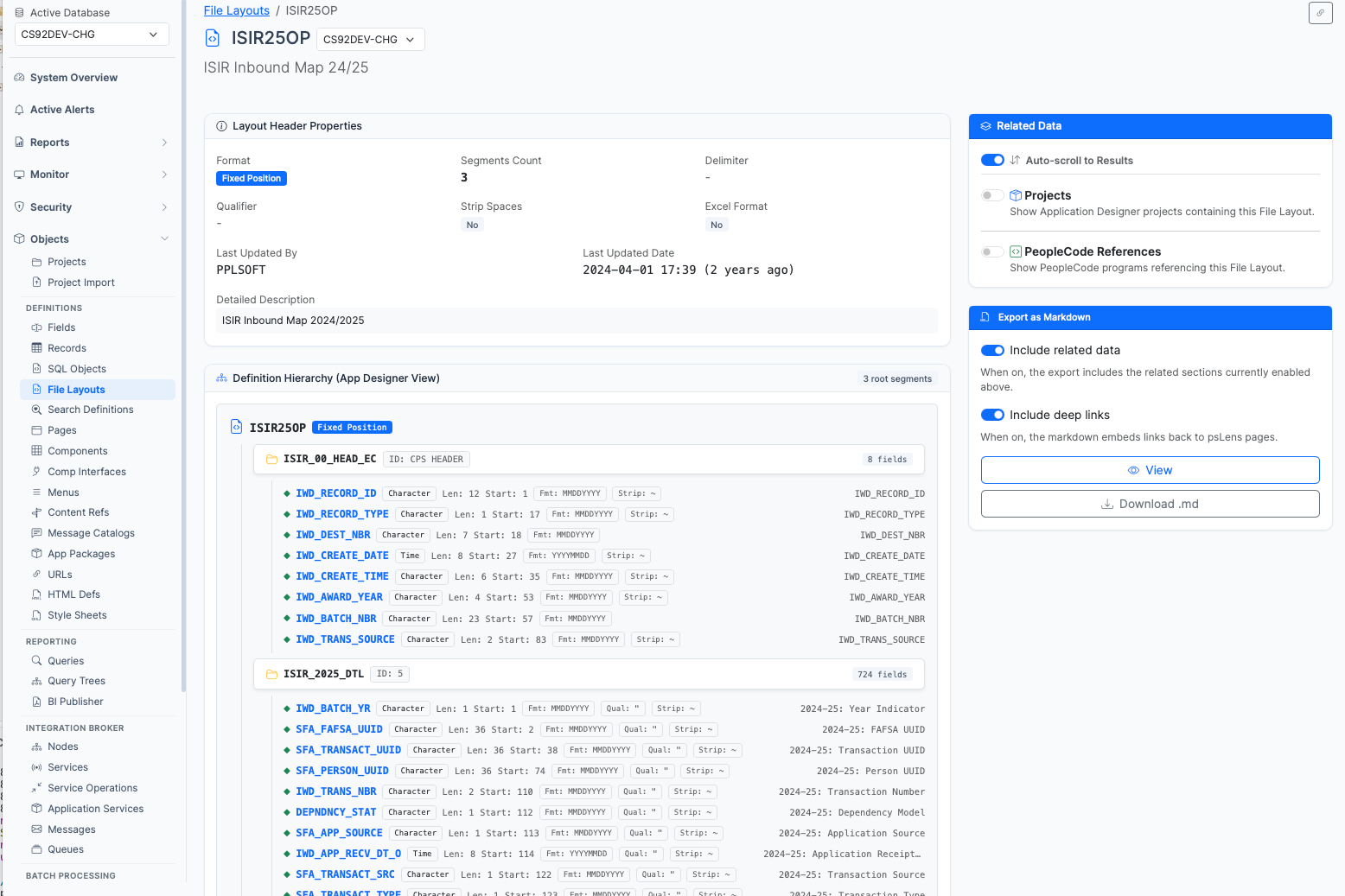
<figure><img src="/images/screenshots/metadata/file-layouts-detail.png"
			alt="File Layout detail page for ISIR25OP showing layout properties, segment hierarchy, and field attributes"><figcaption>
			<p>File Layout detail page for <code>ISIR25OP</code> showing definition hierarchy tree and header properties</p>
		</figcaption>
</figure>


The Detail Page consolidates the definition attributes, segment hierarchy, field specifications, and cross-object references:

- **File Layout Properties:** Displays description, file format type (CSV, Fixed Position, XML), record delimiter, field qualifier, space stripping behavior, Excel formatting flags, segment count, and modification audit metadata (`LASTUPDDTTM`, `LASTUPDOPRID`).
- **Segment & Field Hierarchy:** Renders a tree of segments (`PSFLDSEGDEFN`) and fields (`PSFLDFIELDDEFN`). For each segment, psLens displays its parent segment, segment ID prefix, mapped record (`RECNAME_FILE`), and field count. For each field, psLens lists the field name, start position, length, decimal precision, date format mask, and date separator.
- **Export as Markdown:** Generates a structured Markdown export (`/filelayouts/{FLNAME}/export`) containing an ASCII segment hierarchy tree, complete field lists, project membership, and referencing PeopleCode programs.

## Related Data Panels

### Included in Projects

Queries `PSPROJECTITEM` where `OBJECTTYPE = 31` to display Application Designer projects containing this File Layout definition.

### PeopleCode References

Queries `PSPCMNAME` to list all PeopleCode programs (Application Engine steps, Component PeopleCode, Record PeopleCode, or Application Package methods) that reference the File Layout name in code statements.