Projects
Categories:
- Target Database: —
- Context Type: —
- Alert Severity: —
- Triggered Time: —
- Firing Context:
—
Projects are PeopleSoft’s primary mechanism for grouping metadata objects together for migration between environments (e.g., from Development to Testing to Production). Every project definition is stored in PSPROJECTDEFN, and the items contained within a project are registered in PSPROJECTITEM.
psLens allows you to search and inspect project definitions directly, showing you the exact list of objects included in a project and letting you compare project items across different database environments.
Object Relationships
Projects bundle application metadata for lifecycle management and environment migration:
- Groups Metadata Objects: Projects (
PSPROJECTDEFN) contain project items (PSPROJECTITEM) referencing records, fields, pages, components, PeopleCode, and other definitions.
How psLens Improves Project Inspection
In Application Designer, inspecting projects requires opening individual project files, expanding object trees, and manually cross-referencing upgrade action flags prior to migration.
psLens displays project properties, paginated item inventories categorized by object type, migration health flags for non-standard actions, and cross-database environment comparison on a single screen.
Search Page
URL: /projects?db={database}
The Project Search page lets you locate projects by name (using a prefix match).
- Basic Search: Type a partial name (e.g.,
HRorPT) to search. Search matches as starts with. You can use the%wildcard for more complex queries:%UPGRADE%finds any project containing “UPGRADE”, or%alone lists all projects. - Advanced Filters:
- Operator ID: Filter projects last updated by a specific operator (user).
- Customized Only: Filter to show only projects marked as customized.
- Date Range: Filter projects based on their last updated date.
Detail Page
URL: /projects/{PROJECTNAME}?db={database}
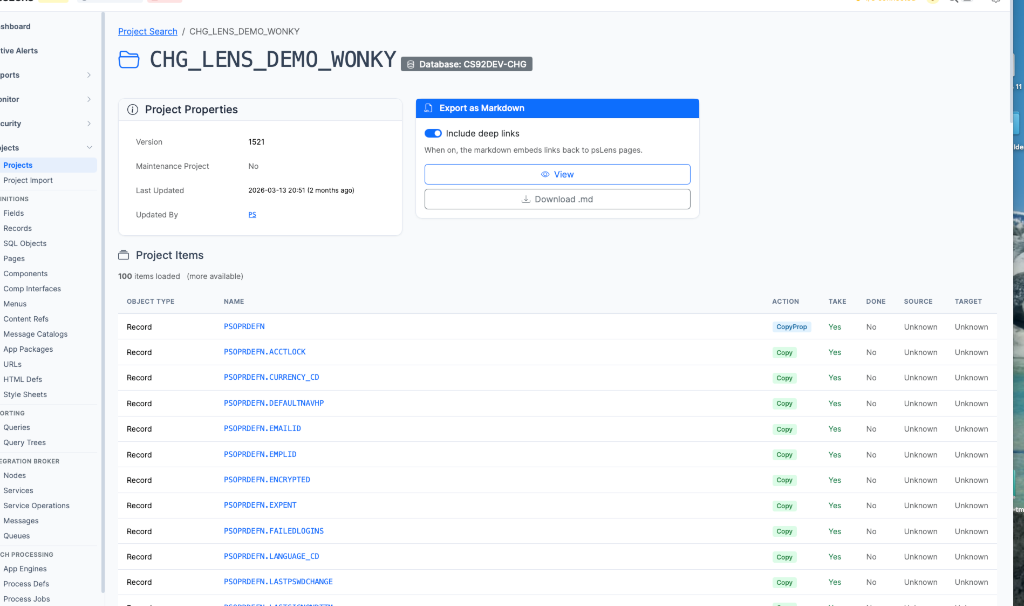
Project detail for CHG_LENS_DEMO_WONKY: properties and item list
The Project Detail page shows:
Project Properties: Shows metadata about the project itself, such as the description, version, object owner, release, release label, update flags, and the user who last updated it.
Project Items: Displays a paginated list of all objects contained within the project, grouped and sorted by object type (e.g., Records, Fields, Pages, Components, PeopleCode).
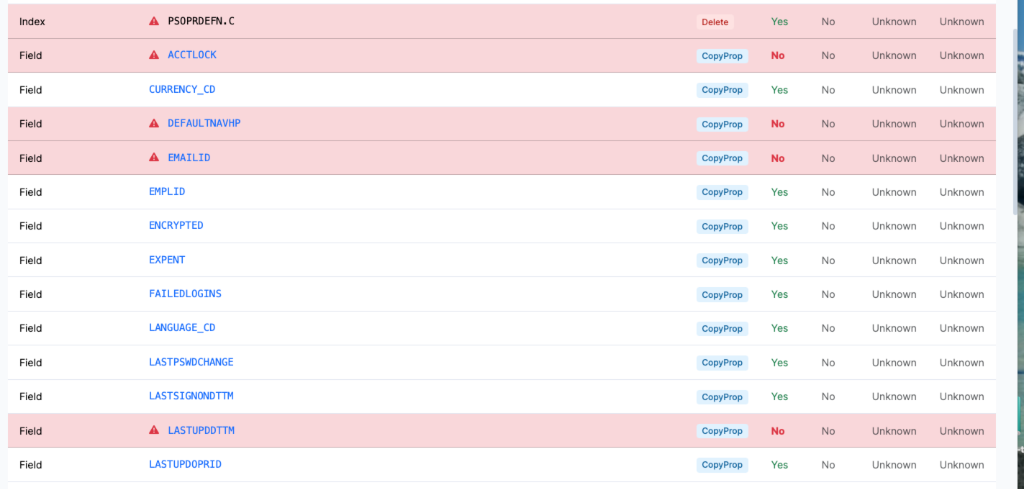
Flagging non-standard project items
Migration & Health Flags: psLens automatically flags non-standard project items in red (as shown above). This highlights things that can cause issues with migrations, such as upgrade flags and actions (e.g.,
Deleteactions or items withTakeset toNo). This gives you a quick check on the state of your project before migrating.Compare to Database: If you have multiple databases configured in psLens, you can select another database from the card on the page to run a project comparison.
Export as Markdown: Export the entire project definition and its items list to a markdown file, which is ideal for change logs, migration documentation, or code reviews.