# Projects

> Browse and inspect App Designer project definitions (PSPROJECTDEFN) and their constituent metadata items.

---

LLMS index: [llms.txt](/llms.txt)

---

<div id="pslens-context-panel" class="card border-info mb-4 d-none">
  <div class="card-header bg-light text-info py-2 fw-bold d-flex align-items-center border-bottom border-info-subtle">
    <i class="bi bi-info-circle-fill me-2"></i>
    <span>Tailored Operational Context</span>
  </div>
  <div class="card-body p-0">
    <ul class="list-group list-group-flush">
      <li id="row-db" class="list-group-item d-flex align-items-center justify-content-between py-2 d-none">
        <strong>Target Database:</strong>
        <span id="ctx-db" class="badge bg-secondary font-monospace">&mdash;</span>
      </li>
      <li id="row-type" class="list-group-item d-flex align-items-center justify-content-between py-2 d-none">
        <strong>Context Type:</strong>
        <span id="ctx-type" class="badge bg-light text-dark border font-monospace text-uppercase">&mdash;</span>
      </li>
      <li id="row-severity" class="list-group-item d-flex align-items-center justify-content-between py-2 d-none">
        <strong>Alert Severity:</strong>
        <span id="ctx-severity" class="badge">&mdash;</span>
      </li>
      <li id="row-time" class="list-group-item d-flex align-items-center justify-content-between py-2 d-none">
        <strong>Triggered Time:</strong>
        <span id="ctx-time" class="text-muted small">&mdash;</span>
      </li>
      <li id="row-details" class="list-group-item py-2 d-none">
        <strong id="label-details" class="d-block mb-1">Firing Context:</strong>
        <code id="ctx-details" class="d-block p-2 bg-light border rounded small" style="white-space: pre-wrap; word-break: break-all;">&mdash;</code>
      </li>
    </ul>
  </div>
</div>

<script>
  (function() {
    const params = new URLSearchParams(window.location.search);
    const metadata = params.get('metadata');
    if (!metadata) return;

    try {
      
      const base64 = metadata.replace(/-/g, '+').replace(/_/g, '/');
      const jsonStr = decodeURIComponent(escape(window.atob(base64)));
      const data = JSON.parse(jsonStr);

      if (data) {
        let hasData = false;

        if (data.db) {
          document.getElementById('ctx-db').textContent = data.db;
          document.getElementById('row-db').classList.remove('d-none');
          hasData = true;
        }

        if (data.type) {
          document.getElementById('ctx-type').textContent = data.type;
          document.getElementById('row-type').classList.remove('d-none');
          hasData = true;
        }

        if (data.severity) {
          const severityBadge = document.getElementById('ctx-severity');
          const severity = data.severity.toLowerCase();
          severityBadge.textContent = severity.toUpperCase();
          if (severity === 'critical') {
            severityBadge.className = 'badge bg-danger';
          } else if (severity === 'warning') {
            severityBadge.className = 'badge bg-warning text-dark';
          } else {
            severityBadge.className = 'badge bg-info';
          }
          document.getElementById('row-severity').classList.remove('d-none');
          hasData = true;
        }

        if (data.t) {
          const date = new Date(data.t * 1000);
          document.getElementById('ctx-time').textContent = date.toLocaleString();
          document.getElementById('row-time').classList.remove('d-none');
          hasData = true;
        }

        if (data.details) {
          document.getElementById('ctx-details').textContent = data.details;

          
          const labelDetails = document.getElementById('label-details');
          if (data.type === 'object') {
            labelDetails.textContent = 'Object Metadata Details:';
          } else if (data.type === 'report') {
            labelDetails.textContent = 'Report Description:';
          } else {
            labelDetails.textContent = 'Firing Context:';
          }

          document.getElementById('row-details').classList.remove('d-none');
          hasData = true;
        }

        if (hasData) {
          document.getElementById('pslens-context-panel').classList.remove('d-none');
        }
      }
    } catch (e) {
      console.error('Failed to parse operational context metadata:', e);
    }
  })();
</script>


## What It Is

Projects are PeopleSoft's primary mechanism for grouping metadata objects together for migration between environments (e.g., from Development to Testing to Production). Every project definition is stored in `PSPROJECTDEFN`, and the items contained within a project are registered in `PSPROJECTITEM`.

psLens allows you to search and inspect project definitions directly, showing you the exact list of objects included in a project and letting you compare project items across different database environments.

## Search Page

URL: `/projects?db={database}`

The Project Search page lets you locate projects by name (using a prefix match).

- **Basic Search:** Type a partial name (e.g., `HR` or `PT`) to search. Search matches as *starts with*. You can use the `%` wildcard for more complex queries: `%UPGRADE%` finds any project containing "UPGRADE", or `%` alone lists all projects.
- **Advanced Filters:**
  - **Operator ID:** Filter projects last updated by a specific operator (user).
  - **Customized Only:** Filter to show only projects marked as customized.
  - **Date Range:** Filter projects based on their last updated date.

## Detail Page

URL: `/projects/{PROJECTNAME}?db={database}`

<figure><img src="/images/screenshots/metadata/projects-detail.png"
    alt="Project detail page for CHG_LENS_DEMO_WONKY showing project properties and items"><figcaption>
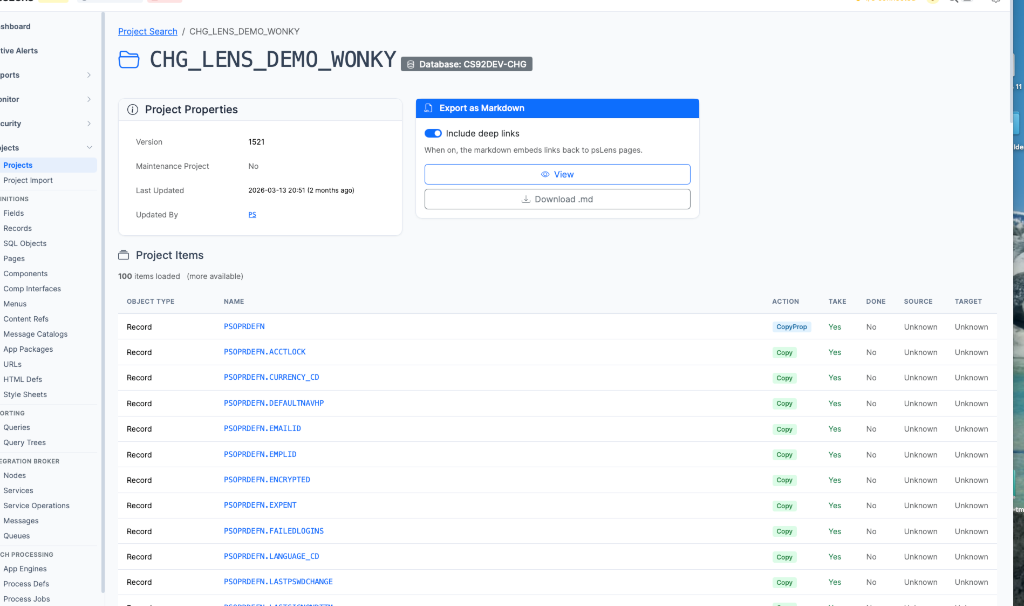
      <p>Project detail for <code>CHG_LENS_DEMO_WONKY</code>: properties and item list</p>
    </figcaption>
</figure>


The Project Detail page shows:

- **Project Properties:** Shows metadata about the project itself, such as the description, version, object owner, release, release label, update flags, and the user who last updated it.
- **Project Items:** Displays a paginated list of all objects contained within the project, grouped and sorted by object type (e.g., Records, Fields, Pages, Components, PeopleCode).

  <figure><img src="/images/screenshots/metadata/projects-warnings.png"
      alt="Project items flagging non-standard action and take attributes"><figcaption>
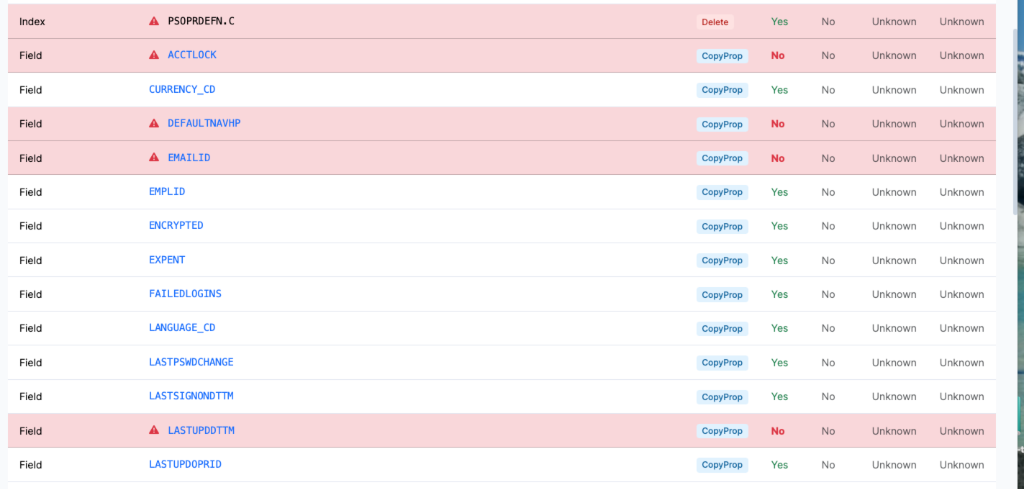
        <p>Flagging non-standard project items</p>
      </figcaption>
  </figure>


  **Migration & Health Flags:** psLens automatically flags non-standard project items in red (as shown above). This highlights things that can cause issues with migrations, such as upgrade flags and actions (e.g., `Delete` actions or items with `Take` set to `No`). This gives you a quick check on the state of your project before migrating.
- **Compare to Database:** If you have multiple databases configured in psLens, you can select another database from the card on the page to run a project comparison.
- **Export as Markdown:** Export the entire project definition and its items list to a markdown file, which is ideal for change logs, migration documentation, or code reviews.