# Search Categories

> Browse PeopleSoft Search Framework search categories: member search definitions, facets, search fields, and search context assignments.

---

Site [llms.txt](/llms.txt)

---

<div id="pslens-context-panel" class="card border-info mb-4 d-none">
  <div class="card-header bg-light text-info py-2 fw-bold d-flex align-items-center border-bottom border-info-subtle">
    <i class="bi bi-info-circle-fill me-2"></i>
    <span>Tailored Operational Context</span>
  </div>
  <div class="card-body p-0">
    <ul class="list-group list-group-flush">
      <li id="row-db" class="list-group-item d-flex align-items-center justify-content-between py-2 d-none">
        <strong>Target Database:</strong>
        <span id="ctx-db" class="badge bg-secondary font-monospace">&mdash;</span>
      </li>
      <li id="row-type" class="list-group-item d-flex align-items-center justify-content-between py-2 d-none">
        <strong>Context Type:</strong>
        <span id="ctx-type" class="badge bg-light text-dark border font-monospace text-uppercase">&mdash;</span>
      </li>
      <li id="row-severity" class="list-group-item d-flex align-items-center justify-content-between py-2 d-none">
        <strong>Alert Severity:</strong>
        <span id="ctx-severity" class="badge">&mdash;</span>
      </li>
      <li id="row-time" class="list-group-item d-flex align-items-center justify-content-between py-2 d-none">
        <strong>Triggered Time:</strong>
        <span id="ctx-time" class="text-muted small">&mdash;</span>
      </li>
      <li id="row-details" class="list-group-item py-2 d-none">
        <strong id="label-details" class="d-block mb-1">Firing Context:</strong>
        <code id="ctx-details" class="d-block p-2 bg-light border rounded small"
          style="white-space: pre-wrap; word-break: break-all;">&mdash;</code>
      </li>
      <li id="row-sql" class="list-group-item py-2 d-none">
        <div class="d-flex justify-content-between align-items-center mb-1">
          <strong id="label-sql">Contextual SQL:</strong>
          <button id="btn-copy-sql" type="button" class="btn btn-sm btn-outline-secondary py-0 px-2 small">
            <i class="bi bi-clipboard me-1"></i>Copy SQL
          </button>
        </div>
        <pre class="mb-0 p-2 bg-light border rounded small"><code id="ctx-sql" style="white-space: pre-wrap; word-break: break-word;">&mdash;</code></pre>
      </li>
    </ul>
  </div>
</div>

<script>
  (function () {
    const params = new URLSearchParams(window.location.search);
    const metadata = params.get('metadata');
    if (!metadata) return;

    try {
      
      const base64 = metadata.replace(/-/g, '+').replace(/_/g, '/');
      const jsonStr = decodeURIComponent(escape(window.atob(base64)));
      const data = JSON.parse(jsonStr);

      if (data) {
        let hasData = false;

        if (data.db) {
          document.getElementById('ctx-db').textContent = data.db;
          document.getElementById('row-db').classList.remove('d-none');
          hasData = true;
        }

        if (data.type) {
          document.getElementById('ctx-type').textContent = data.type;
          document.getElementById('row-type').classList.remove('d-none');
          hasData = true;
        }

        if (data.severity) {
          const severityBadge = document.getElementById('ctx-severity');
          const severity = data.severity.toLowerCase();
          severityBadge.textContent = severity.toUpperCase();
          if (severity === 'critical') {
            severityBadge.className = 'badge bg-danger';
          } else if (severity === 'warning') {
            severityBadge.className = 'badge bg-warning text-dark';
          } else {
            severityBadge.className = 'badge bg-info';
          }
          document.getElementById('row-severity').classList.remove('d-none');
          hasData = true;
        }

        if (data.t) {
          const date = new Date(data.t * 1000);
          document.getElementById('ctx-time').textContent = date.toLocaleString();
          document.getElementById('row-time').classList.remove('d-none');
          hasData = true;
        }

        if (data.details) {
          document.getElementById('ctx-details').textContent = data.details;

          
          const labelDetails = document.getElementById('label-details');
          if (data.type === 'object') {
            labelDetails.textContent = 'Object Metadata Details:';
          } else if (data.type === 'report') {
            labelDetails.textContent = 'Report Description:';
          } else {
            labelDetails.textContent = 'Firing Context:';
          }

          document.getElementById('row-details').classList.remove('d-none');
          hasData = true;
        }

        if (data.sql) {
          document.getElementById('ctx-sql').textContent = data.sql;
          document.getElementById('row-sql').classList.remove('d-none');
          const copyBtn = document.getElementById('btn-copy-sql');
          if (copyBtn && navigator.clipboard) {
            copyBtn.addEventListener('click', function () {
              navigator.clipboard.writeText(data.sql).then(function () {
                copyBtn.innerHTML = '<i class="bi bi-check2 me-1"></i>Copied';
                setTimeout(function () {
                  copyBtn.innerHTML = '<i class="bi bi-clipboard me-1"></i>Copy SQL';
                }, 2000);
              });
            });
          }
          hasData = true;
        }

        if (hasData) {
          document.getElementById('pslens-context-panel').classList.remove('d-none');
        }
      }
    } catch (e) {
      console.error('Failed to parse operational context metadata:', e);
    }
  })();
</script>

Search categories (`PSPTSF_SRCCAT`) group one or more search definitions into the unit that Global Search, component keyword search, and custom search pages query.

psLens shows the category header and its member search definitions from `PSPTSF_SRCCATAT`. Three related-data panels add facets and search fields, search context assignments, and project membership.

## Object Relationships

- **Contains search definitions**: `PSPTSF_SRCCATAT` lists the [search definitions](/docs/objects/search-definitions/) in the category. PeopleSoft creates a category with the same name as each search definition, so most definitions belong to at least that one.
- **Defines facets**: `PSPTSF_CATFACET` lists the facets shown beside the results, and `PSPTSF_FACET_DT` holds the range and hierarchy bucket rules for each.
- **Defines search fields**: advanced search fields (`PSPTSF_CATADVFD`), display fields (`PSPTSF_CATDSPFD`), and sort fields (`PSPTSF_CATSRTFD`) each name a search attribute.
- **Assigned to search contexts**: `PTSF_CTX_DET` ties the category to a homepage, a portal node, or a WorkCenter.

## How psLens Improves Search Category Inspection

In PIA, a category's members, facets, and search fields are on separate tabs of the Search Category component, and its context assignments are on the Search Context administration page.

psLens puts the category, its members, its facets with their bucket rules, its search fields, and its context assignments on one page.

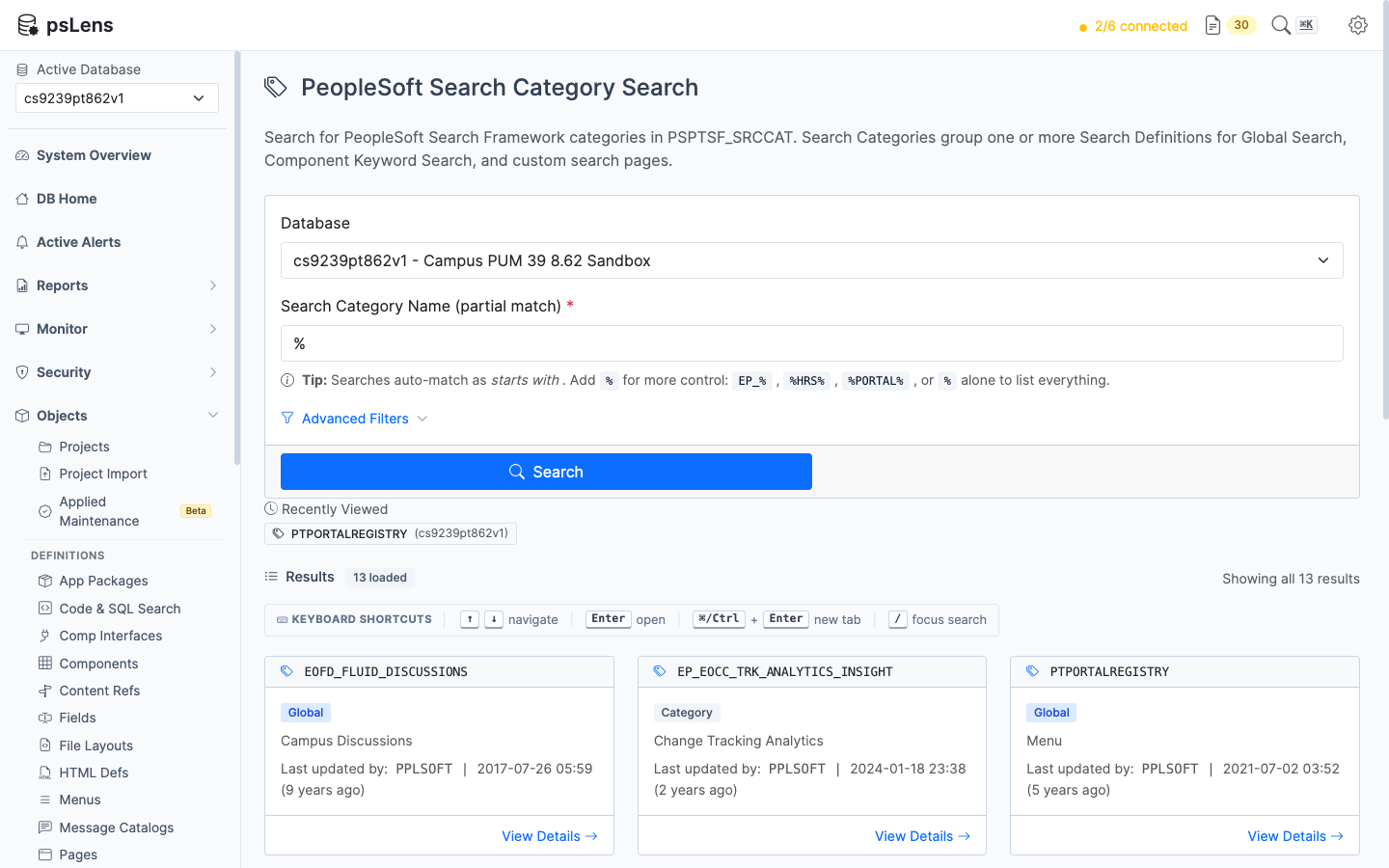
## Search Page

URL: `/searchcategories?db={database}`

<figure><img src="/images/screenshots/metadata/search-categories-search.png"
			alt="Search category search results showing EOFD_FLUID_DISCUSSIONS, EP_EOCC_TRK_ANALYTICS_INSIGHT, and PTPORTALREGISTRY"><figcaption>
			<p>Search category search results for <code>%</code></p>
		</figcaption>
</figure>


- **Search:** matches the category name as *starts with*, and the description as *contains*. Include `%` yourself for other patterns, or use `%` alone to list every category.
- **Filters:** last updated operator, last updated date range, and customized categories only.
- **Result cards:** each card shows the category name, a **Global** badge when the category is in Global Search, a **Component** badge and the component name when the category has a custom search component, the description, and last-updated metadata.

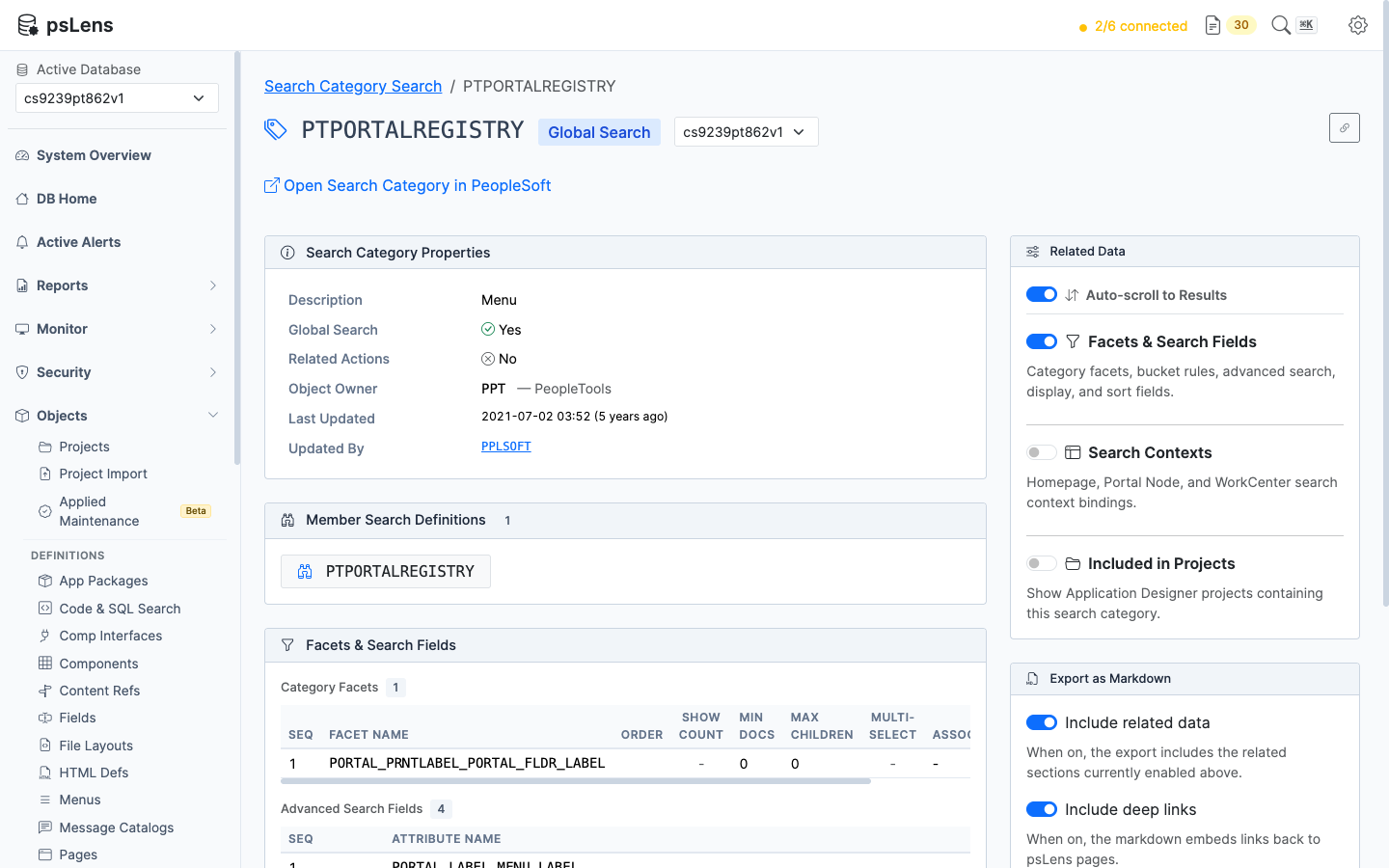
## Detail Page

URL: `/searchcategories/{CATNAME}?db={database}`

<figure><img src="/images/screenshots/metadata/search-categories-detail.png"
			alt="Search category detail page for PTPORTALREGISTRY showing properties and member search definitions"><figcaption>
			<p>Search category detail page for <code>PTPORTALREGISTRY</code></p>
		</figcaption>
</figure>


- **Search Category Properties:** description, Global Search flag, display type (Grid or List), related actions flag, custom search menu and component, basic and advanced search pages, custom application class, message node, object owner, and last-updated metadata.
- **Member Search Definitions:** every definition in the category (`PSPTSF_SRCCATAT`), each linked to its detail page.
- **Open Search Category in PeopleSoft:** opens the category in Search Designer.
- **Export as Markdown:** exports the category and whichever panels are switched on.

## Related Data Panels

Each panel reads optional tables. When a table is not whitelisted the panel names it instead of failing. The tables are listed under Search Framework in [Whitelist Tables](/docs/getting-started/whitelist-tables/).

### Facets & Search Fields

- **Category Facets** (`PSPTSF_CATFACET`): sequence, facet name, order, show-count flag, minimum document count, maximum children, multi-select flag, and associated facet. A facet with bucket rules (`PSPTSF_FACET_DT`) shows each rule with its operators and values.
- **Advanced Search Fields** (`PSPTSF_CATADVFD`): the attributes offered on the advanced search page.
- **Display Fields** (`PSPTSF_CATDSPFD`): the attributes shown on each result, with display type.
- **Sort Fields** (`PSPTSF_CATSRTFD`): the attributes a user can sort results by.

### Search Contexts

Lists the rows of `PTSF_CTX_DET` for the category: context type (Home Page, Portal Node, or Work Center), context key, sequence, and the Default and Enabled flags.

### Included in Projects

Queries `PSPROJECTITEM` where `OBJECTTYPE = 117` to list the Application Designer projects that contain the search category.

## Where Search Categories Appear Elsewhere

- **[Search definition detail pages](/docs/objects/search-definitions/)** list the categories each definition belongs to.
- **The [Search Framework Integrity Audit](/docs/reports/objects/ptsf-integrity-audit/) report** finds categories that list a search definition that does not exist, and definitions missing from their same-named category.
- **MCP:** `get_definition` with `type="searchcategory"` returns the same data as the Markdown export.