# Search Definitions
> Browse PeopleSoft Search Framework search definitions: source query, search attributes, security, deployment and index history, and Real-Time Indexing.
---
Site [llms.txt](/llms.txt)
---
Tailored Operational Context
Target Database:—
Context Type:—
Alert Severity:—
Triggered Time:—
Firing Context:—
Contextual SQL:
—
Search definitions (`PSPTSF_SD`) are the PeopleSoft Search Framework objects that map a PS Query or connected query to the fields stored in an OpenSearch or Elasticsearch index.
psLens shows the definition header, its field-to-attribute mappings from `PSPTSF_SD_ATTR`, and the search categories it belongs to. Five related-data panels add security, record and component mappings, deployment and index history, Real-Time Indexing, and project membership.
## Object Relationships
- **Reads from a query**: `PTSF_SOURCE_TYPE` is `Q` for a PS Query or `C` for a connected query, and `PTSF_SOURCE_NAME` holds its name. A connected-query definition lists its member queries in `PSPTSF_SD_ATTR.QRYNAME`.
- **Maps query fields to search attributes**: each row of `PSPTSF_SD_ATTR` ties a query field to an attribute in the catalog `PSPTSF_ATTRS` and flags it as indexed, faceted, or displayed.
- **Belongs to search categories**: `PSPTSF_SRCCATAT` lists the [search categories](/docs/objects/search-categories/) that include the definition.
- **Calls Application Engine programs**: optional pre-processing, post-processing, and data partitioning programs run around the index build.
- **Secured by an application class or an access list**: document-level security names a class in `PSPTSF_SD_DCACL`. Source-level security lists roles and users in `PSPTSF_SD_SRACL`.
## How psLens Improves Search Definition Inspection
In PIA, a search definition's mappings, security, and advanced settings are on separate tabs of the Search Definition component. Deployment status and index build history are on other Search Framework administration pages, and Real-Time Indexing settings are on another.
psLens puts the definition, its attribute mappings, its security, its deployment and build history, and its Real-Time Indexing trigger records on one page, with links to the queries, records, Application Engine programs, and application packages it names.
## Search Page
URL: `/searchdefinitions?db={database}`
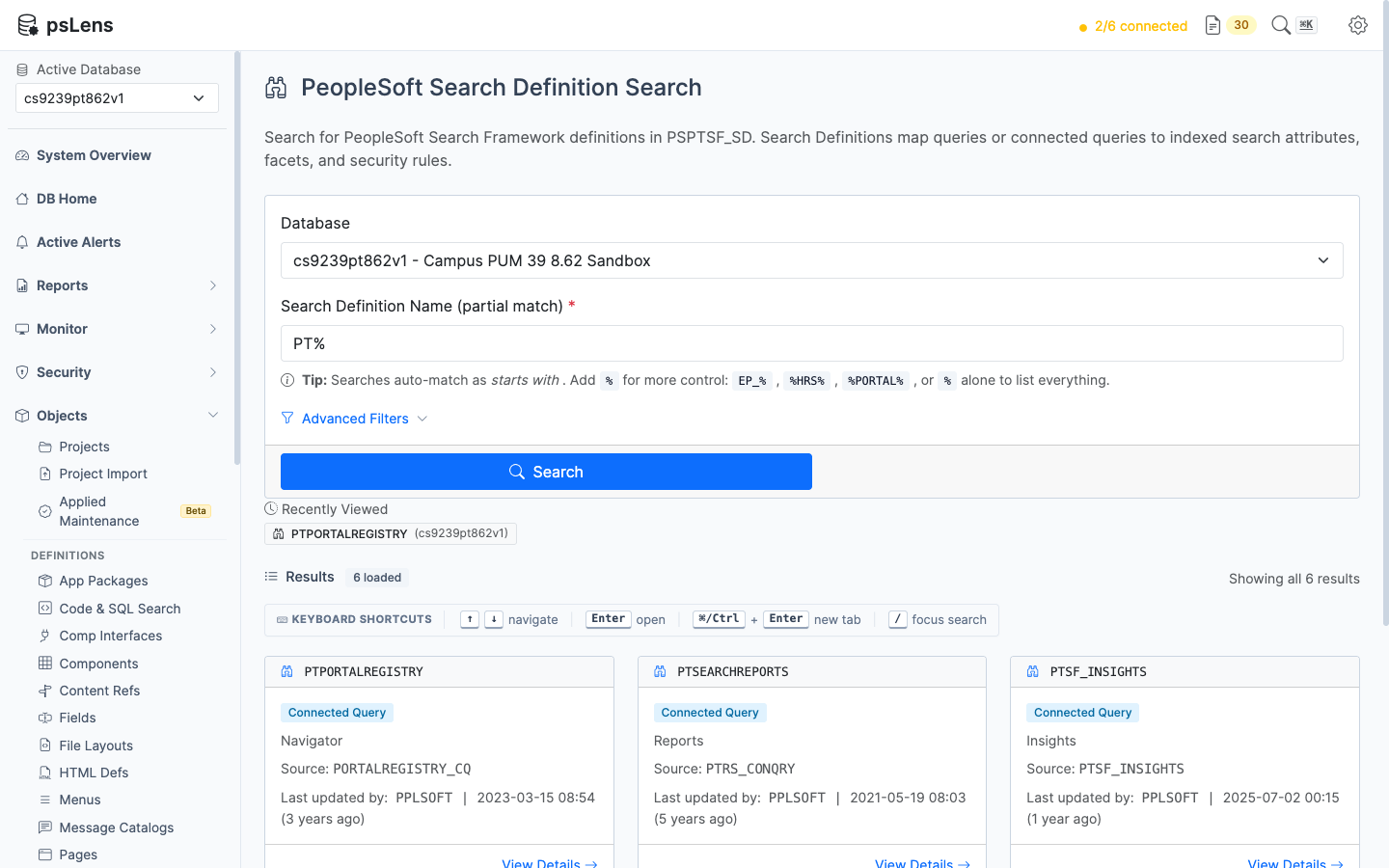
Search definition search results for PT%
- **Search:** matches the definition name as *starts with*, and the description as *contains*. Include `%` yourself for other patterns (`%HRS%`), or use `%` alone to list every definition.
- **Filters:** last updated operator, last updated date range, and customized definitions only.
- **Result cards:** each card shows the definition name, the source type (Query, Connected Query, File Source, Web Source), a **Global** badge when the definition is in Global Search, the description, the source name, and last-updated metadata.
## Detail Page
URL: `/searchdefinitions/{SDNAME}?db={database}`
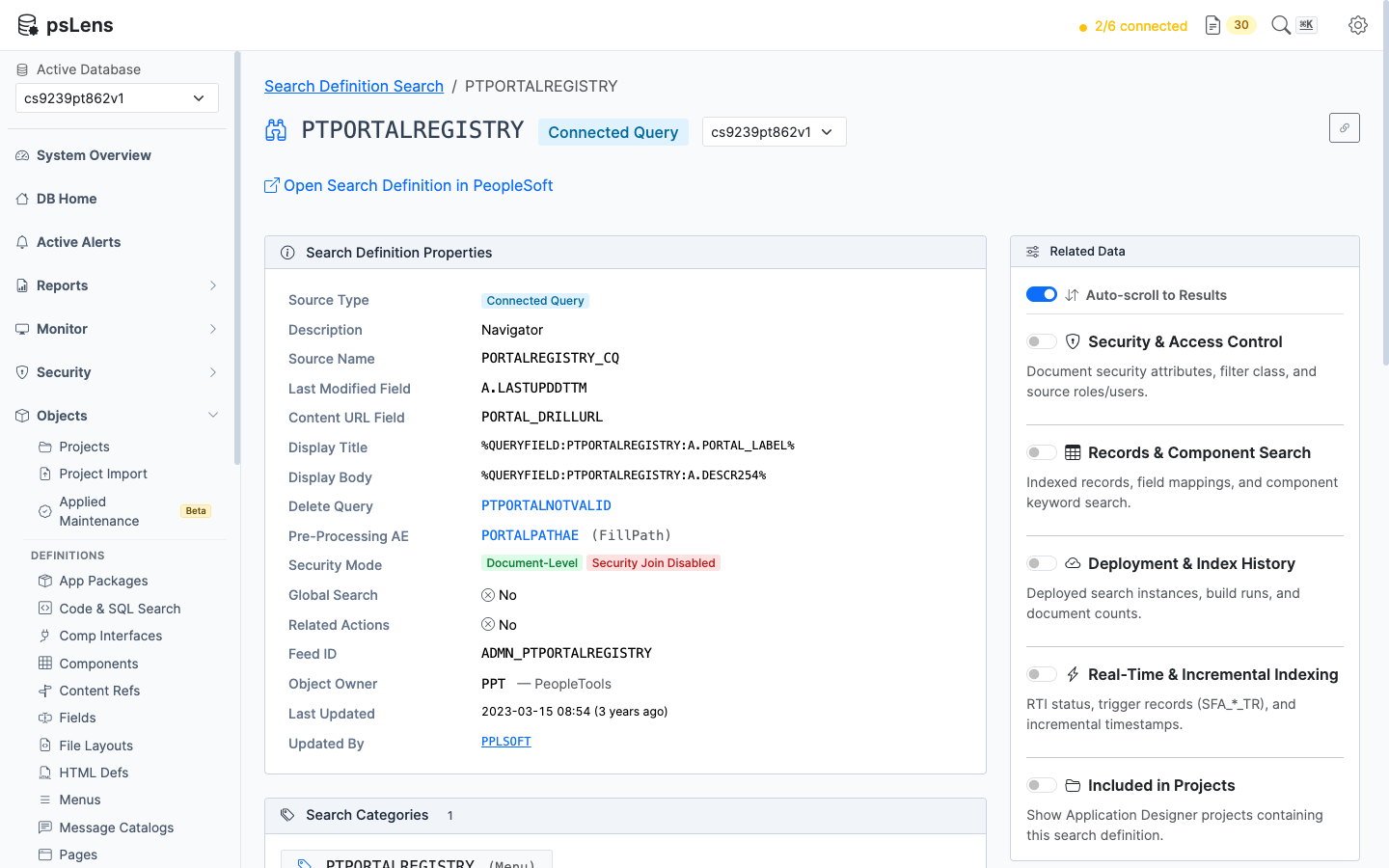
Search definition detail page for PTPORTALREGISTRY
- **Search Definition Properties:** source type and source name (linked to the query), delete query, pre-processing, post-processing, and data partitioning Application Engine programs with their sections, staging record and temp table, security mode badges (Document-Level, Source-Level, Security Join Disabled), Global Search flag, custom application class, object owner, and last-updated metadata.
- **Search Categories:** every category that lists the definition (`PSPTSF_SRCCATAT`), each linked to its detail page.
- **Search Attributes:** one row per mapped query field (`PSPTSF_SD_ATTR`) with the attribute name, query, query field, the record and field behind that query field, and the Indexed, Faceted, Display, Attachment, and Clustered flags.
- **Record and Field** come from the query's field list (`PSQRYFIELD`). The record links to its detail page and the field links to its where-used page, so you can trace an indexed attribute back to the table it reads.
- A query expression shows **Expression**. A dash means the query field is no longer in the query: the PeopleTools 8.62 demo database has two such leftovers on `PTPORTALREGISTRY`.
- **Open Search Definition in PeopleSoft:** opens the definition in Search Designer.
- **Export as Markdown:** exports the definition and whichever panels are switched on.
A search definition has no active or inactive status in PeopleSoft. Whether it is in use is shown by the Deployment & Index History panel.
## Related Data Panels
Each panel reads optional tables. When a table is not whitelisted the panel names it instead of failing. When a table has more rows than psLens reads at once, the panel says the list is incomplete. The tables are listed under Search Framework in [Whitelist Tables](/docs/getting-started/whitelist-tables/).
### Security & Access Control
- **Document Security Filter Application Class** (`PSPTSF_SD_DCACL`): the class that filters results per user, linked to its application package.
- **Document Security Query Attributes** (`PSPTSF_SD_DCATR`): the query fields used as security attributes, with the Allow or Deny privilege.
- **Generic Record Security Attributes** (`PSPTSF_GN_DCATR`): the same for record-based definitions.
- **Source-Level Access Control** (`PSPTSF_SD_SRACL`): the roles and users granted or denied the whole definition.
### Records & Component Keyword Search
- **Indexed Records** (`PSPTSF_RECORDS`) and **Record Field Mappings** (`PSPTSF_SRCHATTR`): filled for record-based definitions. Query-based definitions, which include every definition delivered in the PeopleTools 8.62 Campus Solutions demo database, leave both empty.
- **Component Keyword Search Mappings** (`PSPTSF_SD_PNLGP`): the components whose keyword search uses this definition, with market and search criteria.
### Deployment & Index History
- **Deployed Search Instances** (`PTSF_DEPLOY_OBJ`): each search instance the definition is deployed to, with the deployed name and ID. No rows means the definition is not deployed.
- **Latest Index Build per Search Instance** (`PTSF_SCHED_STAT`, `PTSF_INDEX_STAT`): process instance, run control, crawl mode, feed generation and Application Engine status, and the indexed and error document counts when PeopleSoft recorded them. A successful build can leave the counts at zero, in which case the card shows a dash.
### Real-Time & Incremental Indexing
- **Real-Time Indexing Configuration** (`PTSF_INDEX`, `PTSF_RTI_STATUS`): whether Real-Time Indexing is enabled, the parent record, the batch threshold, and the batch switch status.
- **RTI Trigger Records** (`PTSF_INDEXTRREC`, `PTSF_INDEXTRFLD`): the records that carry a database trigger, the trigger name (`SFA__TR`), and the monitored fields. When the query reads a temp table, the trigger is on the physical record, and that is the name shown.
- **Incremental Timestamp Records** (`PTSF_INC_C_REC`): the record, field, and audit field used for incremental builds.
### Included in Projects
Queries `PSPROJECTITEM` where `OBJECTTYPE = 116` to list the Application Designer projects that contain the search definition.
## Where Search Definitions Appear Elsewhere
- **[Record detail pages](/docs/objects/records/)** have a Search Framework Usage panel listing the search definitions that index the record.
- **[Query detail pages](/docs/objects/queries/)** have a Used by Search Definitions panel.
- **The [Search Framework Monitor](/docs/monitor/search-framework/)** lists every deployed definition with its latest build, Real-Time Indexing status, queue depth, and errors.
- **The [Search Framework Integrity Audit](/docs/reports/objects/ptsf-integrity-audit/) report** finds definitions that reference a missing query, Application Engine program, or application class.
- **The [Search Framework Security Audit](/docs/reports/security/ptsf-security-audit/) report** finds deployed definitions with no security and definitions that index a sensitive field.
- **MCP:** `get_definition` with `type="search"` returns the same data as the Markdown export.