Project Cross-Database Comparison
Categories:
- Target Database: —
- Context Type: —
- Alert Severity: —
- Triggered Time: —
- Firing Context:
—
Project Cross-Database Comparison Report
Report ID: project-compare
Category: Developer Tools
Purpose
This report compares a PeopleSoft project’s definition and items across two databases. It identifies:
- Objects that exist only in the source database (not yet migrated to target)
- Objects that exist only in the target database (previously migrated, now deleted in source)
- Objects in both databases where the item metadata (source status, target status, upgrade action, take action, copy done) differs
This is primarily a migration and change management tool. Use it to verify that a project migration completed correctly, to audit what is in DEV vs. TEST vs. PROD, or to identify drift between environments.
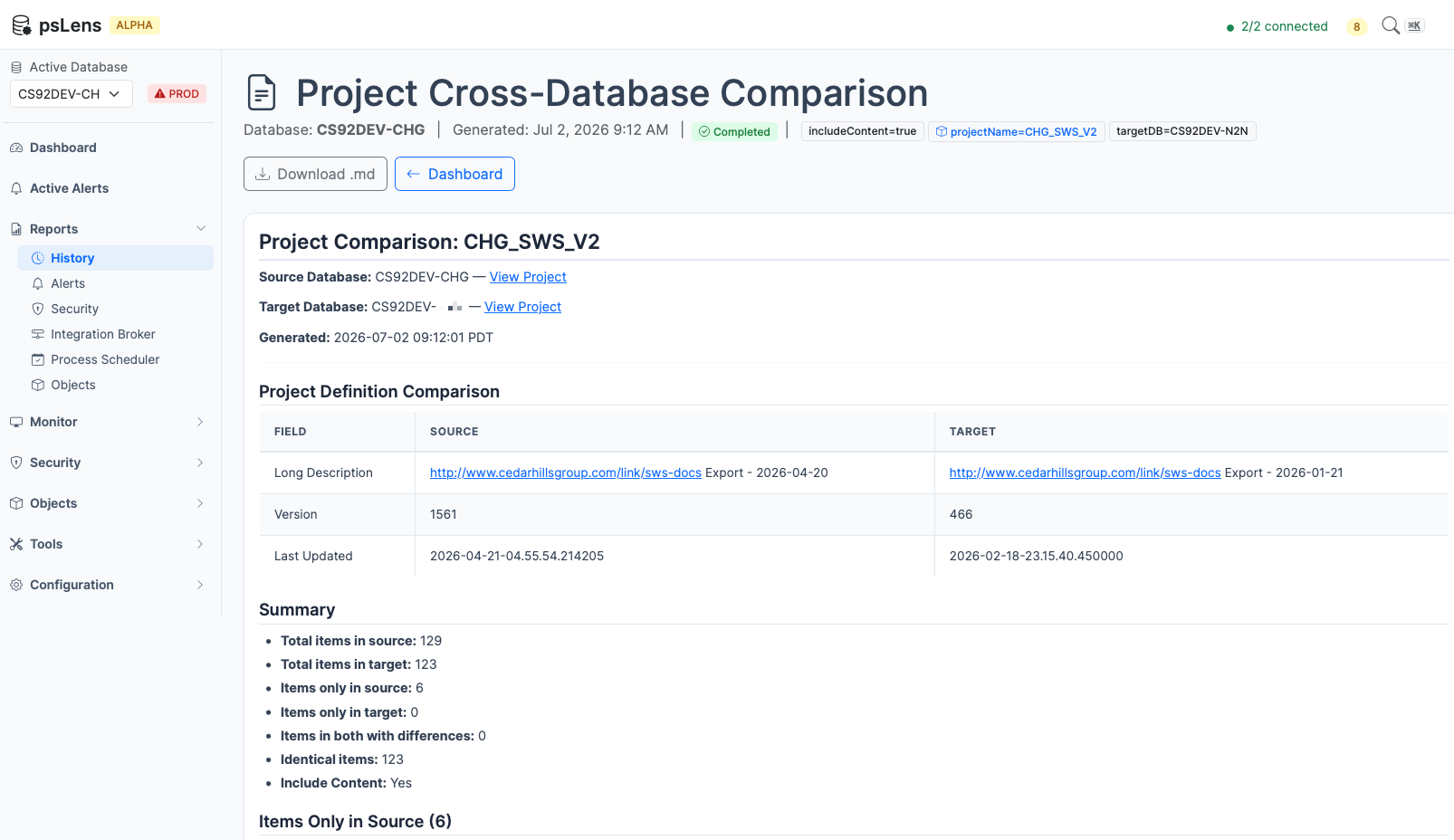
The report surfaces added, removed, and changed project items so migration drift is visible in one artifact
What It Detects
Items Only in Source
Objects that are in the project in the source database but not in the target. These are typically items that have not been migrated yet or were added to the project after the last migration.
Items Only in Target
Objects that are in the project in the target database but not in the source. These may indicate objects that were removed from the project definition in the source after migration, or items migrated separately.
Items with Differences
Objects present in both databases but with different metadata values:
| Field | Description |
|---|---|
| Source Status | Whether the object was copied from the source (Copied, Not Copied, etc.) |
| Target Status | Whether the object was copied to the target |
| Upgrade Action | The configured upgrade action for this item |
| Take Action | Whether psLens will take action on this item during copy |
| Copy Done | Whether the copy operation completed for this item |
Project Definition Comparison
In addition to items, the report compares the project header fields:
- Description and long description
- Version number
- Last updated timestamp and operator
- Owner ID and release label
Tables Queried
PSPROJECTDEFN — Project Definitions
| Field | Description |
|---|---|
| PROJECTNAME | Project name (primary key) |
| DESCR | Short description |
| DESCRLONG | Long description |
| VERSION | Version number |
| LASTUPDOPRID | Last updated by |
| LASTUPDTTM | Last updated timestamp |
| OBJECTOWNERID | Object owner ID |
| RELEASELABEL | Release label |
| RELEASEDTTM | Release date/time |
PSPROJECTITEM — Project Items
| Field | Description |
|---|---|
| PROJECTNAME | Project name |
| OBJECTTYPE | Numeric object type code |
| OBJECTVALUE1-4 | Object identifier fields (vary by type) |
| SOURCESTATUS | Copy-from status |
| TARGETSTATUS | Copy-to status |
| UPGRADEACTION | Configured upgrade action |
| TAKEACTION | Whether action will be taken |
| COPYDONE | Copy completion flag |
Data Flow
1. Fetch project definition from Source DB
        |
        v
2. Fetch project definition from Target DB
        |
        v
3. Compare project header fields
   → Report differences
        |
        v
4. Fetch all project items from Source DB
        |
        v
5. Fetch all project items from Target DB
        |
        v
6. Build composite key maps for each item
   (ObjectType + ObjectValue1-4)
        |
        v
7. Find items only in source (not in target)
8. Find items only in target (not in source)
9. Find items in both with field differences
        |
        v
10. Generate Markdown report with summary + detail sections
Parameters
| Parameter | Required | Description |
|---|---|---|
projectName | Yes | The exact PeopleSoft project name to compare |
targetDB | Yes | The name of the target database (as configured in psLens) |
The source database is the database selected when running the report.
Report Output
The generated report contains:
- Header with source and target database names, project name, and generation timestamp
- Project Definition Comparison table showing any fields that differ between the two databases
- Summary with counts: total items in source, total in target, only-in-source, only-in-target, with-differences, identical
- Items Only in Source section, grouped by object type
- Items Only in Target section, grouped by object type
- Items with Differences table showing object type, name, field, source value, and target value
If the project does not exist in one of the databases, the report notes this and shows the available definition from the other database.
Interpreting Results
- Items only in source are likely candidates for migration — they exist in your development or staging environment but have not been moved to the target yet.
- Items only in target may indicate stale objects in the target environment that were removed from the project in source, or objects migrated separately outside this project.
- Items with differences in Source/Target Status or Copy Done fields can indicate a migration that did not complete cleanly.
- Project definition differences in Version or Last Updated can help confirm which database has the more recent project definition.
Use Cases
- Pre-migration verification: Confirm which objects in a project have not yet been migrated to the next environment
- Post-migration audit: Verify that all project items made it to the target cleanly
- Environment drift detection: Identify objects that exist in PROD but not in DEV (or vice versa)
- Change management documentation: Generate a Markdown report of exactly what changed between environments for a release