# psLens

> psLens is a web dashboard for PeopleSoft environments. Monitor processes, audit security, browse metadata, and manage Integration Broker without App Designer.

---

LLMS index: [llms.txt](/llms.txt)

---

<section id="td-cover-block-0" class="row td-cover-block td-cover-block--height-med js-td-cover td-overlay td-overlay--dark -bg-light" >
  <div class="col-12">
    <div class="container td-overlay__inner">
      <div class="text-center">
        <h1 class="display-1 mt-0 mt-md-5 pb-4">psLens — See Your PeopleSoft Environment Clearly</h1>
        <div class="pt-3 lead">
          

<p class="lead mt-4">
  One screen for security audits, process and IB monitoring, and metadata research across every PeopleSoft database you run. Read-only — no App Designer or DB credentials for your team.
</p>
<div class="mt-5">
<a class="btn btn-lg btn-primary me-3 mb-4" href="/contact/">
Request a Demo <i class="fas fa-calendar-check ms-2"></i>
</a>
<a class="btn btn-lg btn-secondary me-3 mb-4" href="/docs/">
Explore Features <i class="fas fa-binoculars ms-2"></i>
</a>
</div>


<a class="btn btn-link text-info" href="#td-block-1" aria-label="Read more"><i class="fa-solid fa-circle-chevron-down" style="font-size: 400%"></i></a>

</div>
      </div>
    </div>
  </div>
  
</section>


<section class="row td-box td-box--height-auto" style="background-color: #fcf5e6;">
<div class="col">
<div class="container text-center py-5">
<div class="mx-auto" style="max-width: 900px;">
<h2 class="mb-4">Every alert, report, and metadata search across all your PeopleSoft databases — in one browser tab.</h2>
<div id="hero-video-wrap" style="position: relative; line-height: 0; overflow: hidden;">
<video id="hero-video"
       src="/videos/pslens-hero-animation1.mp4"
       poster="/images/pslens-illustration.jpg"
       autoplay muted playsinline preload="metadata"
       aria-label="Illustrated overview of psLens — examining records, security, integration broker, process scheduler, and app packages"
       class="img-fluid"
       style="display: block; width: 100%; height: auto;">
  <img src="/images/pslens-illustration.jpg"
       alt="Illustrated overview of psLens — examining records, security, integration broker, process scheduler, and app packages"
       class="img-fluid" />
</video>
<div id="hero-fade" style="position: absolute; inset: 0; background: #fcf5e6; opacity: 0; pointer-events: none;"></div>
</div>
<script>
  (function () {
    var v = document.getElementById('hero-video');
    var fade = document.getElementById('hero-fade');
    if (!v || !fade) return;
    var HOLD_FRAME_MS = 3500; // hold the clean last frame before any transition
    var FADE_MS = 900;        // duration of fade-out and fade-in transitions
    var BLUR_PX = 5;
    fade.style.transition = 'opacity ' + FADE_MS + 'ms ease';
    v.style.transition = 'filter ' + FADE_MS + 'ms ease';
    v.addEventListener('ended', function () {
      setTimeout(function () {
        fade.style.opacity = '1';
        v.style.filter = 'blur(' + BLUR_PX + 'px)';
        setTimeout(function () {
          v.currentTime = 0;
          v.play();
          fade.style.opacity = '0';
          v.style.filter = 'blur(0px)';
        }, FADE_MS);
      }, HOLD_FRAME_MS);
    });
  })();
</script>
</div>
</div>
</div>
</section>

<div><a id="td-block-1" class="td-anchor-no-extra-offset"></a></div>
<section class="row td-box td-box--primary position-relative td-box--height-auto">
<div class="col-12">
<div class="container text-center td-arrow-down">
<div class="h4 mb-0">


PeopleSoft administrators spend hours in App Designer and SQL clients to answer routine questions: who has access to what, which batch jobs failed overnight, what changed between DEV and PROD.

psLens answers those questions in a browser, in seconds, without database credentials.

</div>
</div>
</div>
</section>


<div><a id="td-block-2" class="td-anchor-no-extra-offset"></a></div>
<section class="row td-box td-box--warning td-box--height-auto">
<div class="col">
<div class="container">


<div class="col-lg-10 mx-auto text-center">
<h2 class="mb-3"><i class="fas fa-rocket me-2"></i>Private Pilot Program</h2>
<p class="lead mb-3">We are currently accepting applications for the psLens Private Pilot Program. Partner with us to deploy psLens in your test environment, shape our product roadmap, and receive dedicated setup and onboarding support.</p>
<p class="mb-4">Want a 1-on-1 walkthrough of the dashboard and security reports connected to a live environment?</p>
<a class="btn btn-lg btn-dark" href="/contact/">
<i class="fas fa-calendar-check me-2"></i>Apply for Early Access
</a>
</div>
</div>
</div>
</section>


<div><a id="td-block-3" class="td-anchor-no-extra-offset"></a></div>
<section class="row td-box td-box--white td-box--height-auto">
<div class="col">
<div class="container">


<div class="col-lg-10 mx-auto text-center">
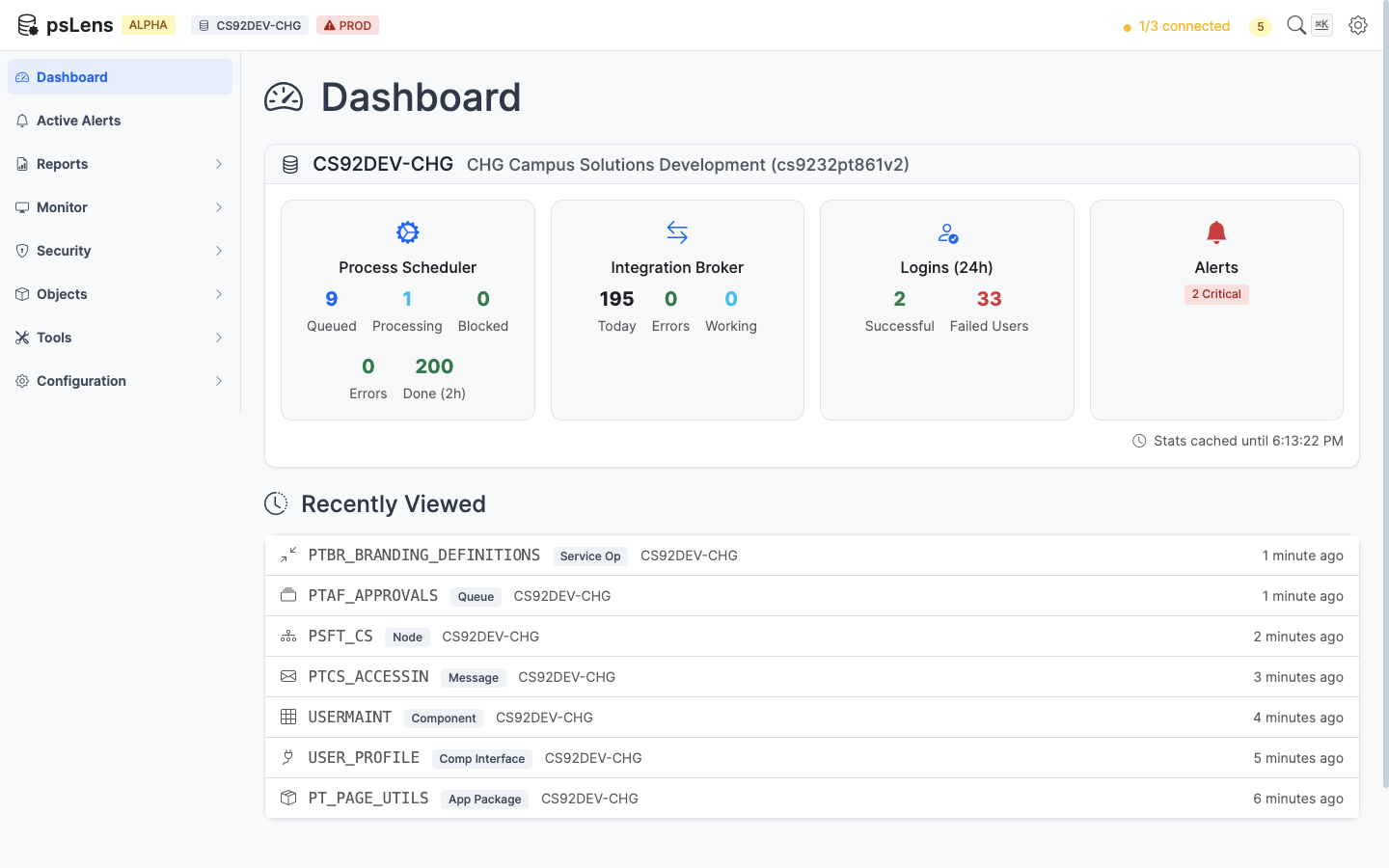
<h2 class="mb-4">The psLens Dashboard</h2>
<p class="text-muted mb-4">One screen to see the health of every connected PeopleSoft environment. Alerts surface problems as they happen.</p>
<img src="/images/screenshots/dashboard-alerts.png" alt="psLens Dashboard showing active alerts and database status" class="img-fluid rounded shadow-lg border" style="max-width: 100%;" />
</div>
</div>
</div>
</section>


<div><a id="td-block-4" class="td-anchor-no-extra-offset"></a></div>
<section class="row td-box td-box--white td-box--height-auto">
<div class="col">
<div class="row">


<div class="col-lg-4 mb-5 mb-lg-0 text-center">
<div class="mb-4 h1">
  <i class="fas fa-bell"></i>
</div>
<h4 class="h3">Real-Time Alerts</h4>
<div class="mb-0">
<p>16 background checks run every few minutes and surface problems as they happen: long-running processes, failures, stalled IB messages, locked operator accounts blocking scheduled jobs, and anomalous traffic spikes.</p>

</div>
<p><a href="/docs/alerts/">View Alerts</a></p>
</div>


<div class="col-lg-4 mb-5 mb-lg-0 text-center">
<div class="mb-4 h1">
  <i class="fas fa-shield-alt"></i>
</div>
<h4 class="h3">Security &amp; Audit Reports</h4>
<div class="mb-0">
<p>14 on-demand reports analyze your PeopleSoft configuration against security best practices: overly broad permissions, missing node passwords, stale passwords, and IB security gaps. Results are stored for 90 days.</p>

</div>
<p><a href="/docs/reports/">View Reports</a></p>
</div>


<div class="col-lg-4 mb-5 mb-lg-0 text-center">
<div class="mb-4 h1">
  <i class="fas fa-search"></i>
</div>
<h4 class="h3">Metadata Browsing</h4>
<div class="mb-0">
<p>Search and explore every type of PeopleSoft object: fields, records, pages, components, menus, permission lists, roles, SQL objects, application packages, and more.</p>

</div>
<p><a href="/docs/objects/">Learn More</a></p>
</div>


</div>
</div>
</section>


<div><a id="td-block-5" class="td-anchor-no-extra-offset"></a></div>
<section class="row td-box td-box--light td-box--height-auto">
<div class="col">
<div class="row">


<div class="col-lg-4 mb-5 mb-lg-0 text-center">
<div class="mb-4 h1">
  <i class="fas fa-cogs"></i>
</div>
<h4 class="h3">Process Scheduler</h4>
<div class="mb-0">
<p>View running, queued, and recently completed process requests. Drill into individual instances to see run details, logs, and status history.</p>

</div>
<p><a href="/docs/monitor/process-monitor/">Learn More</a></p>
</div>


<div class="col-lg-4 mb-5 mb-lg-0 text-center">
<div class="mb-4 h1">
  <i class="fas fa-exchange-alt"></i>
</div>
<h4 class="h3">Integration Broker</h4>
<div class="mb-0">
<p>Monitor async operations, publication contracts, and subscription contracts. 6 dedicated IB alerts detect errors, stalls, and abnormal volume spikes automatically. 7 IB reports audit node security, routing gaps, and sync logging gaps.</p>

</div>
<p><a href="/docs/monitor/ib-monitor/">Learn More</a></p>
</div>


<div class="col-lg-4 mb-5 mb-lg-0 text-center">
<div class="mb-4 h1">
  <i class="fas fa-code"></i>
</div>
<h4 class="h3">Developer Tools</h4>
<div class="mb-0">
<p>Look up SQL objects, Application Engines, Application Packages, Message Catalog entries, HTML definitions, and more through a fast search interface.</p>

</div>
<p><a href="/docs/tools/">Learn More</a></p>
</div>


</div>
</div>
</section>


<div><a id="td-block-6" class="td-anchor-no-extra-offset"></a></div>
<section class="row td-box td-box--info td-box--height-auto">
<div class="col">
<div class="container">


<div class="col-lg-10 mx-auto text-center">
<h2 class="text-white mb-5">How It Works</h2>

<div class="row">
<div class="col-md-4 mb-4">
<div class="display-4 text-white mb-3"><i class="fas fa-plug"></i></div>
<h4 class="text-white">1. Install SWS Framework</h4>
<p class="text-white-50">Install and configure the lightweight SWS framework in your PeopleSoft environment. It provides a secure REST API layer for psLens to query.</p>
</div>

<div class="col-md-4 mb-4">
<div class="display-4 text-white mb-3"><i class="fas fa-server"></i></div>
<h4 class="text-white">2. Deploy psLens</h4>
<p class="text-white-50">Deploy your dedicated psLens instance and point it at your PeopleSoft environments. Each client gets their own isolated deployment.</p>
</div>

<div class="col-md-4 mb-4">
<div class="display-4 text-white mb-3"><i class="fas fa-search"></i></div>
<h4 class="text-white">3. Search, Monitor, Audit</h4>
<p class="text-white-50">Open psLens in a browser. The dashboard populates within minutes of the first health check. Search metadata, monitor processes, and run security reports from one interface.</p>
</div>
</div>

<p class="text-center mt-4 mb-0">
<a class="btn btn-outline-light" href="/docs/getting-started/architecture/">
<i class="fas fa-sitemap me-2"></i>See the full architecture overview
</a>
</p>
</div>
</div>
</div>
</section>


<div><a id="td-block-7" class="td-anchor-no-extra-offset"></a></div>
<section class="row td-box td-box--white td-box--height-auto">
<div class="col">
<div class="container">


<div class="col-lg-10 mx-auto text-center">
<h2 class="mb-5">By the Numbers</h2>

<div class="row">
<div class="col-md-3 col-6 mb-4">
<div class="display-4 text-primary fw-bold">30+</div>
<p class="text-muted mt-2">PeopleSoft object types browsable</p>
</div>

<div class="col-md-3 col-6 mb-4">
<div class="display-4 text-primary fw-bold">16</div>
<p class="text-muted mt-2">Real-time alert types</p>
</div>

<div class="col-md-3 col-6 mb-4">
<div class="display-4 text-primary fw-bold">14</div>
<p class="text-muted mt-2">On-demand reports</p>
</div>

<div class="col-md-3 col-6 mb-4">
<div class="display-4 text-primary fw-bold">&lt;1s</div>
<p class="text-muted mt-2">Search response time</p>
</div>
</div>
</div>
</div>
</div>
</section>


<div><a id="td-block-8" class="td-anchor-no-extra-offset"></a></div>
<section class="row td-box td-box--info td-box--height-auto">
<div class="col">
<div class="container">


<div class="col-lg-10 mx-auto text-center">
<h2 class="text-white mb-3"><i class="fas fa-robot me-2"></i>Make PeopleSoft Readable by ChatGPT and Claude</h2>
<p class="text-white lead mb-4">PeopleCode lives inside App Designer and configuration lives in PeopleTools tables. ChatGPT and Claude can't read either one.</p>
<p class="text-white-50 mb-5">Every PeopleSoft object psLens browses — records, pages, components, projects, application packages, app engines, queries, service operations, permission lists, users, and more — exports as structured Markdown with one click. Paste it into ChatGPT or Claude, drop it into a file Claude Code or Cursor can read, or hand it to whatever AI tool your team already uses.</p>

<div class="row">
<div class="col-md-3 mb-4">
<div class="display-4 text-white mb-3"><i class="fas fa-bug"></i></div>
<h5 class="text-white">Code Review in Minutes</h5>
<p class="text-white-50">Hand an entire project's PeopleCode to an LLM and get bugs, performance issues, and security risks flagged before your next release.</p>
</div>

<div class="col-md-3 mb-4">
<div class="display-4 text-white mb-3"><i class="fas fa-book"></i></div>
<h5 class="text-white">Export a Project to Markdown, Get a Spec from Claude</h5>
<p class="text-white-50">Generate technical specs, data dictionaries, and onboarding guides from your real configuration rather than stale wikis nobody trusts.</p>
</div>

<div class="col-md-3 mb-4">
<div class="display-4 text-white mb-3"><i class="fas fa-sitemap"></i></div>
<h5 class="text-white">Impact Analysis Before You Change</h5>
<p class="text-white-50">"What breaks if I touch this record?" Ask an AI before you ship the change, not after the helpdesk lights up.</p>
</div>

<div class="col-md-3 mb-4">
<div class="display-4 text-white mb-3"><i class="fas fa-users"></i></div>
<h5 class="text-white">Onboarding Material for Legacy Customizations</h5>
<p class="text-white-50">Export PSPROJECTITEM for a long-lived customization, hand it to an LLM, and get a plain-language explanation new team members can read.</p>
</div>
</div>

<p class="text-white-50 mt-4 mb-4"><em>Coming on the <a href="/docs/roadmap/" class="text-white">roadmap</a>:</em> psLens as MCP servers, so Claude Code, Cursor, and other MCP-aware tools can query PeopleSoft objects live without an export step. Five use cases documented.</p>

<a class="btn btn-lg btn-light" href="/docs/use-cases/ai-enablement/">
<i class="fas fa-arrow-right me-2"></i>How psLens Exports PeopleSoft for AI Tools
</a>
</div>
</div>
</div>
</section>


<div><a id="td-block-9" class="td-anchor-no-extra-offset"></a></div>
<section class="row td-box td-box--dark td-box--height-auto">
<div class="col">
<div class="container">


<div class="col-lg-10 mx-auto text-center">
<h2 class="text-white mb-5">Who Is psLens For?</h2>

<div class="row">
<div class="col-md-4 mb-4">
<h4 class="text-white"><i class="fas fa-user-shield me-2"></i>Security Administrators</h4>
<p class="text-white-50">Audit permission lists, roles, and users without writing SQL. Automated reports flag overly-broad access, stale passwords, and IB security gaps for your next audit.</p>
</div>

<div class="col-md-4 mb-4">
<h4 class="text-white"><i class="fas fa-server me-2"></i>System Administrators</h4>
<p class="text-white-50">Know within minutes when processes fail, stall, or won't start because an operator account is locked. Monitor Process Scheduler and Integration Broker with 16 near-real-time alerts.</p>
</div>

<div class="col-md-4 mb-4">
<h4 class="text-white"><i class="fas fa-laptop-code me-2"></i>Developers</h4>
<p class="text-white-50">Look up any PeopleSoft object in seconds (records, fields, pages, components, SQL objects, application packages) without opening App Designer. Compare projects across DEV, TEST, and PROD in one report.</p>
</div>
</div>

<div class="row mt-3">
<div class="col-md-4 mb-4">
<h4 class="text-white"><i class="fas fa-chart-bar me-2"></i>Business Analysts</h4>
<p class="text-white-50">Understand PeopleSoft structure and configuration without needing developer tools or database access. Research components, pages, and security setup independently.</p>
</div>

<div class="col-md-4 mb-4">
<h4 class="text-white"><i class="fas fa-headset me-2"></i>DevOps & Support</h4>
<p class="text-white-50">Monitor Integration Broker and Process Scheduler health from a single screen. Deep-link to specific objects when troubleshooting issues.</p>
</div>

<div class="col-md-4 mb-4">
<h4 class="text-white"><i class="fas fa-file-export me-2"></i>Technical Writers & QA</h4>
<p class="text-white-50">Export PeopleSoft object definitions to Markdown for documentation, test planning, and AI-assisted analysis. Share structured metadata with anyone.</p>
</div>
</div>
</div>
</div>
</div>
</section>


<div><a id="td-block-10" class="td-anchor-no-extra-offset"></a></div>
<section class="row td-box td-box--light td-box--height-auto">
<div class="col">
<div class="container">


<div class="col-lg-10 mx-auto text-center">
<h2 class="mb-4"><i class="fas fa-shield-alt me-2"></i>Read-Only. No Shared Tenancy. Whitelisted Query Surface.</h2>
<p class="text-muted mb-4">Read-only by design, with no direct database credentials. Queries are scoped to a whitelist of PeopleTools metadata tables. Every customer gets a dedicated deployment with no shared tenancy.</p>
<a class="btn btn-outline-dark" href="/security/">
<i class="fas fa-lock me-2"></i>How psLens Protects Your Environment
</a>
</div>
</div>
</div>
</section>


<div><a id="td-block-11" class="td-anchor-no-extra-offset"></a></div>
<section class="row td-box td-box--primary td-box--height-auto">
<div class="col">
<div class="container">


<div class="col-lg-8 mx-auto text-center">
<h2 class="text-white">See psLens in Action</h2>
<p class="text-white-50 lead mb-4">Schedule a personalized walkthrough and apply to join our early access pilot program.</p>
<a class="btn btn-lg btn-light me-3 mb-3" href="/contact/">
<i class="fas fa-calendar-check me-2"></i>Schedule a Demo
</a>
<a class="btn btn-lg btn-outline-light me-3 mb-3" href="/docs/why-pslens/">
<i class="fas fa-question-circle me-2"></i>Why psLens?
</a>
</div>
</div>
</div>
</section>

---

Section pages:

- [Documentation](/docs/): Complete documentation for psLens, the PeopleSoft admin dashboard. Installation, configuration, features, alerts, and reports.
- [Security & Trust](/security/): How psLens protects your PeopleSoft environment: read-only by design, table whitelist, dedicated instance per client, no direct database access.
- [Request a Demo](/contact/): Request a demo of psLens, the PeopleSoft admin dashboard. See it connected to a live PeopleSoft environment.